
HTML5 Game Development – Lesson 4
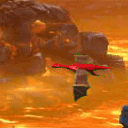
Today we continue a series of articles on game development in HTML5 using canvas. Today we going to learn next elements: animation with sprites and basic work with sound. In our demonstration you will see a flying dragon. We will hear the sounds of wings all time (we will loop this sound), and another sound – dragon’s roar (on mouseup event). And finally we will teach our dragon be closer to the mouse cursor (when we hold down the mouse).
Our previous article you can read here: Developing Your First HTML5 Game – Lesson 3. Our new script is new enhanced version of previous one.
Here are our demo and downloadable package:
Live Demo
[sociallocker]
download in package
[/sociallocker]
Ok, download the example files and lets start coding !
Step 1. HTML
Here is html markup of our demo.
index.html
<!DOCTYPE html>
<html lang="en" >
    <head>
        <meta charset="utf-8" />
        <title>HTML5 Game Development - Lesson 4 | Script Tutorials</title>
        <link href="css/main.css" rel="stylesheet" type="text/css" />
        <!--[if lt IE 9]>
          <script src="http://html5shiv.googlecode.com/svn/trunk/html5.js"></script>
        <![endif]-->
        <script src="http://code.jquery.com/jquery-latest.min.js"></script>
        <script type="text/javascript" src="js/script.js"></script>
    </head>
    <body>
        <div class="container">
            <canvas id="scene" width="1000" height="600"></canvas>
        </div>
        <footer>
            <h2>HTML5 Game Development - Lesson 4</h2>
            <a href="https://www.script-tutorials.com/html5-game-development-lesson-4/" class="stuts">Back to original tutorial on <span>Script Tutorials</span></a>
        </footer>
    </body>
</html>
Step 2. CSS
Here are used CSS styles.
css/main.css
I will not publish styles today – this is just page layout styles, nothing special. Available in package.
Step 3. JS
js/script.js
// inner variables
var canvas, ctx;
var backgroundImage;
var iBgShiftX = 100;
var dragon;
var dragonW = 75; // dragon width
var dragonH = 70; // dragon height
var iSprPos = 0; // initial sprite frame
var iSprDir = 4; // initial dragon direction
var dragonSound; // dragon sound
var wingsSound; // wings sound
var bMouseDown = false; // mouse down state
var iLastMouseX = 0;
var iLastMouseY = 0;
// -------------------------------------------------------------
// objects :
function Dragon(x, y, w, h, image) {
    this.x = x;
    this.y = y;
    this.w = w;
    this.h = h;
    this.image = image;
    this.bDrag = false;
}
// -------------------------------------------------------------
// draw functions :
function clear() { // clear canvas function
    ctx.clearRect(0, 0, ctx.canvas.width, ctx.canvas.height);
}
function drawScene() { // main drawScene function
    clear(); // clear canvas
    // draw background
    iBgShiftX -= 4;
    if (iBgShiftX <= 0) {
        iBgShiftX = 1045;
    }
    ctx.drawImage(backgroundImage, 0 + iBgShiftX, 0, 1000, 940, 0, 0, 1000, 600);
    // update sprite positions
    iSprPos++;
    if (iSprPos >= 9) {
        iSprPos = 0;
    }
    // in case of mouse down - move dragon more close to our mouse
    if (bMouseDown) {
        if (iLastMouseX > dragon.x) {
            dragon.x += 5;
        }
        if (iLastMouseY > dragon.y) {
            dragon.y += 5;
        }
        if (iLastMouseX < dragon.x) {
            dragon.x -= 5;
        }
        if (iLastMouseY < dragon.y) {
            dragon.y -= 5;
        }
    }
    // draw dragon
    ctx.drawImage(dragon.image, iSprPos*dragon.w, iSprDir*dragon.h, dragon.w, dragon.h, dragon.x - dragon.w/2, dragon.y - dragon.h/2, dragon.w, dragon.h);
}
// -------------------------------------------------------------
// initialization
$(function(){
    canvas = document.getElementById('scene');
    ctx = canvas.getContext('2d');
    var width = canvas.width;
    var height = canvas.height;
    // load background image
    backgroundImage = new Image();
    backgroundImage.src = 'images/hell.jpg';
    backgroundImage.onload = function() {
    }
    backgroundImage.onerror = function() {
        console.log('Error loading the background image.');
    }
    // 'Dragon' music init
    dragonSound = new Audio('media/dragon.wav');
    dragonSound.volume = 0.9;
    // 'Wings' music init
    wingsSound = new Audio('media/wings.wav');
    wingsSound.volume = 0.9;
    wingsSound.addEventListener('ended', function() { // looping wings sound
        this.currentTime = 0;
        this.play();
    }, false);
    wingsSound.play();
    // initialization of dragon
    var oDragonImage = new Image();
    oDragonImage.src = 'images/dragon.gif';
    oDragonImage.onload = function() {
    }
    dragon = new Dragon(400, 300, dragonW, dragonH, oDragonImage);
    $('#scene').mousedown(function(e) { // binding mousedown event (for dragging)
        var mouseX = e.layerX || 0;
        var mouseY = e.layerY || 0;
        if(e.originalEvent.layerX) { // changes for jquery 1.7
            mouseX = e.originalEvent.layerX;
            mouseY = e.originalEvent.layerY;
        }
        bMouseDown = true;
        if (mouseX > dragon.x- dragon.w/2 && mouseX < dragon.x- dragon.w/2 +dragon.w &&
            mouseY > dragon.y- dragon.h/2 && mouseY < dragon.y-dragon.h/2 +dragon.h) {
            dragon.bDrag = true;
            dragon.x = mouseX;
            dragon.y = mouseY;
        }
    });
    $('#scene').mousemove(function(e) { // binding mousemove event
        var mouseX = e.layerX || 0;
        var mouseY = e.layerY || 0;
        if(e.originalEvent.layerX) { // changes for jquery 1.7
            mouseX = e.originalEvent.layerX;
            mouseY = e.originalEvent.layerY;
        }
        // saving last coordinates
        iLastMouseX = mouseX;
        iLastMouseY = mouseY;
        // perform dragon dragging
        if (dragon.bDrag) {
            dragon.x = mouseX;
            dragon.y = mouseY;
        }
        // change direction of dragon (depends on mouse position)
        if (mouseX > dragon.x && Math.abs(mouseY-dragon.y) < dragon.w/2) {
            iSprDir = 0;
        } else if (mouseX < dragon.x && Math.abs(mouseY-dragon.y) < dragon.w/2) {
            iSprDir = 4;
        } else if (mouseY > dragon.y && Math.abs(mouseX-dragon.x) < dragon.h/2) {
            iSprDir = 2;
        } else if (mouseY < dragon.y && Math.abs(mouseX-dragon.x) < dragon.h/2) {
            iSprDir = 6;
        } else if (mouseY < dragon.y && mouseX < dragon.x) {
            iSprDir = 5;
        } else if (mouseY < dragon.y && mouseX > dragon.x) {
            iSprDir = 7;
        } else if (mouseY > dragon.y && mouseX < dragon.x) {
            iSprDir = 3;
        } else if (mouseY > dragon.y && mouseX > dragon.x) {
            iSprDir = 1;
        }
    });
    $('#scene').mouseup(function(e) { // binding mouseup event
        dragon.bDrag = false;
        bMouseDown = false;
        // play dragon sound
        dragonSound.currentTime = 0;
        dragonSound.play();
    });
    setInterval(drawScene, 30); // loop drawScene
});
How it work (shortly): Firstly we define canvas, context, then we load background image, two sounds, then we initialize our dragon and binding different mouse events. In our main loop draw function I am shifting background image (loop), then update sprite positions, and finally – draw our dragon. In our code you can find several new interesting methods:
1. Loop background sound
    // 'Wings' music init
    wingsSound = new Audio('media/wings.wav');
    wingsSound.volume = 0.9;
    wingsSound.addEventListener('ended', function() { // looping wings sound
        this.currentTime = 0;
        this.play();
    }, false);
    wingsSound.play();
2. Draw sprites
    var oDragonImage = new Image();
    oDragonImage.src = 'images/dragon.gif';
    oDragonImage.onload = function() {
    }
....
    // update sprite positions
    iSprPos++;
    if (iSprPos >= 9) {
        iSprPos = 0;
    }
    // draw dragon
    ctx.drawImage(dragon.image, iSprPos*dragon.w, iSprDir*dragon.h, dragon.w, dragon.h, dragon.x - dragon.w/2, dragon.y - dragon.h/2, dragon.w, dragon.h);
So, we loading initial image (with set of all sub-images), then – draw part of that image, then shifting its positions, and draw again (loop).
Step 4. Custom files
images/dragon.gif, images/hell.jpg, media/dragon.wav and media/wings.wav
All these files available in our package
Live Demo
Conclusion
Are you like our new handy dragon? :-) I will be glad to see your thanks and comments. Good luck!





https://www.script-tutorials.com/tag/game/
You forgot to add the ‘game’ tag.
Sorry for the rude request, but I think that you should write an new post to list the series of tutorial entry link, that would be good for promoting or bookmarking.
Thanks for your nice work!
Hello WM,
Do you mean – create list of all previous game-related tutorials in bottom of each game lesson?
Sorry for my poor English, I’m Taiwanese.
I mean like that: http://net.tutsplus.com/sessions/python-from-scratch/
So, do you like to see all related articles (of same session / series) in one place like here?
Yes, sharing one link is much easier than multiple links, isn’t it?
I’ve seen some journal sites do this way, they posted an introductory index post , and then posted the first article of the series, when proceeding articles was posted, they updated the index post to add links.
There is another way, posting the index post with conclusion after the series ends, but I think the former is better, for that it could make the index post to be spread early.
Thanks for your idea, right now I’m thinking about adding alternative navigation menu to website (dropdown) where will be listed all articles by categories.
Outstanding! But when coming from another site, your #3 tutorial did not have the right link.
https://www.script-tutorials.com/html5-game-development-navigating-your-spaceship-lesson-3/
It would make it Ez-ier for people if you had a link at the bottom of each of your tutorial pages to your next tutorial.
In fact I had to go to Lesson 4 to get the link for Lesson 3.
Because you start out with this URL for Lesson 1
https://www.script-tutorials.com/html5-game-development-lesson-1/
https://www.script-tutorials.com/html5-game-development-lesson-2/
Different for Lesson 3 (see above)
And then Lesson 4 is:
https://www.script-tutorials.com/html5-game-development-lesson-4/
Hello Judith,
Thanks for your remarks, I am going to think about it. Generally I want to create extra alternative navigation for more comfort access to our articles (maybe put it into dropdown menu, with sorting by categories)
Do not work in the Safari and have bug in the Opera
Hello Daima,
Do you have any errors in console in the Opera and Safari?
THANK YOU VERY MUCH YOU ARTICLES ARE VERY VERY HELPFUL AND MANY THANKS AGAIN &AGAIN
Wow, I don’t know much about flash, but this is very impressive. I think Adobe’s got their work cut out for them. Keep up the great work.
Thanks for the tutorials Andrew. They are amazing. This was my first exposure to image sprites and the canvas tag. I applied your teachings and played around with your code to create a small change management game: http://carldgosselin.com/chasethelaggards
Many thanks!
Carl
Your game is good enough :-)