Form Validation with Javascript and PHP
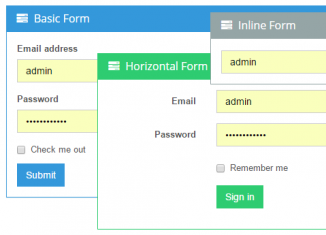
In this tutorial, I will show you how to create an attractive, pleasant to look form for your website and then I will explain you how to dynamically validate them using Javascript. We’ll also cover server-side validation with PHP to make everything 100% safe. This tutorial will help you to add more functionality to your forms which leads to better user experience and better quality of your website. You may also enhance your already existing forms by adding them some fancy effects presented in this tutorial. Let’s get started! Info: If you’d like to modify already existing form by adding some javascript to it then skip HTML and CSS part of this tutorial and go to step five. Otherwise, if you’re planning to create new form start reading here.
READ MORE »
Posts in category HTML/CSS
Form Validation with Javascript and PHP
Powerful Chat System – Lesson 3
Today we continue a series of articles on the creation of powerful chat system. Our third lesson will contain next elements: join form (with html5 validation). A long ago, I have already made similar validation. So you can refresh your memories if you like.
READ MORE »
CSS3 Image Hover Effects
Today I will tell you how to create different CSS3 image hover effects. I hope that you still remember our one old tutorial. We used javascript there. Today I will try to make something similar with using CSS3. In the result gallery page we will have 9 images, each of them have own hover effect.
READ MORE »
HTML5 Game Development – Lesson 7
Today we will create our first complete game – Arkanoid. In this lesson I will show you how to detect basic collisions and work with HTML5 local storage. You can operate with pad using mouse and keyboard (left/right buttons). We will store in local storage elapsed time of previous game and amount of broken bricks (points).
Here you can read our previous lesson: Developing Your First HTML5 Game – Lesson 6.
READ MORE »
CSS3 Modal Popups
CSS3 Modal Popups
Today I will tell you how to create cool CSS3 modal popup windows (or boxes). Literally, not so long ago, in order to achieve such effects, we used jQuery. But, as it turned out, CSS3 has all the necessary tools for making modal windows too. In our demonstration I have prepared single page with two popup elements: join form and login form. Welcome to test results and understand how it was made.
READ MORE »
Powerful Chat System – Lesson 2
Today we continue a series of articles on the creation of powerful chat system. Our second lesson will contain next elements: smart chat (ajax, with spam filtering – protection from the frequent messages). I have decided to make registration for next lesson. Hope that it is ok for you.
READ MORE »
Isometric interactive interior guide
During browsing internet, I have noticed new interesting thing – it looked like isometric guide. Today I will show you how you can create something similar. We will create isometric interactive interior guide with CSS3 and jQuery.
Powerful Chat System
Today we begin a series of articles on the creation of powerful chat system. The system will contain next elements: registration, login processing, main chat, profiles with avatars, ranking system (of profiles), private messaging, custom rooms, moderation / administration and possible something else (in future). This will be ajax chat PHP) with storing messages in database (MySQL). Plus we will implement CSS3/HTML5 features in our development process.
READ MORE »
Creating photo album with jQuery Fotorama
Today I have prepared tutorial about using new impressive jQuery gallery – Fotorama. This is a nice looking javascript gallery with intuitive controls, and great browser compatibility. You can use this plugin at iPhones and any other mobile devices (you can slide photos with touch).
READ MORE »
Fullscreen Javascript Slide navigation
Today – new pure javascript tutorial-demonstration. Result page will contain 16 slides (pages). Four in each row, four columns, plus we will add animated navigation to them through css3 arrows (at sides of screen). Plus, we will have mini-navigation bar for better navigation.