
Pure HTML5 file upload
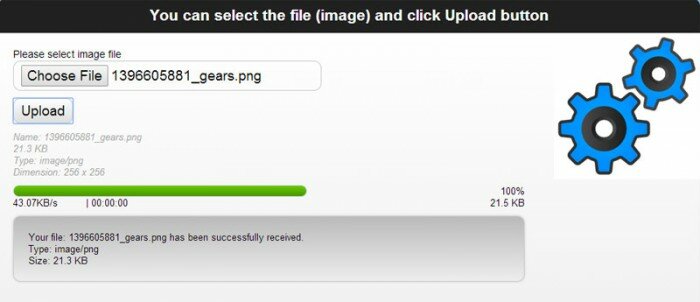
HTML5 upload tutorial: today we will develop a great HTML5 file upload form with progress bar and preview (at client-side). We have already gave you jQuery based solution, but today’s application don’t require jQuery at all. All made in pure HTML5 Javascript. I’m going to use FileReader (html5) to implement live preview (without uploading to server), and, going to use XMLHttpRequest to send data to server.
Here are our demo and downloadable package:
Live Demo
[sociallocker]
download in package
[/sociallocker]
Ok, download the sources and lets begin !
Step 1. HTML
At this page you can see out form for upload images
index.html
<html lang="en" >
<head>
<meta charset="utf-8" />
<title>Pure HTML5 file upload | Script Tutorials</title>
<link href="css/main.css" rel="stylesheet" type="text/css" />
<script src="js/script.js"></script>
</head>
<body>
<header>
<h2>Pure HTML5 file upload</h2>
<a href="https://www.script-tutorials.com/pure-html5-file-upload/" class="stuts">Back to original tutorial on <span>Script Tutorials</span></a>
</header>
<div class="container">
<div class="contr"><h2>You can select the file (image) and click Upload button</h2></div>
<div class="upload_form_cont">
<form id="upload_form" enctype="multipart/form-data" method="post" action="upload.php">
<div>
<div><label for="image_file">Please select image file</label></div>
<div><input type="file" name="image_file" id="image_file" onchange="fileSelected();" /></div>
</div>
<div>
<input type="button" value="Upload" onclick="startUploading()" />
</div>
<div id="fileinfo">
<div id="filename"></div>
<div id="filesize"></div>
<div id="filetype"></div>
<div id="filedim"></div>
</div>
<div id="error">You should select valid image files only!</div>
<div id="error2">An error occurred while uploading the file</div>
<div id="abort">The upload has been canceled by the user or the browser dropped the connection</div>
<div id="warnsize">Your file is very big. We can't accept it. Please select more small file</div>
<div id="progress_info">
<div id="progress"></div>
<div id="progress_percent"> </div>
<div class="clear_both"></div>
<div>
<div id="speed"> </div>
<div id="remaining"> </div>
<div id="b_transfered"> </div>
<div class="clear_both"></div>
</div>
<div id="upload_response"></div>
</div>
</form>
<img id="preview" />
</div>
</div>
</body>
</html>
Step 2. CSS
css/main.css
I have selected all necessary styles for our html5 upload form
css/main.css
.upload_form_cont {
    background: -moz-linear-gradient(#ffffff, #f2f2f2);
    background: -ms-linear-gradient(#ffffff, #f2f2f2);
    background: -webkit-gradient(linear, left top, left bottom, color-stop(0%, #ffffff), color-stop(100%, #f2f2f2));
    background: -webkit-linear-gradient(#ffffff, #f2f2f2);
    background: -o-linear-gradient(#ffffff, #f2f2f2);
    filter: progid:DXImageTransform.Microsoft.gradient(startColorstr='#ffffff', endColorstr='#f2f2f2');
    -ms-filter: "progid:DXImageTransform.Microsoft.gradient(startColorstr='#ffffff', endColorstr='#f2f2f2')";
    background: linear-gradient(#ffffff, #f2f2f2);
    color:#000;
    overflow:hidden;
}
#upload_form {
    float:left;
    padding:20px;
    width:700px;
}
#preview {
    background-color:#fff;
    display:block;
    float:right;
    width:200px;
}
#upload_form > div {
    margin-bottom:10px;
}
#speed,#remaining {
    float:left;
    width:100px;
}
#b_transfered {
    float:right;
    text-align:right;
}
.clear_both {
    clear:both;
}
input {
    border-radius:10px;
    -moz-border-radius:10px;
    -ms-border-radius:10px;
    -o-border-radius:10px;
    -webkit-border-radius:10px;
    border:1px solid #ccc;
    font-size:14pt;
    padding:5px 10px;
}
input[type=button] {
    background: -moz-linear-gradient(#ffffff, #dfdfdf);
    background: -ms-linear-gradient(#ffffff, #dfdfdf);
    background: -webkit-gradient(linear, left top, left bottom, color-stop(0%, #ffffff), color-stop(100%, #dfdfdf));
    background: -webkit-linear-gradient(#ffffff, #dfdfdf);
    background: -o-linear-gradient(#ffffff, #dfdfdf);
    filter: progid:DXImageTransform.Microsoft.gradient(startColorstr='#ffffff', endColorstr='#dfdfdf');
    -ms-filter: "progid:DXImageTransform.Microsoft.gradient(startColorstr='#ffffff', endColorstr='#dfdfdf')";
    background: linear-gradient(#ffffff, #dfdfdf);
}
#image_file {
    width:400px;
}
#progress_info {
    font-size:10pt;
}
#fileinfo,#error,#error2,#abort,#warnsize {
    color:#aaa;
    display:none;
    font-size:10pt;
    font-style:italic;
    margin-top:10px;
}
#progress {
    border:1px solid #ccc;
    display:none;
    float:left;
    height:14px;
    border-radius:10px;
    -moz-border-radius:10px;
    -ms-border-radius:10px;
    -o-border-radius:10px;
    -webkit-border-radius:10px;
    background: -moz-linear-gradient(#66cc00, #4b9500);
    background: -ms-linear-gradient(#66cc00, #4b9500);
    background: -webkit-gradient(linear, left top, left bottom, color-stop(0%, #66cc00), color-stop(100%, #4b9500));
    background: -webkit-linear-gradient(#66cc00, #4b9500);
    background: -o-linear-gradient(#66cc00, #4b9500);
    filter: progid:DXImageTransform.Microsoft.gradient(startColorstr='#66cc00', endColorstr='#4b9500');
    -ms-filter: "progid:DXImageTransform.Microsoft.gradient(startColorstr='#66cc00', endColorstr='#4b9500')";
    background: linear-gradient(#66cc00, #4b9500);
}
#progress_percent {
    float:right;
}
#upload_response {
    margin-top: 10px;
    padding: 20px;
    overflow: hidden;
    display: none;
    border: 1px solid #ccc;
    border-radius:10px;
    -moz-border-radius:10px;
    -ms-border-radius:10px;
    -o-border-radius:10px;
    -webkit-border-radius:10px;
    box-shadow: 0 0 5px #ccc;
    background: -moz-linear-gradient(#bbb, #eee);
    background: -ms-linear-gradient(#bbb, #eee);
    background: -webkit-gradient(linear, left top, left bottom, color-stop(0%, #bbb), color-stop(100%, #eee));
    background: -webkit-linear-gradient(#bbb, #eee);
    background: -o-linear-gradient(#bbb, #eee);
    filter: progid:DXImageTransform.Microsoft.gradient(startColorstr='#bbb', endColorstr='#eee');
    -ms-filter: "progid:DXImageTransform.Microsoft.gradient(startColorstr='#bbb', endColorstr='#eee')";
    background: linear-gradient(#bbb, #eee);
}
Step 3. HTML5 JS
js/script.js
// common variables
var iBytesUploaded = 0;
var iBytesTotal = 0;
var iPreviousBytesLoaded = 0;
var iMaxFilesize = 1048576; // 1MB
var oTimer = 0;
var sResultFileSize = '';
function secondsToTime(secs) { // we will use this function to convert seconds in normal time format
    var hr = Math.floor(secs / 3600);
    var min = Math.floor((secs - (hr * 3600))/60);
    var sec = Math.floor(secs - (hr * 3600) -  (min * 60));
    if (hr < 10) {hr = "0" + hr; }
    if (min < 10) {min = "0" + min;}
    if (sec < 10) {sec = "0" + sec;}
    if (hr) {hr = "00";}
    return hr + ':' + min + ':' + sec;
};
function bytesToSize(bytes) {
    var sizes = ['Bytes', 'KB', 'MB'];
    if (bytes == 0) return 'n/a';
    var i = parseInt(Math.floor(Math.log(bytes) / Math.log(1024)));
    return (bytes / Math.pow(1024, i)).toFixed(1) + ' ' + sizes[i];
};
function fileSelected() {
    // hide different warnings
    document.getElementById('upload_response').style.display = 'none';
    document.getElementById('error').style.display = 'none';
    document.getElementById('error2').style.display = 'none';
    document.getElementById('abort').style.display = 'none';
    document.getElementById('warnsize').style.display = 'none';
    // get selected file element
    var oFile = document.getElementById('image_file').files[0];
    // filter for image files
    var rFilter = /^(image\/bmp|image\/gif|image\/jpeg|image\/png|image\/tiff)$/i;
    if (! rFilter.test(oFile.type)) {
        document.getElementById('error').style.display = 'block';
        return;
    }
    // little test for filesize
    if (oFile.size > iMaxFilesize) {
        document.getElementById('warnsize').style.display = 'block';
        return;
    }
    // get preview element
    var oImage = document.getElementById('preview');
    // prepare HTML5 FileReader
    var oReader = new FileReader();
        oReader.onload = function(e){
        // e.target.result contains the DataURL which we will use as a source of the image
        oImage.src = e.target.result;
        oImage.onload = function () { // binding onload event
            // we are going to display some custom image information here
            sResultFileSize = bytesToSize(oFile.size);
            document.getElementById('fileinfo').style.display = 'block';
            document.getElementById('filename').innerHTML = 'Name: ' + oFile.name;
            document.getElementById('filesize').innerHTML = 'Size: ' + sResultFileSize;
            document.getElementById('filetype').innerHTML = 'Type: ' + oFile.type;
            document.getElementById('filedim').innerHTML = 'Dimension: ' + oImage.naturalWidth + ' x ' + oImage.naturalHeight;
        };
    };
    // read selected file as DataURL
    oReader.readAsDataURL(oFile);
}
function startUploading() {
    // cleanup all temp states
    iPreviousBytesLoaded = 0;
    document.getElementById('upload_response').style.display = 'none';
    document.getElementById('error').style.display = 'none';
    document.getElementById('error2').style.display = 'none';
    document.getElementById('abort').style.display = 'none';
    document.getElementById('warnsize').style.display = 'none';
    document.getElementById('progress_percent').innerHTML = '';
    var oProgress = document.getElementById('progress');
    oProgress.style.display = 'block';
    oProgress.style.width = '0px';
    // get form data for POSTing
    //var vFD = document.getElementById('upload_form').getFormData(); // for FF3
    var vFD = new FormData(document.getElementById('upload_form'));
    // create XMLHttpRequest object, adding few event listeners, and POSTing our data
    var oXHR = new XMLHttpRequest();
    oXHR.upload.addEventListener('progress', uploadProgress, false);
    oXHR.addEventListener('load', uploadFinish, false);
    oXHR.addEventListener('error', uploadError, false);
    oXHR.addEventListener('abort', uploadAbort, false);
    oXHR.open('POST', 'upload.php');
    oXHR.send(vFD);
    // set inner timer
    oTimer = setInterval(doInnerUpdates, 300);
}
function doInnerUpdates() { // we will use this function to display upload speed
    var iCB = iBytesUploaded;
    var iDiff = iCB - iPreviousBytesLoaded;
    // if nothing new loaded - exit
    if (iDiff == 0)
        return;
    iPreviousBytesLoaded = iCB;
    iDiff = iDiff * 2;
    var iBytesRem = iBytesTotal - iPreviousBytesLoaded;
    var secondsRemaining = iBytesRem / iDiff;
    // update speed info
    var iSpeed = iDiff.toString() + 'B/s';
    if (iDiff > 1024 * 1024) {
        iSpeed = (Math.round(iDiff * 100/(1024*1024))/100).toString() + 'MB/s';
    } else if (iDiff > 1024) {
        iSpeed =  (Math.round(iDiff * 100/1024)/100).toString() + 'KB/s';
    }
    document.getElementById('speed').innerHTML = iSpeed;
    document.getElementById('remaining').innerHTML = '| ' + secondsToTime(secondsRemaining);
}
function uploadProgress(e) { // upload process in progress
    if (e.lengthComputable) {
        iBytesUploaded = e.loaded;
        iBytesTotal = e.total;
        var iPercentComplete = Math.round(e.loaded * 100 / e.total);
        var iBytesTransfered = bytesToSize(iBytesUploaded);
        document.getElementById('progress_percent').innerHTML = iPercentComplete.toString() + '%';
        document.getElementById('progress').style.width = (iPercentComplete * 4).toString() + 'px';
        document.getElementById('b_transfered').innerHTML = iBytesTransfered;
        if (iPercentComplete == 100) {
            var oUploadResponse = document.getElementById('upload_response');
            oUploadResponse.innerHTML = '<h1>Please wait...processing</h1>';
            oUploadResponse.style.display = 'block';
        }
    } else {
        document.getElementById('progress').innerHTML = 'unable to compute';
    }
}
function uploadFinish(e) { // upload successfully finished
    var oUploadResponse = document.getElementById('upload_response');
    oUploadResponse.innerHTML = e.target.responseText;
    oUploadResponse.style.display = 'block';
    document.getElementById('progress_percent').innerHTML = '100%';
    document.getElementById('progress').style.width = '400px';
    document.getElementById('filesize').innerHTML = sResultFileSize;
    document.getElementById('remaining').innerHTML = '| 00:00:00';
    clearInterval(oTimer);
}
function uploadError(e) { // upload error
    document.getElementById('error2').style.display = 'block';
    clearInterval(oTimer);
}
function uploadAbort(e) { // upload abort
    document.getElementById('abort').style.display = 'block';
    clearInterval(oTimer);
}
Most of code is already commented. So I will hope that you will understand all this code. Anyway – how it working: when we select file – function ‘fileSelected’ is executing. We filter all unnecessary formats (allow to upload next formats: bmp, gif, jpg, png, tif), in case of huge file – we will draw warning message. Then, through FileReader::readAsDataURL we will draw live preview of selected file. Plus, we will display another information about image: its name, size, type, and dimensions. Process of uploading is a little complicated. But generally, we have to prepare XMLHttpRequest object, add event listeners to next events: progress, load, error and abort. And after – post form data (I have used FormData class) to our ‘upload.php’ receiver.
Step 4. PHP
upload.php
<?php
function bytesToSize1024($bytes, $precision = 2) {
    $unit = array('B','KB','MB');
    return @round($bytes / pow(1024, ($i = floor(log($bytes, 1024)))), $precision).' '.$unit[$i];
}
$sFileName = $_FILES['image_file']['name'];
$sFileType = $_FILES['image_file']['type'];
$sFileSize = bytesToSize1024($_FILES['image_file']['size'], 1);
echo <<<EOF
<p>Your file: {$sFileName} has been successfully received.</p>
<p>Type: {$sFileType}</p>
<p>Size: {$sFileSize}</p>
EOF;
As you can see – I’m not uploading file. But, ‘echo’ back all info about accepted file. This information will appear in our <div id="upload_response"></div> element.
Live Demo
Conclusion
Welcome back to read new awesome and unique articles about HTML5. Good luck!







Hi Andrey, I have been using this script for around a year, slightly modified of course, I was just wondering what you would need to do (Java side) to allow multiple files to be uploaded? I am hopeless with JS, my upload.php allows it, I just need help with the JS.
Thanks again.
Hi Mitch, it can be pretty complicated to make it work with multiple files. First of all, yes, you will need to put ‘multiple’ flag for the file selector. Then, you will need to change it’s name from image_file to image_file[] (to turn it into array), after you will need to find an appropriate solution for preview, progress and upload (because currently it works only for single file)
Nice dude, but what if i want to change file type filter to allow RAR, ZIP, and other compressed file types? thanks :)
Hi Matius, pay attention to ‘fileSelected’ function. The accepted formats are listed here.
I am getting a JS error on line 38 of the script. var oFile = document.getElementById(‘image_file’).files[0]; the error says “Unable to get property of ‘0’ of undefined or null reference”
Hi Mike,
What is your browser where you have this trouble?
HTTP Error 405.0 – Method Not Allowed
The page you are looking for cannot be displayed because an invalid method (HTTP verb) is being used.
Do you see this error on your own website?