
How to Easily Make Chat application with PHP + SQL
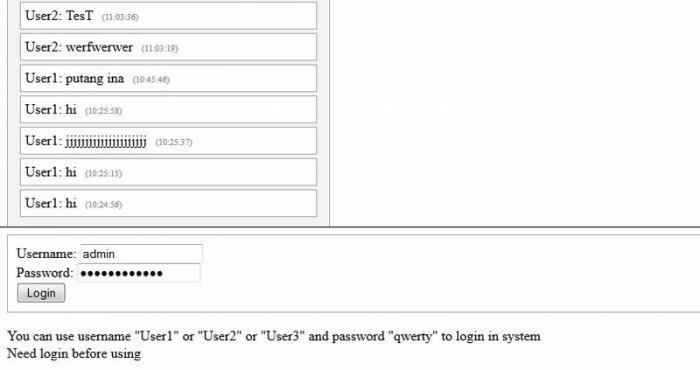
Today I will tell you about creating simple Chat application using our existing login system. This will be useful and most simple solution. We will able to chat with our logged members. We will use database to store messages.
Here is a sample and package:
Live Demo
[sociallocker]
download in package
[/sociallocker]
Now please download the example files and lets start coding!
Step 1. HTML
As usual, we start with the HTML.
This main chat window.
index.html
<frameset rows="65%,35%" framespacing="1" frameborder="yes" border="1" bordercolor="#FF0000">
    <frame src="messages.php" name="main_frame">
    <frame src="main.php" name="login_frame" scrolling="no" noresize target="middle">
</frameset>
This is login form code.
login_form.html
<link type="text/css" rel="stylesheet" href="styles.css" />
<form class="login_form" method="post" action="main.php">
 <div>Username: <input type="text" name="username" /></div>
 <div>Password: <input type="password" name="password" /></div>
 <div><input type="submit" value="Login" name="Login" /></div>
</form>
<div>You can use username "User1" or "User2" or "User3" and password "qwerty" to login in system</div>
Here are new 3 template files to chat (2 to messages box and 1 to send message form):
chat_begin.html
<link type="text/css" rel="stylesheet" href="styles.css" />
<div class="chat_main">
 <h3>Chat</h3>
chat_end.html
</div>
chat_input.html
<link type="text/css" rel="stylesheet" href="styles.css" />
<form class="submit_form" method="post" action="main.php">
 <div><input type="text" name="s_message" /><input type="submit" value="Say" name="s_say" /></div>
</form>
<div>You can type anything in chat</div>
Step 2. CSS
Here are used CSS styles.
styles.css
.login_form {
 border: 1px solid #AAA;
 padding:10px;
}
h3 {margin-top:3px;}
.chat_main {
 border:1px solid #AAA;
 -moz-box-shadow:0 0 10px #ccc;
 -webkit-box-shadow: 0 0 10px #ccc;
 width:350px;
 padding:10px;
 background:#f3f3f3;
}
.message {
 border:1px solid #AAA;
 margin:4px;
 padding:5px;
 -moz-border-radius:7px;
 -webkit-border-radius:7px;
 background:#ffffff;
}
.textf {
-moz-box-shadow:0 0 10px #CCCCCC;
-webkit-box-shadow:0 0 10px #CCCCCC;
border:1px solid #CCCCCC;
height:40px;
}
.submit {
-moz-border-radius:7px;
-webkit-border-radius:7px;
background:#F3F3F3;
border:1px solid #CCCCCC;
font-size:16px;
font-weight:bold;
height:35px;
margin-left:10px;
padding:5px;
}
.message span {
 font-size:10px;
 color:#888;
 margin-left:10px;
}
.submit_form {
 margin:10px 0px;
}
Step 3. SQL
We will need to execute next SQL in our database.
CREATE TABLE `s_chat_messages` (
`id` INT(11) NOT NULL AUTO_INCREMENT ,
`user` VARCHAR(255) NOT NULL ,
`message` VARCHAR(255) NOT NULL ,
`when` INT(11) NOT NULL ,
PRIMARY KEY (`id`)
) ENGINE=MyISAM DEFAULT CHARSET=utf8;
Step 4. PHP
As you remember – we already had ready easy authentication system. I moved it to external library file (inc/login.inc.php). This will useful for us – now code more structured and it comfortable to use in different places of code.
After I created new library to work with chat (inc/chat.inc.php). This class have next functions:
acceptMessages – function accepts sent messages and saves them in database table
getMessages – returns list of recent 15 messages
Then I created two php files: messages.php and main.php. First file generates list of recent messages. It refreshes the list each 5 seconds (it is enough to our chat). Second file generates a login form and one text input field for the chat. After we login, we can use this field to post messages in the chat.
Ok, here are all used PHP files:
main.php
<?php
// set error reporting level
if (version_compare(phpversion(), "5.3.0", ">=") == 1)
 error_reporting(E_ALL & ~E_NOTICE & ~E_DEPRECATED);
else
 error_reporting(E_ALL & ~E_NOTICE);
require_once('inc/login.inc.php');
require_once('inc/chat.inc.php');
// initialization of login system and generation code
$oSimpleLoginSystem = new SimpleLoginSystem();
$oSimpleChat = new SimpleChat();
// draw login box
echo $oSimpleLoginSystem->getLoginBox();
// draw chat application
$sChatResult = 'Need login before using';
if ($_COOKIE['member_name'] && $_COOKIE['member_pass']) {
 if ($oSimpleLoginSystem->check_login($_COOKIE['member_name'], $_COOKIE['member_pass'])) {
 $sChatResult = $oSimpleChat->acceptMessages();
 }
}
echo $sChatResult;
?>
messages.php
<meta http-equiv="refresh" content="5">
<?php
require_once('inc/chat.inc.php');
$oSimpleChat = new SimpleChat();
echo $oSimpleChat->getMessages();
?>
inc/chat.inc.php
<?php
// simple chat class
class SimpleChat {
    // DB variables
    var $sDbName;
    var $sDbUser;
    var $sDbPass;
    // constructor
    function SimpleChat() {
        //mysql_connect("localhost","username","password");
        $this->sDbName = 'database_name';
        $this->sDbUser = 'username';
        $this->sDbPass = 'password';
    }
    // adding to DB table posted message
    function acceptMessages() {
        if ($_COOKIE['member_name']) {
            if(isset($_POST['s_say']) && $_POST['s_message']) {
                $sUsername = $_COOKIE['member_name'];
                //the host, name, and password for your mysql
                $vLink = mysql_connect("localhost", $this->sDbUser, $this->sDbPass);
                //select the database
                mysql_select_db($this->sDbName);
                $sMessage = mysql_real_escape_string($_POST['s_message']);
                if ($sMessage != '') {
                    mysql_query("INSERT INTO `s_chat_messages` SET `user`='{$sUsername}', `message`='{$sMessage}', `when`=UNIX_TIMESTAMP()");
                }
                mysql_close($vLink);
            }
        }
        ob_start();
        require_once('chat_input.html');
        $sShoutboxForm = ob_get_clean();
        return $sShoutboxForm;
    }
    function getMessages() {
        $vLink = mysql_connect("localhost", $this->sDbUser, $this->sDbPass);
        //select the database
        mysql_select_db($this->sDbName);
        //returning the last 15 messages
        $vRes = mysql_query("SELECT * FROM `s_chat_messages` ORDER BY `id` ASC LIMIT 15");
        $sMessages = '';
        // collecting list of messages
        if ($vRes) {
            while($aMessages = mysql_fetch_array($vRes)) {
                $sWhen = date("H:i:s", $aMessages['when']);
                $sMessages .= '<div class="message">' . $aMessages['user'] . ': ' . $aMessages['message'] . '<span>(' . $sWhen . ')</span></div>';
            }
        } else {
            $sMessages = 'DB error, create SQL table before';
        }
        mysql_close($vLink);
        ob_start();
        require_once('chat_begin.html');
        echo $sMessages;
        require_once('chat_end.html');
        return ob_get_clean();
    }
}
?>
inc/login.inc.php
<?
// class SimpleLoginSystem
class SimpleLoginSystem {
    // variables
    var $aExistedMembers; // Existed members array
    // constructor
    function SimpleLoginSystem() {
        $this->aExistedMembers = array(
            'User1' => 'd8578edf8458ce06fbc5bb76a58c5ca4',
            'User2' => 'd8578edf8458ce06fbc5bb76a58c5ca4',
            'User3' => 'd8578edf8458ce06fbc5bb76a58c5ca4'
        );
    }
    function getLoginBox() {
        ob_start();
        require_once('login_form.html');
        $sLoginForm = ob_get_clean();
        $sLogoutForm = '<a href="'.$_SERVER['PHP_SELF'].'?logout=1">logout</a>';
        if ((int)$_REQUEST['logout'] == 1) {
            if (isset($_COOKIE['member_name']) && isset($_COOKIE['member_pass']))
                $this->simple_logout();
        }
        if ($_REQUEST['username'] && $_REQUEST['password']) {
            if ($this->check_login($_REQUEST['username'], MD5($_REQUEST['password']))) {
                $this->simple_login($_REQUEST['username'], $_REQUEST['password']);
                return 'Hello ' . $_REQUEST['username'] . '! ' . $sLogoutForm;
            } else {
                return 'Username or Password is incorrect' . $sLoginForm;
            }
        } else {
            if ($_COOKIE['member_name'] && $_COOKIE['member_pass']) {
                if ($this->check_login($_COOKIE['member_name'], $_COOKIE['member_pass'])) {
                    return 'Hello ' . $_COOKIE['member_name'] . '! ' . $sLogoutForm;
                }
            }
            return $sLoginForm;
        }
    }
    function simple_login($sName, $sPass) {
        $this->simple_logout();
        $sMd5Password = MD5($sPass);
        $iCookieTime = time() + 24*60*60*30;
        setcookie("member_name", $sName, $iCookieTime, '/');
        $_COOKIE['member_name'] = $sName;
        setcookie("member_pass", $sMd5Password, $iCookieTime, '/');
        $_COOKIE['member_pass'] = $sMd5Password;
    }
    function simple_logout() {
        setcookie('member_name', '', time() - 96 * 3600, '/');
        setcookie('member_pass', '', time() - 96 * 3600, '/');
        unset($_COOKIE['member_name']);
        unset($_COOKIE['member_pass']);
    }
    function check_login($sName, $sPass) {
        return ($this->aExistedMembers[$sName] == $sPass);
    }
}
?>
Conclusion
I described how to make easy chat application based on PHP and MySQL. You can use this material to create own scripts into your startups. Good luck!





Hello, i got this warning messages, what should I do? Thanks!
( ! ) Warning: mysql_connect(): Access denied for user ‘username’@’localhost’ (using password: YES) in C:\wamp\www\chat_test\inc\chat.inc.php on line 48
Call Stack
# Time Memory Function Location
1 0.0020 141400 {main}( ) ..\messages.php:0
2 0.0040 152384 SimpleChat->getMessages( ) ..\messages.php:6
3 0.0040 152544 mysql_connect ( ) ..\chat.inc.php:48
( ! ) Warning: mysql_close() expects parameter 1 to be resource, boolean given in C:\wamp\www\chat_test\inc\chat.inc.php on line 68
Call Stack
# Time Memory Function Location
1 0.0020 141400 {main}( ) ..\messages.php:0
2 0.0040 152384 SimpleChat->getMessages( ) ..\messages.php:6
3 0.0530 159256 mysql_close ( ) ..\chat.inc.php:68
Chat
DB error, create SQL table before
Hi Balazs,
Make sure that you didn’t forget the step 3 and you already configured your db details in the ‘inc/chat.inc.php’ file
how can i change the 5secs display time for the chat to appear?
Hi Alt,
Refer to the following code: <meta http-equiv="refresh" content="5">
hi
i am new for php wil it works in local host…..?
For sure
how we can chat with a particular person
Hi Sonu,
This chat is public chat. Try to have a look at another our tutorial with this function (powerful chat system).
give me step how to create database in phpmyadmin please.. i’m newbie
Hi Bie,
This is easy: enter the phpMyAdmin, there is the form to create new databased at it’s index page
Thanks for the effort!
I think everything is OK with the chat box above. But below, I get the following warning, and I would very be pleased if you told me why :
aExistedMembers = array( ‘User1’ => ‘a’, ‘User2’ => ‘b’, ‘User3’ => ‘c’ ); } function getLoginBox() { ob_start(); require_once(‘login_form.html’); $sLoginForm = ob_get_clean(); $sLogoutForm = ‘logout’; if ((int)$_REQUEST[‘logout’] == 1) { if (isset($_COOKIE[‘member_name’]) && isset($_COOKIE[‘member_pass’])) $this->simple_logout(); } if ($_REQUEST[‘username’] && $_REQUEST[‘password’]) { if ($this->check_login($_REQUEST[‘username’], MD5($_REQUEST[‘password’]))) { $this->simple_login($_REQUEST[‘username’], $_REQUEST[‘password’]); return ‘Hello ‘ . $_REQUEST[‘username’] . ‘! ‘ . $sLogoutForm; } else { return ‘Username or Password is incorrect’ . $sLoginForm; } } else { if ($_COOKIE[‘member_name’] && $_COOKIE[‘member_pass’]) { if ($this->check_login($_COOKIE[‘member_name’], $_COOKIE[‘member_pass’])) { return ‘Hello ‘ . $_COOKIE[‘member_name’] . ‘! ‘ . $sLogoutForm; } } return $sLoginForm; } } function simple_login($sName, $sPass) { $this->simple_logout(); $sMd5Password = MD5($sPass); $iCookieTime = time() + 24*60*60*30; setcookie(“member_name”, $sName, $iCookieTime, ‘/’); $_COOKIE[‘member_name’] = $sName; setcookie(“member_pass”, $sMd5Password, $iCookieTime, ‘/’); $_COOKIE[‘member_pass’] = $sMd5Password; } function simple_logout() { setcookie(‘member_name’, ”, time() – 96 * 3600, ‘/’); setcookie(‘member_pass’, ”, time() – 96 * 3600, ‘/’); unset($_COOKIE[‘member_name’]); unset($_COOKIE[‘member_pass’]); } function check_login($sName, $sPass) { return ($this->aExistedMembers[$sName] == $sPass); } } ?>
Thanks in advance
Hi Cenkhan,
What warning exactly did you get? By the way, the code you send us looks like a mess, sorry
Add <?php tag on the top to
login.inc.php
It doesnt save to my database sir.. the message doesnt
how do i name my database? i named in sql
Oh, sorry sir.. i mean, i cant see the message in the page..
Hi Andrew,
Check the database credentials in the ‘inc/chat.inc.php’ file
Hi
How to clean chat (sql rows) after some time ?
Hi Hq,
Better – if you create a special purifying cron script
hello sir, I did not get the “inc/chat.inc.php” part. how to make that? I can;t name a php file with ‘/’.. what are you meaning by “I moved these files to another library”? how to make it sir? plz help.
Hi Anuran,
In PHP, as well as all other programming languages (and even in windows system) – ‘/’ is separator that is used in paths. Thus, ‘inc/chat.inc.php’ means that this is the ‘chat.inc.php’ file that is in ‘inc’ directory.
pls what is sql name. then can i add new user
Hi Adams,
There is no way to add new members through database, all members are hardcoded in ‘inc/login.inc.php’ file (as it is explained in description)
Where ia the download link????
Hi Khan, the download section is under the demo link (in top)
Am getting these errors:-
Warning: require_once(chat_begin.html): failed to open stream: No such file or directory in /home/asapscot/public_html/inxspot/inc/chat.inc.php on line 71 Fatal error: require_once(): Failed opening required ‘chat_begin.html’ (include_path=’.:/opt/php54/lib/php’) in /home/asapscot/public_html/inxspot/inc/chat.inc.php on line 71
Warning: require_once(login_form.html): failed to open stream: No such file or directory in /home/asapscot/public_html/inxspot/inc/login.inc.php on line 20 Fatal error: require_once(): Failed opening required ‘login_form.html’ (include_path=’.:/opt/php54/lib/php’) in /home/asapscot/public_html/inxspot/inc/login.inc.php on line 20
Please help.
Samantha
Hi Samantha, both html files (chat_begin.html and login_form.html) should be in root directory of the script, the ‘chat.inc.php’ file should be in ‘inc’ directory (that is created in the same root directory)
I need help, it keeps on showing
Chat
DB error, create SQL table before
on the main box.
Also, i need to know how to create a user using the script provided.
Hello Jerome, before all, you need to process Step 3 – you need to create a new database (or you can use an existing one), create ‘s_chat_messages’ table in the database, and put credentials of this database in inc/chat.inc.php file (in constructor)
sir how can i convert your sql to ssms?
I suggest that you use mysql.
i wan to create a social networking website and I’ve got no idea how start (php). please help if can
thanks
Hi Davewhite, this is a very broad question, and can mean a great deal of discussion. Well, first of all, there are many ready scripts (CMSs) in internet to deploy the social network. If you still prefer to create your own code, I recommend that you learn PHP (and mySQL) well, before you start writing your own code.
aExistedMembers = array( ‘User1’ => ‘d8578edf8458ce06fbc5bb76a58c5ca4’, ‘User2’ => ‘d8578edf8458ce06fbc5bb76a58c5ca4’, ‘User3’ => ‘d8578edf8458ce06fbc5bb76a58c5ca4’ ); } function getLoginBox() { ob_start(); require_once(‘login_form.html’); $sLoginForm = ob_get_clean(); $sLogoutForm = ‘logout’; if ((int)$_REQUEST[‘logout’] == 1) { if (isset($_COOKIE[‘member_name’]) && isset($_COOKIE[‘member_pass’])) $this->simple_logout(); } if ($_REQUEST[‘username’] && $_REQUEST[‘password’]) { if ($this->check_login($_REQUEST[‘username’], MD5($_REQUEST[‘password’]))) { $this->simple_login($_REQUEST[‘username’], $_REQUEST[‘password’]); return ‘Hello ‘ . $_REQUEST[‘username’] . ‘! ‘ . $sLogoutForm; } else { return ‘Username or Password is incorrect’ . $sLoginForm; } } else { if ($_COOKIE[‘member_name’] && $_COOKIE[‘member_pass’]) { if ($this->check_login($_COOKIE[‘member_name’], $_COOKIE[‘member_pass’])) { return ‘Hello ‘ . $_COOKIE[‘member_name’] . ‘! ‘ . $sLogoutForm; } } return $sLoginForm; } } function simple_login($sName, $sPass) { $this->simple_logout(); $sMd5Password = MD5($sPass); $iCookieTime = time() + 24*60*60*30; setcookie(“member_name”, $sName, $iCookieTime, ‘/’); $_COOKIE[‘member_name’] = $sName; setcookie(“member_pass”, $sMd5Password, $iCookieTime, ‘/’); $_COOKIE[‘member_pass’] = $sMd5Password; } function simple_logout() { setcookie(‘member_name’, ”, time() – 96 * 3600, ‘/’); setcookie(‘member_pass’, ”, time() – 96 * 3600, ‘/’); unset($_COOKIE[‘member_name’]); unset($_COOKIE[‘member_pass’]); } function check_login($sName, $sPass) { return ($this->aExistedMembers[$sName] == $sPass); } } ?>
Fatal error: Class ‘SimpleLoginSystem’ not found in C:\xampp\htdocs\samo-moje\CHAT\main.php on line 17
Dalibor, I think that you need to enable ‘short-open-tags’. It looks that your apache doesn’t process <? correctly
thanks
Hello ! I am sure i’ve configured my Database details in the ini file, i still get the DB Error message… Why ? How can I fix it? Can you send me your ini file please (a screenshot) ? You can hide the passwords. Ill just find where I have gone wrong.
Hi Matt, there is no any ‘ini’ file (like you mentioned) to configure the DB details. You need to put your database details in ‘inc/chat.inc.php’ file (in constructor). I already prepared the necessary variables for these details.
GREAT WORK BUT PLEASE HELP MW WITH THIS ERROR:
Class ‘SimpleLoginSystem’ not found in C:\xampp\htdocs\chat_application\main.php on line 13
Hi Richard, this class is defined in ‘inc/login.inc.php’ file. Make sure if there is this file, and, check is ‘short-open-tags’ is enabled in your apache.
Hi Andrew,
It’s a very good example there you have shown, i have used your design for my website, however i would require few help.
Is it possible to add notification type of function when some one gets message like we have in gtalk.
please let me know how i can implement it.
Thanks in advance
Hi Sushil, what kind of notifications did you mean? Blinking?
I need more explaination ….
Hi Nepolian,
About what exactly?
where i put sql code ????
i am beginer please help me
Hi Kotti, usually, the SQL code is executed in phpMyAdmin
what algorithm can be used to develope a desktop messenger with session timing that can be set by the user
If you mean the native desktop application, then you can use any system language, for example – C#