
How to Easily Make “Ajaxy” Chat application with PHP + SQL + jQuery
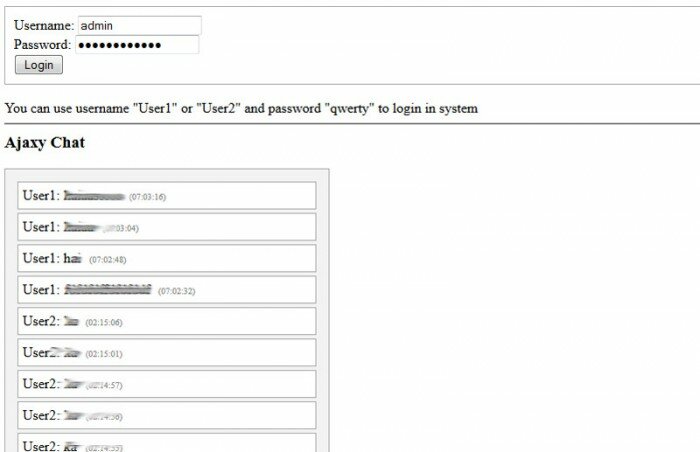
Today I will tell you about another chat system. After making old-style chat described in previous post I decided to make modern, pretty version. I made several enhancements:
- a) Login system. Now it using database to keep members. Also it have easy methods to take some necessary info about logged member.
- b) Chat interface. Now it much more user friendly. And show last added messages via toggling (based on jQuery). Looks fine.
- c) Inner code structure. Now here are good order. All libraries in ‘inc’ folder, all javascripts in ‘js’ folder, all template-related files in folder ‘templates’. More, class organization: now we have useful DB class, class of login system, chat class too.
- d) of code safety. Added necessary methods to protect from hack attacks. As example function process_db_input in our DB class.
So, as result – we will able to chat with our logged members. We will use database to store messages as usual.
Here is a sample:
- Live “Ajaxy” Chat Demo
- download in package
[sociallocker]
[/sociallocker]
Ok, download the example files and lets start coding !
Step 1. HTML
As usual, we start with the HTML.
This is input text form of our chat.
templates/chat_input.html
<form class="submit_form" method="post" action="" target="chat_res">
    <div><input type="text" name="s_message" /><input type="submit" value="Say" name="s_say" /></div>
</form>
<div>You can type anything in chat</div>
<iframe name="chat_res" style="display:none;"></iframe>
This is login form code.
templates/login_form.html
<form class="login_form" method="post" action="">
    <div>Username: <input type="text" name="username" /></div>
    <div>Password: <input type="password" name="password" /></div>
    <div><input type="submit" value="Login" name="Login" /></div>
</form>
<div>You can use username "User1" or "User2" and password "qwerty" to login in system</div>
<hr />
Step 2. CSS
Here are used CSS styles.
templates/css/styles.css
.login_form {
border: 1px solid #AAA;
padding:10px;
}
h3 {margin-top:3px;}
.chat_main {
border:1px solid #AAA;
-moz-box-shadow:0 0 10px #ccc;
-webkit-box-shadow: 0 0 10px #ccc;
width:350px;
padding:10px;
background:#f3f3f3;
}
.message {
border:1px solid #AAA;
margin:4px;
padding:5px;
-moz-border-radius:7px;
-webkit-border-radius:7px;
background:#ffffff;
}
.textf {-moz-box-shadow:0 0 10px #CCCCCC;
-webkit-box-shadow:0 0 10px #CCCCCC;
border:1px solid #CCCCCC;
height:40px;}
.submit {
-moz-border-radius:7px;
-webkit-border-radius:7px;
background:#F3F3F3;
border:1px solid #CCCCCC;
font-size:16px;
font-weight:bold;
height:35px;
margin-left:10px;
padding:5px;
}
.message span {
font-size:10px;
color:#888;
margin-left:10px;
}
.submit_form {
margin:10px 0px;
}
Step 3. SQL
We will need to execute next SQL in our database.
CREATE TABLE `s_ajax_chat_messages` (
  `id` INT( 11 ) NOT NULL AUTO_INCREMENT ,
  `member_id` INT( 11 ) NOT NULL ,
  `member_name` VARCHAR( 255 ) NOT NULL ,
  `message` VARCHAR( 255 ) NOT NULL ,
  `when` INT( 11 ) NOT NULL ,
  PRIMARY KEY ( `id` )
) ENGINE=MyISAM DEFAULT CHARSET=utf8;
CREATE TABLE `s_members` (
  `id` int(11) NOT NULL AUTO_INCREMENT,
  `name` varchar(255) NOT NULL,
  `pass` varchar(40) NOT NULL,
  PRIMARY KEY (`id`)
) ENGINE=MyISAM  DEFAULT CHARSET=utf8;
INSERT INTO `s_members` (`id`, `name`, `pass`) VALUES
(NULL, 'User1', 'd8578edf8458ce06fbc5bb76a58c5ca4'),
(NULL, 'User2', 'd8578edf8458ce06fbc5bb76a58c5ca4');
Step 4. JS
Here are few necessary JS files to our project.
js/main.js
$(function() {
    getMessages = function() {
        var self = this;
        var _sRandom = Math.random();
        $.getJSON('index.php?action=get_last_messages' + '&_r=' + _sRandom, function(data){
            if(data.messages) {
                $('.chat_main').html(data.messages);
            }
            // start it again;
            setTimeout(function(){
               getMessages();
            }, 5000);
        });
    }
    getMessages();
});
js/jquery-1.4.2.min.js
This classe are general – jQuery library. No need to give full code of that file here. It always available as a download package
Step 5. PHP
I hope that most code will easy for your understanding – each function have normal name and commented.
Ok, here are all used PHP files:
index.php
<?php
// set error reporting level
if (version_compare(phpversion(), "5.3.0", ">=") == 1)
  error_reporting(E_ALL & ~E_NOTICE & ~E_DEPRECATED);
else
  error_reporting(E_ALL & ~E_NOTICE);
require_once('inc/db.inc.php');
require_once('inc/login.inc.php');
require_once('inc/ajx_chat.inc.php');
if ($_REQUEST['action'] == 'get_last_messages') {
    $sChatMessages = $GLOBALS['AjaxChat']->getMessages(true);
    require_once('inc/Services_JSON.php');
    $oJson = new Services_JSON();
    echo $oJson->encode(array('messages' => $sChatMessages));
    exit;
}
// draw login box
echo $GLOBALS['oSimpleLoginSystem']->getLoginBox();
// draw exta necessary files
echo '<link type="text/css" rel="stylesheet" href="templates/css/styles.css" />';
echo '<script type="text/javascript" src="js/jquery-1.4.2.min.js"></script>';
echo '<script type="text/javascript" src="js/main.js"></script>';
// draw chat messages
$sChatMessages = $GLOBALS['AjaxChat']->getMessages();
// draw input form + accept inserted texts
$sChatInputForm = 'Need login before using';
if ($GLOBALS['bLoggedIn']) {
    $sChatInputForm = $GLOBALS['AjaxChat']->getInputForm();
    $GLOBALS['AjaxChat']->acceptMessages();
}
echo $sChatMessages . $sChatInputForm;
?>
inc/ajx_chat.inc.php
This is our Chat class
<?php
/**
* Simple ajaxy chat class
*/
class SimpleAjaxyChat {
    /**
    * constructor
    */
    function SimpleAjaxyChat() {}
    /**
    * Adding to DB table posted message
    */
    function acceptMessages() {
        $sUsername = $GLOBALS['aLMemInfo']['name'];
        $iUserID = (int)$GLOBALS['aLMemInfo']['id'];
        if($sUsername && isset($_POST['s_message']) && $_POST['s_message'] != '') {
            $sMessage = $GLOBALS['MySQL']->process_db_input($_POST['s_message'], A_TAGS_STRIP);
            if ($sMessage != '') {
                $GLOBALS['MySQL']->res("INSERT INTO `s_ajax_chat_messages` SET `member_id`='{$iUserID}', `member_name`='{$sUsername}', `message`='{$sMessage}', `when`=UNIX_TIMESTAMP()");
            }
        }
    }
    /**
    * Return input text form
    */
    function getInputForm() {
        ob_start();
        require_once('templates/chat_input.html');
        return ob_get_clean();
    }
    /**
    * Return last 15 messages
    */
    function getMessages($bOnlyMessages = false) {
        $aMessages = $GLOBALS['MySQL']->getAll("SELECT `s_ajax_chat_messages`.*, `s_members`.`name`, UNIX_TIMESTAMP()-`s_ajax_chat_messages`.`when` AS 'diff' FROM `s_ajax_chat_messages` INNER JOIN `s_members` ON `s_members`.`id` = `s_ajax_chat_messages`.`member_id` ORDER BY `id` DESC LIMIT 15");
        $sMessages = '';
        // collecting list of messages
        foreach ($aMessages as $iID => $aMessage) {
            $sExStyles = $sExJS = '';
            $iDiff = (int)$aMessage['diff'];
            if ($iDiff < 7) {
                $sExStyles = 'style="display:none;"';
                $sExJS = "<script> $('#message_{$aMessage['id']}').slideToggle('slow'); </script>";
            }
            $sWhen = date("H:i:s", $aMessage['when']);
            $sMessages .= '<div class="message" id="message_'.$aMessage['id'].'" '.$sExStyles.'>' . $aMessage['name'] . ': ' . $aMessage['message'] . '<span>(' . $sWhen . ')</span></div>' . $sExJS;
        }
        if ($bOnlyMessages) return $sMessages;
        return '<h3>Ajaxy Chat</h3><div class="chat_main">' . $sMessages . '</div>';
    }
}
$GLOBALS['AjaxChat'] = new SimpleAjaxyChat();
?>
inc/db.inc.php, inc/login.inc.php, inc/Services_JSON.php
All these classes are general in nature and is large enough that we will not describe them here, but they are always available as a download package
Conclusion
Today I told you how to create own simple and good ajaxy chat application based on PHP, MySQL, jQuery and JSON a little. You can use this material to create own scripts into your startups. Good luck!






Working Dude 100 Percent . Thanks alot
I tried it and found a problem
Found error in the file ‘C:\wamp\www\source_2\example7\inc\ajx_chat.inc.php’ at line 40.
Called ‘getAll’ function with erroneous argument #0.
This is strange, I can advice you to check your DB details, and, you can try to execute that SQL in your phpMyAdmin (that SQL I using in that place):
SELECT `s_ajax_chat_messages`.*, `s_members`.`name`, UNIX_TIMESTAMP()-`s_ajax_chat_messages`.`when` AS ‘diff’ FROM `s_ajax_chat_messages` INNER JOIN `s_members` ON `s_members`.`id` = `s_ajax_chat_messages`.`member_id` ORDER BY `id` DESC LIMIT 15
Sorry for not fully understanding this in advance but, I’m not abel to run this program. I can’t run .php files in my browser for some reason. Also, where do i put the .SQL file? in the same folder? Which file am i supposed to excecute in the browser? -thanks
Hello Bill,
Yes, you should execute that SQL file in your phpMyAdmin (you have add these instructions into database)
I downloaded the package and the browser says in footer, “Found error in the file ‘/var/www/example7/inc/ajx_chat.inc.php’ at line 40.
Called ‘getAll’ function with erroneous argument #0.” how can i fix this? I’m also unable to login. I set the user and password to what i wanted, but it won’t log me on.
Hi jacob,
Make sure that you added SQL instructions into database
I was not able to find db.inc.php and login.inc.php in the download package
Hi fikayo,
Please pay attention that both files are in ‘inc’ folder (they are not in the root folder)
how to add user name and password?? i just inserted in members database, but not working in log in.
help me plz…
Hi giggler,
Please pay attention that password cache (in database) is MD5 of your real password. You can check how it works (login process) in login.inc.php
Hi admin,
The script work! May i know to change the latest mesages is at the bottom? Thanks :)
Hi Nelsom,
Basically, if you want to display the latest messages in the bottom (reverse), you have to change function getMessages (ajx_chat.inc.php), try to use PHP array sorting functions to change position of elements
Everything works perfect. Thank you very much.
Just one thing: in my country, we speak spanish, and in the words we use “tildes” (i don’t know how to say that word in english). the “tildes” are a stick that goes above the letter. When I add this phrase to chat, for example: “¿cómo estás?” (how are you?, in english), the chat just shows me this: “¿c”. That is, does not show the letters that use accents and what comes next. How could I fix this?
Hello Carlos,
If you want to use non-english characters, you always should use UTF8 everywhere.
It means, that you should convert all your source files into UTF8 (without BOM) encoding. You can do it easily with Notepad++
Hi I’m a 12 grade student and I haven’t try this but I really want to learn how to make one of this. I want to ask if how can I connect it to facebook, which I want the visitor chat as a facebook user or twitter. And how can I also include their pictures. Like show their profile pictures while chatting? Hope you guys help me. I’m a newbie and really want to learn that. Thanks a lot in advance ;) more power ;)
Hello Mizzy,
You have a lot of interesting questions :-)
But, I suggest that you start reading API documentation of all services you want to use. Just because actually, this is pretty difficult to use facebook chat. You have to use some special software and methods in case of facebook.
hi !! I am using notepad++ in this code.. i would like to ask if what is this error
Warning: require_once(inc/db.inc.php) [function.require-once]: failed to open stream: No such file or directory in C:\xampplite\htdocs\chatsystem2\index.php on line 9
Fatal error: require_once() [function.require]: Failed opening required ‘inc/db.inc.php’ (include_path=’.;c:\xampplite\php\PEAR’) in C:\xampplite\htdocs\chatsystem2\index.php on line 9
after i have run the codes.
Hi Sheila,
Please pay attention that this file (db.inc.php) should be inside your ‘inc’ directory.
can you tell me how to get rid of this error?
Found error in the file ‘C:\xampp\htdocs\iecep\livechat\inc\login.inc.php’ at line 90.
Called ‘getAll’ function with erroneous argument #0.
thanks a lot
Hello Ralph, this function doesn’t have any errors, look:
function setLoggedMemberInfo($iMemberID) {
$sSQL = "SELECT * FROM `s_members` WHERE `id`='{$iMemberID}’";
$aMemberInfos = $GLOBALS[‘MySQL’]->getAll($sSQL);
$GLOBALS[‘aLMemInfo’] = $aMemberInfos[0];
}
it returns all info for a certain member. Can you show me a page where you get this error?
Hi,
your script is perfect!
Now I ‘m trying to add some features but there is an error I can’t manage.
I added another insert in ajx_chat_inc.php, the same of the function acceptMessages() but it returns error:
Called ‘res’ function with erroneous argument #0.
I can’t find the way! Copy and Paste of the same code of acceptMessages but stil error remains!
If I run the insert in mysql it works…
Is there something I don’t know?
Thank you anyway
OK! Resolved!
Wrong column name!
Now it works perfect!!!!
Thanks
Hello Franz,
Yes, you just had to recheck your db name, username/password. Something was wrong :-)
Hello,
I love it , Just want to know. I want to change it like to a web hosting chat sales script. Is it possible to make this chat , like Users chats to operators. Means like private chat.
Hello Baber,
Actually, yes, you can of course, but in this case you will need to implement some registration system here.
Hello, Thanks for the codes, i just have a question… how can i use the user details in my database that i made for my website’s login information… i really need it, thanks! :)
Hello Hasancan,
The login function is in inc/login.inc.php
You can modify it according your system of members.
in chrome and IE ver 8, the chat message box flicker after say few seconds, may be refreshing
Hello Biju,
Yes, it refreshs it’s content periodically.
Hello
How can I implement private chat?
Give me a sample if possible.
Hi David, please refer to https://www.script-tutorials.com/powerful-chat-system/
please video tutorial admin & this message showing
PHP Error Message
Warning: mysql_connect() [function.mysql-connect]: Access denied for user ‘database_usernam’@’localhost’ (using password: YES) in /home/a8207801/public_html/example7/inc/db.inc.php on line 35
Hi shoaib,
Your error tells that you have problems with database connection. You have to set valid DB parameters in ‘inc/db.inc.php’ file
When I’ll use a WHERE clause, and then wants to automatically retrieve messages from mysql. It works only when manually refresh the page. Why??
$aMessages = $GLOBALS[‘MySQL’]->getAll(“SELECT *, UNIX_TIMESTAMP()-`$meUserID`.`time` AS ‘diff’ FROM `$meUserID` WHERE `member_id`=’$iUserID’ ORDER BY `id` DESC LIMIT 10”);
The chat refreshs it’s content periodically (every 5 seconds) :
setTimeout(function(){
getMessages();
}, 5000);
You don’t need to refresh it manually.
This script is working fine on wampserver but when I have uploaded it on my linux server its displaying following message
Found error in the file ‘/public_html/chat/inc/ajx_chat.inc.php’ at line 40.
Called ‘getAll’ function with erroneous argument #0.
I think this error is in getMessages function
Hi Ashish,
Did you upload the source files in the ‘Binary’ ftp mode? (not ‘text’ or ‘auto’)
@Admin i m not able to find the download package link can you post it back under my reply. Thanks in anticipartion
Hi Rahul, you can find the package (under locker) in the beginning of the article
Where is downlaod link?
Hi sharjeel,
The download form is in the beginning of article.