
How to Easily Make Chat application with PHP + SQL
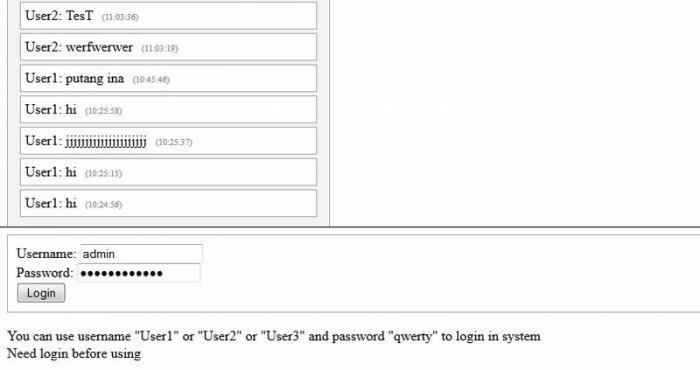
Today I will tell you about creating simple Chat application using our existing login system. This will be useful and most simple solution. We will able to chat with our logged members. We will use database to store messages.
Here is a sample and package:
Live Demo
[sociallocker]
download in package
[/sociallocker]
Now please download the example files and lets start coding!
Step 1. HTML
As usual, we start with the HTML.
This main chat window.
index.html
<frameset rows="65%,35%" framespacing="1" frameborder="yes" border="1" bordercolor="#FF0000">
    <frame src="messages.php" name="main_frame">
    <frame src="main.php" name="login_frame" scrolling="no" noresize target="middle">
</frameset>
This is login form code.
login_form.html
<link type="text/css" rel="stylesheet" href="styles.css" />
<form class="login_form" method="post" action="main.php">
 <div>Username: <input type="text" name="username" /></div>
 <div>Password: <input type="password" name="password" /></div>
 <div><input type="submit" value="Login" name="Login" /></div>
</form>
<div>You can use username "User1" or "User2" or "User3" and password "qwerty" to login in system</div>
Here are new 3 template files to chat (2 to messages box and 1 to send message form):
chat_begin.html
<link type="text/css" rel="stylesheet" href="styles.css" />
<div class="chat_main">
 <h3>Chat</h3>
chat_end.html
</div>
chat_input.html
<link type="text/css" rel="stylesheet" href="styles.css" />
<form class="submit_form" method="post" action="main.php">
 <div><input type="text" name="s_message" /><input type="submit" value="Say" name="s_say" /></div>
</form>
<div>You can type anything in chat</div>
Step 2. CSS
Here are used CSS styles.
styles.css
.login_form {
 border: 1px solid #AAA;
 padding:10px;
}
h3 {margin-top:3px;}
.chat_main {
 border:1px solid #AAA;
 -moz-box-shadow:0 0 10px #ccc;
 -webkit-box-shadow: 0 0 10px #ccc;
 width:350px;
 padding:10px;
 background:#f3f3f3;
}
.message {
 border:1px solid #AAA;
 margin:4px;
 padding:5px;
 -moz-border-radius:7px;
 -webkit-border-radius:7px;
 background:#ffffff;
}
.textf {
-moz-box-shadow:0 0 10px #CCCCCC;
-webkit-box-shadow:0 0 10px #CCCCCC;
border:1px solid #CCCCCC;
height:40px;
}
.submit {
-moz-border-radius:7px;
-webkit-border-radius:7px;
background:#F3F3F3;
border:1px solid #CCCCCC;
font-size:16px;
font-weight:bold;
height:35px;
margin-left:10px;
padding:5px;
}
.message span {
 font-size:10px;
 color:#888;
 margin-left:10px;
}
.submit_form {
 margin:10px 0px;
}
Step 3. SQL
We will need to execute next SQL in our database.
CREATE TABLE `s_chat_messages` (
`id` INT(11) NOT NULL AUTO_INCREMENT ,
`user` VARCHAR(255) NOT NULL ,
`message` VARCHAR(255) NOT NULL ,
`when` INT(11) NOT NULL ,
PRIMARY KEY (`id`)
) ENGINE=MyISAM DEFAULT CHARSET=utf8;
Step 4. PHP
As you remember – we already had ready easy authentication system. I moved it to external library file (inc/login.inc.php). This will useful for us – now code more structured and it comfortable to use in different places of code.
After I created new library to work with chat (inc/chat.inc.php). This class have next functions:
acceptMessages – function accepts sent messages and saves them in database table
getMessages – returns list of recent 15 messages
Then I created two php files: messages.php and main.php. First file generates list of recent messages. It refreshes the list each 5 seconds (it is enough to our chat). Second file generates a login form and one text input field for the chat. After we login, we can use this field to post messages in the chat.
Ok, here are all used PHP files:
main.php
<?php
// set error reporting level
if (version_compare(phpversion(), "5.3.0", ">=") == 1)
 error_reporting(E_ALL & ~E_NOTICE & ~E_DEPRECATED);
else
 error_reporting(E_ALL & ~E_NOTICE);
require_once('inc/login.inc.php');
require_once('inc/chat.inc.php');
// initialization of login system and generation code
$oSimpleLoginSystem = new SimpleLoginSystem();
$oSimpleChat = new SimpleChat();
// draw login box
echo $oSimpleLoginSystem->getLoginBox();
// draw chat application
$sChatResult = 'Need login before using';
if ($_COOKIE['member_name'] && $_COOKIE['member_pass']) {
 if ($oSimpleLoginSystem->check_login($_COOKIE['member_name'], $_COOKIE['member_pass'])) {
 $sChatResult = $oSimpleChat->acceptMessages();
 }
}
echo $sChatResult;
?>
messages.php
<meta http-equiv="refresh" content="5">
<?php
require_once('inc/chat.inc.php');
$oSimpleChat = new SimpleChat();
echo $oSimpleChat->getMessages();
?>
inc/chat.inc.php
<?php
// simple chat class
class SimpleChat {
    // DB variables
    var $sDbName;
    var $sDbUser;
    var $sDbPass;
    // constructor
    function SimpleChat() {
        //mysql_connect("localhost","username","password");
        $this->sDbName = 'database_name';
        $this->sDbUser = 'username';
        $this->sDbPass = 'password';
    }
    // adding to DB table posted message
    function acceptMessages() {
        if ($_COOKIE['member_name']) {
            if(isset($_POST['s_say']) && $_POST['s_message']) {
                $sUsername = $_COOKIE['member_name'];
                //the host, name, and password for your mysql
                $vLink = mysql_connect("localhost", $this->sDbUser, $this->sDbPass);
                //select the database
                mysql_select_db($this->sDbName);
                $sMessage = mysql_real_escape_string($_POST['s_message']);
                if ($sMessage != '') {
                    mysql_query("INSERT INTO `s_chat_messages` SET `user`='{$sUsername}', `message`='{$sMessage}', `when`=UNIX_TIMESTAMP()");
                }
                mysql_close($vLink);
            }
        }
        ob_start();
        require_once('chat_input.html');
        $sShoutboxForm = ob_get_clean();
        return $sShoutboxForm;
    }
    function getMessages() {
        $vLink = mysql_connect("localhost", $this->sDbUser, $this->sDbPass);
        //select the database
        mysql_select_db($this->sDbName);
        //returning the last 15 messages
        $vRes = mysql_query("SELECT * FROM `s_chat_messages` ORDER BY `id` ASC LIMIT 15");
        $sMessages = '';
        // collecting list of messages
        if ($vRes) {
            while($aMessages = mysql_fetch_array($vRes)) {
                $sWhen = date("H:i:s", $aMessages['when']);
                $sMessages .= '<div class="message">' . $aMessages['user'] . ': ' . $aMessages['message'] . '<span>(' . $sWhen . ')</span></div>';
            }
        } else {
            $sMessages = 'DB error, create SQL table before';
        }
        mysql_close($vLink);
        ob_start();
        require_once('chat_begin.html');
        echo $sMessages;
        require_once('chat_end.html');
        return ob_get_clean();
    }
}
?>
inc/login.inc.php
<?
// class SimpleLoginSystem
class SimpleLoginSystem {
    // variables
    var $aExistedMembers; // Existed members array
    // constructor
    function SimpleLoginSystem() {
        $this->aExistedMembers = array(
            'User1' => 'd8578edf8458ce06fbc5bb76a58c5ca4',
            'User2' => 'd8578edf8458ce06fbc5bb76a58c5ca4',
            'User3' => 'd8578edf8458ce06fbc5bb76a58c5ca4'
        );
    }
    function getLoginBox() {
        ob_start();
        require_once('login_form.html');
        $sLoginForm = ob_get_clean();
        $sLogoutForm = '<a href="'.$_SERVER['PHP_SELF'].'?logout=1">logout</a>';
        if ((int)$_REQUEST['logout'] == 1) {
            if (isset($_COOKIE['member_name']) && isset($_COOKIE['member_pass']))
                $this->simple_logout();
        }
        if ($_REQUEST['username'] && $_REQUEST['password']) {
            if ($this->check_login($_REQUEST['username'], MD5($_REQUEST['password']))) {
                $this->simple_login($_REQUEST['username'], $_REQUEST['password']);
                return 'Hello ' . $_REQUEST['username'] . '! ' . $sLogoutForm;
            } else {
                return 'Username or Password is incorrect' . $sLoginForm;
            }
        } else {
            if ($_COOKIE['member_name'] && $_COOKIE['member_pass']) {
                if ($this->check_login($_COOKIE['member_name'], $_COOKIE['member_pass'])) {
                    return 'Hello ' . $_COOKIE['member_name'] . '! ' . $sLogoutForm;
                }
            }
            return $sLoginForm;
        }
    }
    function simple_login($sName, $sPass) {
        $this->simple_logout();
        $sMd5Password = MD5($sPass);
        $iCookieTime = time() + 24*60*60*30;
        setcookie("member_name", $sName, $iCookieTime, '/');
        $_COOKIE['member_name'] = $sName;
        setcookie("member_pass", $sMd5Password, $iCookieTime, '/');
        $_COOKIE['member_pass'] = $sMd5Password;
    }
    function simple_logout() {
        setcookie('member_name', '', time() - 96 * 3600, '/');
        setcookie('member_pass', '', time() - 96 * 3600, '/');
        unset($_COOKIE['member_name']);
        unset($_COOKIE['member_pass']);
    }
    function check_login($sName, $sPass) {
        return ($this->aExistedMembers[$sName] == $sPass);
    }
}
?>
Conclusion
I described how to make easy chat application based on PHP and MySQL. You can use this material to create own scripts into your startups. Good luck!





what of having a moderator to chatting with logged user
Hi moses,
In this case you have to create own necessary functional to moderate messages (maybe using some special member with extra possibilities)
Do you know how I could add the following features:
*Registration
*Make your own chat box
*Ranking system
*Private messages
*Avatars
*Profiles
*Banning system
Thanks for your comment Darren,
I will try to organize my time and start new thread of articles regarding creating powerful chat system
hi. thanks for this. can i ask something? what code make you chat refresh every second. it is needed to show the new messages from other people and i would like to know how.. Thanks in advance..
2 bert-coder,
Yes, in That chat application – we have to refresh chat.
please point to next:
<meta http-equiv="refresh" content="5">
By the way – you can focus your attention to new series of articles where we are making nice ajax chat.
oh thx.. havent seen that in message.php file. lol
Sure i will check that new article thx..
hi again another question coz im new to this one.. what is the use of ob_start and flush?? right now i just modified the chat by adding who’s online and making the user fetch from database and putting them into session. thanks alot for this one ..
Honestly, this is no necessary to use ob_start here, yes. As example, we can use also ‘file_get_contents’ function too. This is the one of my oldest articles, where I had used ‘ob_start’.
Hi admin,
I’m getting the error messages below. Can you tell me how to setup mysql-server. Step 3. SQL is not clear to me. Any help is greatly appreciated.
Thanks,
jeff
=================================================
Warning: mysql_connect() [function.mysql-connect]: Access denied for user ‘username’@’localhost’ (using password: YES) in C:\Domains\estechs.com\estechs.com\wwwroot\inc\chat.inc.php on line 48
Warning: mysql_select_db() [function.mysql-select-db]: Access denied for user ‘ODBC’@’localhost’ (using password: NO) in C:\Domains\estechs.com\estechs.com\wwwroot\inc\chat.inc.php on line 51
Warning: mysql_select_db() [function.mysql-select-db]: A link to the server could not be established in C:\Domains\estechs.com\estechs.com\wwwroot\inc\chat.inc.php on line 51
Warning: mysql_query() [function.mysql-query]: Access denied for user ‘ODBC’@’localhost’ (using password: NO) in C:\Domains\estechs.com\estechs.com\wwwroot\inc\chat.inc.php on line 54
Warning: mysql_query() [function.mysql-query]: A link to the server could not be established in C:\Domains\estechs.com\estechs.com\wwwroot\inc\chat.inc.php on line 54
Warning: mysql_close(): supplied argument is not a valid MySQL-Link resource in C:\Domains\estechs.com\estechs.com\wwwroot\inc\chat.inc.php on line 68
Chat
DB error, create SQL table before
=================================================
Hi Jeff,
As I see – you are working at localhost. So I can advise you to check your sql database (and check – if any db used linked to this database, possible that no). Also I can advise you to use WAMP software (as best software for local simulation Apache+MySQL+PHP for windows).
can we change the code to accept the other user name like “john,rock” and password ?????????
Hi alok0077,
Yes, of course we can, in this case you have to expand array with members: $this->aExistedMembers
And, you always welcome to read our recent Chat-related tutorials where we develop our own modern chat software.
i m using wamp server as my localhost.. but still cannot run.. the error displayed is “The requested URL /LiveChat/’.$_SERVER[‘PHP_SELF’].'” was not found on this server.”…..wht i hv done r changed the name of
$this->sDbName = ‘database_name’;
$this->sDbUser = ‘root’;
$this->sDbPass = ”;
Hi Manish,
Basically, you had to unpack our package to your localhost somewhere, as example at:
c:/wamp/www/my_chat/
Then, add one SQL table from step 3 into new database or into any of your existed databased,
after, configure inc/chat.inc.php, where you have to set variables for your database (database name, username and password).
Hi admin. I am a new web dev going into my senior year, and am trying to make a small chat room for my private school. I used the documents from the sample and am working on all necessary corrections, but I am in need of more knowledge in terms of how i can create:
1. User privilege settings (i.e. admin, mod, user)
2. A ranking system
3. Private messages
4. Avatars
5. Profiles
6. Banning system
7. Registration
8. How to log an ip address into a system so that only the allowed ip addresses could access the website.
Hi Zack,
Welcome to: https://www.script-tutorials.com/powerful-chat-system-lesson-4/
Hi this code is not running
it gives error
error is SimpleLoginSystem give error at line 13 in main.php ifle
file code is this
=”) == 1)
error_reporting(E_ALL & ~E_NOTICE & ~E_DEPRECATED);
else
error_reporting(E_ALL & ~E_NOTICE);
require_once(‘inc/login.inc.php’);
require_once(‘inc/chat.inc.php’);
// initialization of login system and generation code
$oSimpleLoginSystem = new SimpleLoginSystem();
$oSimpleChat = new SimpleChat();
// draw login box
echo $oSimpleLoginSystem->getLoginBox();
// draw chat application
$sChatResult = ‘Need login before using’;
if ($_COOKIE[‘member_name’] && $_COOKIE[‘member_pass’]) {
if ($oSimpleLoginSystem->check_login($_COOKIE[‘member_name’], $_COOKIE[‘member_pass’])) {
$sChatResult = $oSimpleChat->acceptMessages();
}
}
echo $sChatResult;
?>
Hi Patel,
But, which exactly error? PHP syntax error or what?
Try to set binary mode (FTP transfer mode) during upload files to unix server (if you use unix- based host).
i have a table. how do i connect this source code into my table. my table have username and password. please help me
Hi Black,
I would recommend you to start reading our recent tutorials about creating better chat software rather than this old one. All because current one doesn’t support keeping members in database at all.
Hello SIr,
Your coding is very useful but your text content exceeded from out of the textarea,How to avoid this,Please reply to my mail id sir.
Thanks®ards,
Vinoth
Thank you Vinoth,
But where exactly?
Do you mean long strings in the code? (which are separated to few lines sometimes)
Thank you! It works. But, can I bring it as a pop out for chat? like the one in Facebook, GMail etc.
Hello Arjun,
Yes, you can of course, but it means that you have to play with codes a little
Chat
DB error, create SQL table before
i create sql but i still have this problem
i cant write anything on chat
Hi CZKA,
Make sure that you placed your database credentials into the script
i have one doubt…..i need chat app coding in php ….no need group chat…..if i chat 2nd person dnt c the 3rd person
Hi Reka,
If you don’t need ‘group chat’, you always can read the series of our PowerfulChatSystem tutorials
dear admin,
I used this. it is working untill loging page..but i cant log in using user names given….pls help me…and how i put user names which i want.
thanks
Hello Sumee,
Please pay attention to array $aExistedMembers in inc/login.inc.php, it contains a set of possible members. At the left you can see usernames, at the right (values) – MD5 hashes of your actual passwords.
this is working..but cannot log..given usernames ar not working…..pls help.how i can use uernames which i want…
Hi,
I’m getting an error while running the code…
Fatal error: Class ‘SimpleLoginSystem’ not found in E:\files\wamp\www\Chat\main.php on line 13
The line 13 is $oSimpleLoginSystem = new SimpleLoginSystem();
I put the file “login.inc.php” in the folder named “inc”…
Regards
Sumesh
Hello Sumesh,
Please keep the same source codes as in our package (in the same structure of folders). You should have 2 files in ‘inc’ folder: login.inc.php and chat.inc.php
hello
i am unable to run this code .
because it having some problem like chat box not shows the msg on the screen and i am unable to reset the cookies..
please help me….
Hi milli,
For the first – check your DB connection details in inc/chat.inc.php file, And make sure that you run our code at localhost (or at remote host)
Your ideea is ingenious but is a mechanism problem: if I write a message longer than 5 sec my page is refreshing and I have to focus again on form. So is not very functionally with http.
Hi catmanol,
Yes, I know. In this case – try to play with more modern chats (which are presented at our blog)
Hey admin,
I am new to this chat thing. Can you help me from where to start. ??
I will highly appreciate your help. Thanks in advance.
Hi Rushit,
Firstly – prepare your local environment (in case if you want to play with it at your own local computer), download our source package, and unpack it at your localhost.
hii admin, my name is maddy0101 and i want to try bulid a chat application and i follow your giving code and its not runing. i have some problem like when i want to run folder of application when i put all the files and .inc folder but its not displayed any thing and when i run the main.php file its giving error like:-
Warning: require_once(inc-login.inc.php) [function.require-once]: failed to open stream: No such file or directory in C:\wamp\www\Chat\main.php on line 9
and so many more plz give me a proper response and code so that i can create this application. Please give me reply as soon as posible. and if posible please send your response at my email . i have download your pakage but its not runing . and i want to ask to that you have mention database_name,user_name, can i use another database name like ”xyx”.
Regards:-
Maddy0101
Hello Manish,
Yes, You very correctly observed – first of all you need to put your own details for your database (it is in ‘inc/chat.inc.php file). Of course, you don’t need to use predefined values – you have to use your own.
As for paths – make sure that ‘inc’ folder is in your ‘chat’ folder (with exactly the same structure as in our package)
You should use an ajax refresh of the messages. If you use meta name=”refresh” the user always sees the page loading
It’s much smoother with ajax
Thank you Bakeca for your remark, yes, I know, AJAX is much better, but current chat is not AJAX-based chat. I already made few more chats (AJAX) – just search for it
Hey i need a little help…
i have done all of it and it workes fine, but i have the following 2 problems:
1: The messages is posted UNDER the other messages instead of OVER the other messages.
2: When it hits the max ammount of messages, new messages will not be shown… (i think it is because of my first problem)
please help…. For a demonstration, visit ….
Hello SnowPatch,
If you like to display the latest messages in the bottom (reverse), you have to change function getMessages (chat.inc.php), try to use PHP array sorting functions to change position of elements.
Hi,
Brilliant idea. I have tried to get the code to work, and it almost works expcept for one thing:
I can’t display any of the messages i write in the application. The things i write appear in the database, when i check that manually, but it will not display on the website. Any ideas?
PS: There is also no error messages.
Thank you in advance.
Hello Stian,
Yes, really interesting. I think that you have debug inc/chat.inc.php::getMessages function.
And, you can also just open ‘messages.php’ in your browser. this file should echo all messages using this getMessages function.
Hi Admin!
( I’m very new to web development.) the thing I did was, extracted all files of the package into C:\xampp\htdocs and run http://localhost/index.html on Firefox. It says an error like this,
Warning: mysql_connect() [function.mysql-connect]: Access denied for user ‘username’@’localhost’ (using password: YES) in C:\xampp\htdocs\inc\chat.inc.php on line 48
Warning: mysql_close() expects parameter 1 to be resource, boolean given in C:\xampp\htdocs\inc\chat.inc.php on line 68
Chat
DB error, create SQL table before
Please explain me the error and how to solve it.
Thanks,
Hi Mark,
Please make sure that you need to point proper DB params in inc/chat.inc.php file (in Constructor)
how must you use the .sql code.
Hi Bram,
You need to execute this SQL code in your database (see phpMyAdmin)
Can this be made to work in WordPress with a pre existing sql an maybe support avatars and smileys
Yes, sure, you always can enhance current result (iframe-based chat) and add support of avatars and smiles. But, frankly speaking, iframe-based coding is not so useful.
hie admin..when ever i refresh my page..the same message is again inseritng into database..how can i avoid this
Hi tabrez,
When you refresh your page, you shouldn’t re-post. Just click ‘cancel’ button if you get similar confirmation box.
Hi admin,
I first logged in using User1/qwerty, and this appears on all the time. I tried to type something else, and hit “say”, but see nothing updated. Even logged in with User2/qwerty, and typed hello then “say’ button, but nothing happened (nothing updated!).
What is wrong?
Hi Michael,
After you send a message, you have to wait a bit until your message appear in the section above (it can take 1-2 seconds)