
How to Easily Make Chat application with PHP + SQL
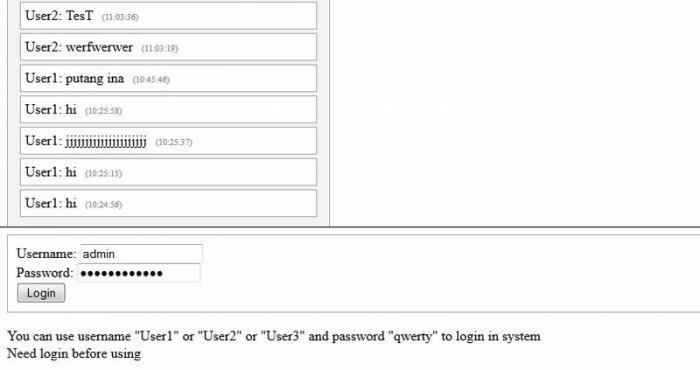
Today I will tell you about creating simple Chat application using our existing login system. This will be useful and most simple solution. We will able to chat with our logged members. We will use database to store messages.
Here is a sample and package:
Live Demo
[sociallocker]
download in package
[/sociallocker]
Now please download the example files and lets start coding!
Step 1. HTML
As usual, we start with the HTML.
This main chat window.
index.html
<frameset rows="65%,35%" framespacing="1" frameborder="yes" border="1" bordercolor="#FF0000">
    <frame src="messages.php" name="main_frame">
    <frame src="main.php" name="login_frame" scrolling="no" noresize target="middle">
</frameset>
This is login form code.
login_form.html
<link type="text/css" rel="stylesheet" href="styles.css" />
<form class="login_form" method="post" action="main.php">
 <div>Username: <input type="text" name="username" /></div>
 <div>Password: <input type="password" name="password" /></div>
 <div><input type="submit" value="Login" name="Login" /></div>
</form>
<div>You can use username "User1" or "User2" or "User3" and password "qwerty" to login in system</div>
Here are new 3 template files to chat (2 to messages box and 1 to send message form):
chat_begin.html
<link type="text/css" rel="stylesheet" href="styles.css" />
<div class="chat_main">
 <h3>Chat</h3>
chat_end.html
</div>
chat_input.html
<link type="text/css" rel="stylesheet" href="styles.css" />
<form class="submit_form" method="post" action="main.php">
 <div><input type="text" name="s_message" /><input type="submit" value="Say" name="s_say" /></div>
</form>
<div>You can type anything in chat</div>
Step 2. CSS
Here are used CSS styles.
styles.css
.login_form {
 border: 1px solid #AAA;
 padding:10px;
}
h3 {margin-top:3px;}
.chat_main {
 border:1px solid #AAA;
 -moz-box-shadow:0 0 10px #ccc;
 -webkit-box-shadow: 0 0 10px #ccc;
 width:350px;
 padding:10px;
 background:#f3f3f3;
}
.message {
 border:1px solid #AAA;
 margin:4px;
 padding:5px;
 -moz-border-radius:7px;
 -webkit-border-radius:7px;
 background:#ffffff;
}
.textf {
-moz-box-shadow:0 0 10px #CCCCCC;
-webkit-box-shadow:0 0 10px #CCCCCC;
border:1px solid #CCCCCC;
height:40px;
}
.submit {
-moz-border-radius:7px;
-webkit-border-radius:7px;
background:#F3F3F3;
border:1px solid #CCCCCC;
font-size:16px;
font-weight:bold;
height:35px;
margin-left:10px;
padding:5px;
}
.message span {
 font-size:10px;
 color:#888;
 margin-left:10px;
}
.submit_form {
 margin:10px 0px;
}
Step 3. SQL
We will need to execute next SQL in our database.
CREATE TABLE `s_chat_messages` (
`id` INT(11) NOT NULL AUTO_INCREMENT ,
`user` VARCHAR(255) NOT NULL ,
`message` VARCHAR(255) NOT NULL ,
`when` INT(11) NOT NULL ,
PRIMARY KEY (`id`)
) ENGINE=MyISAM DEFAULT CHARSET=utf8;
Step 4. PHP
As you remember – we already had ready easy authentication system. I moved it to external library file (inc/login.inc.php). This will useful for us – now code more structured and it comfortable to use in different places of code.
After I created new library to work with chat (inc/chat.inc.php). This class have next functions:
acceptMessages – function accepts sent messages and saves them in database table
getMessages – returns list of recent 15 messages
Then I created two php files: messages.php and main.php. First file generates list of recent messages. It refreshes the list each 5 seconds (it is enough to our chat). Second file generates a login form and one text input field for the chat. After we login, we can use this field to post messages in the chat.
Ok, here are all used PHP files:
main.php
<?php
// set error reporting level
if (version_compare(phpversion(), "5.3.0", ">=") == 1)
 error_reporting(E_ALL & ~E_NOTICE & ~E_DEPRECATED);
else
 error_reporting(E_ALL & ~E_NOTICE);
require_once('inc/login.inc.php');
require_once('inc/chat.inc.php');
// initialization of login system and generation code
$oSimpleLoginSystem = new SimpleLoginSystem();
$oSimpleChat = new SimpleChat();
// draw login box
echo $oSimpleLoginSystem->getLoginBox();
// draw chat application
$sChatResult = 'Need login before using';
if ($_COOKIE['member_name'] && $_COOKIE['member_pass']) {
 if ($oSimpleLoginSystem->check_login($_COOKIE['member_name'], $_COOKIE['member_pass'])) {
 $sChatResult = $oSimpleChat->acceptMessages();
 }
}
echo $sChatResult;
?>
messages.php
<meta http-equiv="refresh" content="5">
<?php
require_once('inc/chat.inc.php');
$oSimpleChat = new SimpleChat();
echo $oSimpleChat->getMessages();
?>
inc/chat.inc.php
<?php
// simple chat class
class SimpleChat {
    // DB variables
    var $sDbName;
    var $sDbUser;
    var $sDbPass;
    // constructor
    function SimpleChat() {
        //mysql_connect("localhost","username","password");
        $this->sDbName = 'database_name';
        $this->sDbUser = 'username';
        $this->sDbPass = 'password';
    }
    // adding to DB table posted message
    function acceptMessages() {
        if ($_COOKIE['member_name']) {
            if(isset($_POST['s_say']) && $_POST['s_message']) {
                $sUsername = $_COOKIE['member_name'];
                //the host, name, and password for your mysql
                $vLink = mysql_connect("localhost", $this->sDbUser, $this->sDbPass);
                //select the database
                mysql_select_db($this->sDbName);
                $sMessage = mysql_real_escape_string($_POST['s_message']);
                if ($sMessage != '') {
                    mysql_query("INSERT INTO `s_chat_messages` SET `user`='{$sUsername}', `message`='{$sMessage}', `when`=UNIX_TIMESTAMP()");
                }
                mysql_close($vLink);
            }
        }
        ob_start();
        require_once('chat_input.html');
        $sShoutboxForm = ob_get_clean();
        return $sShoutboxForm;
    }
    function getMessages() {
        $vLink = mysql_connect("localhost", $this->sDbUser, $this->sDbPass);
        //select the database
        mysql_select_db($this->sDbName);
        //returning the last 15 messages
        $vRes = mysql_query("SELECT * FROM `s_chat_messages` ORDER BY `id` ASC LIMIT 15");
        $sMessages = '';
        // collecting list of messages
        if ($vRes) {
            while($aMessages = mysql_fetch_array($vRes)) {
                $sWhen = date("H:i:s", $aMessages['when']);
                $sMessages .= '<div class="message">' . $aMessages['user'] . ': ' . $aMessages['message'] . '<span>(' . $sWhen . ')</span></div>';
            }
        } else {
            $sMessages = 'DB error, create SQL table before';
        }
        mysql_close($vLink);
        ob_start();
        require_once('chat_begin.html');
        echo $sMessages;
        require_once('chat_end.html');
        return ob_get_clean();
    }
}
?>
inc/login.inc.php
<?
// class SimpleLoginSystem
class SimpleLoginSystem {
    // variables
    var $aExistedMembers; // Existed members array
    // constructor
    function SimpleLoginSystem() {
        $this->aExistedMembers = array(
            'User1' => 'd8578edf8458ce06fbc5bb76a58c5ca4',
            'User2' => 'd8578edf8458ce06fbc5bb76a58c5ca4',
            'User3' => 'd8578edf8458ce06fbc5bb76a58c5ca4'
        );
    }
    function getLoginBox() {
        ob_start();
        require_once('login_form.html');
        $sLoginForm = ob_get_clean();
        $sLogoutForm = '<a href="'.$_SERVER['PHP_SELF'].'?logout=1">logout</a>';
        if ((int)$_REQUEST['logout'] == 1) {
            if (isset($_COOKIE['member_name']) && isset($_COOKIE['member_pass']))
                $this->simple_logout();
        }
        if ($_REQUEST['username'] && $_REQUEST['password']) {
            if ($this->check_login($_REQUEST['username'], MD5($_REQUEST['password']))) {
                $this->simple_login($_REQUEST['username'], $_REQUEST['password']);
                return 'Hello ' . $_REQUEST['username'] . '! ' . $sLogoutForm;
            } else {
                return 'Username or Password is incorrect' . $sLoginForm;
            }
        } else {
            if ($_COOKIE['member_name'] && $_COOKIE['member_pass']) {
                if ($this->check_login($_COOKIE['member_name'], $_COOKIE['member_pass'])) {
                    return 'Hello ' . $_COOKIE['member_name'] . '! ' . $sLogoutForm;
                }
            }
            return $sLoginForm;
        }
    }
    function simple_login($sName, $sPass) {
        $this->simple_logout();
        $sMd5Password = MD5($sPass);
        $iCookieTime = time() + 24*60*60*30;
        setcookie("member_name", $sName, $iCookieTime, '/');
        $_COOKIE['member_name'] = $sName;
        setcookie("member_pass", $sMd5Password, $iCookieTime, '/');
        $_COOKIE['member_pass'] = $sMd5Password;
    }
    function simple_logout() {
        setcookie('member_name', '', time() - 96 * 3600, '/');
        setcookie('member_pass', '', time() - 96 * 3600, '/');
        unset($_COOKIE['member_name']);
        unset($_COOKIE['member_pass']);
    }
    function check_login($sName, $sPass) {
        return ($this->aExistedMembers[$sName] == $sPass);
    }
}
?>
Conclusion
I described how to make easy chat application based on PHP and MySQL. You can use this material to create own scripts into your startups. Good luck!





Hi, i want to add more user using database. And i have been also changed the password of SimpleLoginSystem function.
But i log in it does not except new password.
Hello Feroz,
Yes, of course, it is always possible to enhance it and move members into database, but, you can also read our another articles where it is already implemented.
and, don’t forget that all passwords are in MD5
hi admin.. can i ask a code for admin and user? i’m just new to PHP code and i need some help.. thank you.. :)
Hi Ian,
We didn’t prepare anything for admin (in this chat). Pay your attention to another chat (with this function)
Sorry for mistake. Actually i want to say , when i logged in it always say password incorrect.
Use md5 encrypted password and add the password into database
Hi Sagar,
Yes, this is always possible to use database to store information about members.
Fatal error: Class ‘SimpleLoginSystem’ not found in C:\xampp\htdocs\chat\main.php on line 14.
how do i solve this error?i hv unpscked all the files
Hi steffi,
Make sure that you unpacked all the files into your folder (this class is already here: inc/login.inc.php)
check the inc/login.inc.php file where php starting tag is <? then it replace by <?php
Hello Kavish,
Thank you for your remark, yes, this is true that it starts with <?
If this file doesn’t open for you, you can just enable the ‘short open tags’ in your PHP settings
here is good but i wann your members
hello
I am using wordpress well i use these codes and how to use these code’s please tell me.
Hello Niranjan,
You can use it as is, or you can try to wrap it as a new plugin for WP
Hello Admin,
am getting an error lyk dis…..
Fatal error: Class ‘SimpleLoginSystem’ not found in C:\wamp\www\dms\source\main.php on line 17
hw cn i resolve it??
Hi Vivek,
Make sure that C:\wamp\www\dms\source\inc\login.inc.php is in place
Hi, I think there is a problem with login.inc.php, I get the code from the array to the end of the file instead of the actual form followed by “Fatal error: Class ‘SimpleLoginSystem’ not found in C:\xampp\htdocs\chat\main.php”. At first I modified the project in my own way, but when I downloaded the package I still get the error.
tnx
Hi martin
This file can be ‘invisible’ in case of ‘short_open_tag’ option is off, try to check if it ON in PHP settings.
Otherwise, change <? to <?php in all PHP files
also, you can remove ?> in the end of this file
DB error, create SQL table before
This error comes up in the chat window…
Please refer to step 3, it seems that you forgot to do this step. It is supposed that you have to prepare a new db table in your database.
hi,
i need your help actually i am making a chat client for my final year project with the help of your project. i also add a signup form and it is working but when i try to log in it shows that username or password is incirrect. in your inc/login.inc.php file you have sat some predefine user User1 , User2 and User3 and their password so can you plz help me to implement to that file i want that it should verify password and user name from db and if user is present , it should login. can you please make those changes in your inc/login.inc.php according to my requirements plz only 2 days are left for submitting my project.
i am waiting for your reply
Hi napendra,
Firstly, we already published a tutorial where there are two db tables (with members and with messages), you can refer to our ‘Powerful Chat’. Anyway, if you’d like to implement a similar system with the current Easy PHP chat, you should:
1) prepare a db table to keep your members. You can make a copy of our `cs_profiles` table (or similar) from the first lesson about Powerful chat.
2) php stuff: actually, you can copy the content of ‘checkLogin’ function (again – from the first lesson about Powerful chat). It performs the same functionality
PS: don’t forget to change all using of $GLOBALS[‘MySQL’] in this function (this class is not exists in the current Simple Chat tutorial)
well, i need a chat box, which can have number of tabs opened, and can chat with only one in a tab. this chat is so crowded and there is no sink in chat at all
Hi Bala,
In this case you can look our other tutorials (as example: powerful chat)
Andrew,
May i know if i can modify the php to support two different users login to the same index.html at the same time?
Now the php cannot support this feature.
Thanks,
victor
Hello Victor,
It is always available (just use two different computers)
Hello Admin,
nice tut, but can you please tell me how can i make a privaye chat like in fb and gmail…and add more members like the way,you sign-up and see online members and chat with one of them? how can i do that? please any resourcess or any stuff for acheieving that would be great.
Thanks
Hi Dru,
Please follow our another tutorial ‘Powerful Chat System’
I downloaded the package from this site and I unzipped it ,but I received the following errors :
1. Warning: mysql_connect(): Access denied for user ‘username’@’localhost’ (using password: YES) in D:\xampp\htdocs\source\inc\chat.inc.php on line 48 ==> this is the line of error : ” $vLink = mysql_connect(“localhost”, $this->sDbUser, $this->sDbPass); ”
2. Warning: mysql_close() expects parameter 1 to be resource, boolean given in D:\xampp\htdocs\source\inc\chat.inc.php on line 68 ==> this is the line of erro r” mysql_close($vLink); ”
3. Fatal error: Class ‘SimpleLoginSystem’ not found in D:\xampp\htdocs\source\main.php on line 17
==> this is the line of error : ” $oSimpleLoginSystem = new SimpleLoginSystem(); ”
How I resolve it ?
Thanks
Hi Nikmo,
1 and 2) Make sure that you used your proper database details in inc\chat.inc.php (lines 45-47)
3) Try to remove all ?> in the end of all PHP files
hi Admin
I really need your help ..when i publish the database on a server it tells (Chat
DB error, create SQL table before) …i did every thing changed localhost to my server name and same to database username and password…. to be specific i publish this code throught free server from 000webhost.com to try to publish mysql database on a server not localhost to learn more :).
..thank you in advance
Hello Mohamed,
Yes, before you use this chat, you will need to prepare a new database and create the `s_chat_messages` table in it, after, don’t forget to adjust DB settings in the chat.inc.php
Wonderful tutorial. Well, I am new to programing everything look difficult to me. But, I love to write for mobile devices like phones etc.
sir can you give me how to connect video chat feature with out skype and any other thierd party application directly to my website can you give me suggestion please as early as possible response highly admirable …
thanks in advanced
Hello,
There are two opportunities: to use flash to capture the video, or you can use html5
hi,
i need your help actually i am making a chat
but this error in the chat
Fatal error: Class ‘SimpleLoginSystem’ not found in C:\wamp\www\23-8\main.php on line
Try to remove all ?> in the end of all PHP files, and also make sure that there is ‘inc\chat.inc.php’ file
It’s very nice tutorial for learning to build chat system using php & mysql. I want to add smileys in it. Please guide me how can I do ??? or would you please make another advance version tutorial of it by adding more features like smileys in it & share with us.
Hello Asif,
Thank you for your idea. It may be done as an additional code to replace smile codes to icons (using regular expressions)
Fatal Error: Class ‘SimpleLoginSystem’ not found in C:\wamp\www\source\main.php on line 17 Solution Please!
Please enable the ‘short open tags’ in your PHP settings
Hi, just newbie. I copied the codes and execute it using localhost. This appeared below the page:
aExistedMembers = array( ‘User1’ => ‘d8578edf8458ce06fbc5bb76a58c5ca4’, ‘User2’ => ‘d8578edf8458ce06fbc5bb76a58c5ca4’, ‘User3’ => ‘d8578edf8458ce06fbc5bb76a58c5ca4’ ); } function getLoginBox() { ob_start(); require_once(‘login_form.html’); $sLoginForm = ob_get_clean(); $sLogoutForm = ‘logout’; if ((int)$_REQUEST[‘logout’] == 1) { if (isset($_COOKIE[‘member_name’]) && isset($_COOKIE[‘member_pass’])) $this->simple_logout(); } if ($_REQUEST[‘username’] && $_REQUEST[‘password’]) { if ($this->check_login($_REQUEST[‘username’], MD5($_REQUEST[‘password’]))) { $this->simple_login($_REQUEST[‘username’], $_REQUEST[‘password’]); return ‘Hello ‘ . $_REQUEST[‘username’] . ‘! ‘ . $sLogoutForm; } else { return ‘Username or Password is incorrect’ . $sLoginForm; } } else { if ($_COOKIE[‘member_name’] && $_COOKIE[‘member_pass’]) { if ($this->check_login($_COOKIE[‘member_name’], $_COOKIE[‘member_pass’])) { return ‘Hello ‘ . $_COOKIE[‘member_name’] . ‘! ‘ . $sLogoutForm; } } return $sLoginForm; } } function simple_login($sName, $sPass) { $this->simple_logout(); $sMd5Password = MD5($sPass); $iCookieTime = time() + 24*60*60*30; setcookie(“member_name”, $sName, $iCookieTime, ‘/’); $_COOKIE[‘member_name’] = $sName; setcookie(“member_pass”, $sMd5Password, $iCookieTime, ‘/’); $_COOKIE[‘member_pass’] = $sMd5Password; } function simple_logout() { setcookie(‘member_name’, ”, time() – 96 * 3600, ‘/’); setcookie(‘member_pass’, ”, time() – 96 * 3600, ‘/’); unset($_COOKIE[‘member_name’]); unset($_COOKIE[‘member_pass’]); } function check_login($sName, $sPass) { return ($this->aExistedMembers[$sName] == $sPass); } } ?>
Can you help me correct the error?
Thanks.
Hello Mike,
Make sure that your server processes PHP files as PHP (not as a text). Try to run it on Localhost
can u pliz to write step by step how to used all this coding?? sorry bcoz i cant understand what i need to do..i have tried but it still can’t work..i dont now wheres the coding need to put in phpMyAdmin or dreamweaver
TQ for ur cooperation
~~need ur herlp:(
Hello Daisy,
Basically, our tutorial is already the step-by-step article about creating this chat. All you need is to follow this tutorial, you have to create all the necessary files (in necessary places). Otherwise, you may just download the source package and investigate it.
I dont know where we putting or creating the database or the name of it. I will look to see if I could figure it out in the script can someone help me?
Hi Albert,
You can create the database using phpMyAdmin, and then configure this connection in the following file: inc\chat.inc.php
I am developing a website, I using all of the above, I am curios to why you chose to framesets instead of tables?
Initially, the reason of that post was – to show, how to create the basic chat using iframes.
please am having this error report “Class SimpleLoginSystem cannot be found” please help me out ASAP…..Thanks
Hi Muhammed,
Please make sure that all files are located in their places, the ‘SimpleLoginSystem’ class is defined in ‘inc\login.inc.php’
Warning: require_once(inc/login.inc.php) [function.require-once]: failed to open stream: No such file or directory in C:\wamp\www\m\main.php on line 13
Fatal error: require_once() [function.require]: Failed opening required ‘inc/login.inc.php’ (include_path=’.;C:\php5\pear’) in C:\wamp\www\m\main.php on line 13
please help me….
Hi chichu,
Please make sure that all files and folders are located in the proper order. Pluggable ‘inc/login.inc.php’ file must be in the specified ‘inc’ directory.
Hi Andrey,
Your chat really works well, so thank you for this beautiful tutorial…
I’ve adapted the code… But there is something which might sound really silly to you…
I can’t keep the focus on … Each time on validating the text with ‘Return’ or click, we lose the focus on this input type and I need to click on the text frame to fill text again…
How to solve that to make some continuous stream of conversation for example?
Thanks for you help.
Hello John,
The reason for the loss of focus is that we use different iframes to display the form and messages, and also we do not use AJAX to send messages. You may check our another tutorial where we use ajax.
is it possible to add ajax functionality coz its annoying the page will need to reload.
Hi,
Yes, of course, but not to this tutorial. Ajax is already added to another our chat tutorial.
can I have the link to your other chatbox tutorial?
Check it out: https://www.script-tutorials.com/powerful-chat-system-lesson-9/
I’m a noob in PHP . Don’t know anything about PHP. I’m very eager to know about this PHP script. could you please suggest some free e-books,articles for a newbie ? please , thanks in advance .
Hum, if you know nothing, I suppose that it would be the best for you just to search in google for ‘php’, and then – you should read at least first 10 results. It should give you much information.
Fatal error: Class ‘SimpleLoginSystem’ not found in C:\xampp\htdocs\main.php on line 17
this appeared when i log-in using the username and pass you gave.
what i understand is to run from localhost and all. i get the html parts but the php parts im really unsure. could you enlighten me what should i do. i removed the ?> parts but to no avail also i on the short open tags thingy. what should i do :( all my files are in the correct folder.
i am using xampp so i place my files in xampp/htdocs and i run also from localhost. so i dont know where did i go wrong…. #sadhumanhere
Hi Annn,
When you open it in xamp (or wamp), you need to open the following link: localhost/main.php
Is this a link you opened? Or you tried to open it as ‘C:\xampp\htdocs\main.php’ ?
Andrey,seriously you are rare in so many kinds,thanks you offered to teach us,i am a self taught kid but i need more help,if you can help me with different links to learn more because am getting to understand phpmyadmin and am trying to make a chat app,will appreciate your response….thanks
Hi Shylock,
Do you think that few lessons about phpmyadmin would be useful?
Sir…….i want a chat script for…..customer support….means one(admin) to many(clients) chat…..how to modifiy it?
Hi Ann,
The best would be if you add a registration system for your clients, so they will be able to register and chat with you.