
HTML5 Game Development – Lesson 3
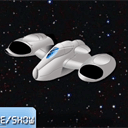
Today we continue a series of articles on game development in HTML5 using canvas. Finally, today we will start adding animation, and few more interesting features. Our demonstration will include a spaceship flying through space, and a new element – the Dialogue. The dialogue will contain two pages, and our button will toggle the dialog pages + hide the dialog on the second click.
Our previous article you can read here: Developing Your First HTML5 Game – Lesson 2. Our base script will taken from previous letter.
Here are our demo and downloadable package:
Live Demo
[sociallocker]
download in package
[/sociallocker]
Ok, download the example files and lets start coding !
Step 1. HTML
Here are all html of my demo
index.html
<!DOCTYPE html>
<html lang="en" >
    <head>
        <meta charset="utf-8" />
        <title>HTML5 Game Development - Lesson 3 | Script Tutorials</title>
        <link href="css/main.css" rel="stylesheet" type="text/css" />
        <!--[if lt IE 9]>
          <script src="http://html5shiv.googlecode.com/svn/trunk/html5.js"></script>
        <![endif]-->
        <script type="text/javascript" src="js/jquery-1.5.2.min.js"></script>
        <script type="text/javascript" src="js/script.js"></script>
    </head>
    <body>
        <div class="container">
            <canvas id="scene" width="800" height="600"></canvas>
        </div>
        <footer>
            <h2>HTML5 Game Development - Lesson 3</h2>
            <a href="https://www.script-tutorials.com/html5-game-development-navigating-your-spaceship-lesson-3" class="stuts">Back to original tutorial on <span>Script Tutorials</span></a>
        </footer>
    </body>
</html>
Step 2. CSS
Here are used CSS styles.
css/main.css
/* general styles */
*{
    margin:0;
    padding:0;
}
@font-face {
    font-family: "DS-Digital";
    src: url("../fonts/Ds-digib.ttf");
}
body {
    background-color:#bababa;
    background-image: -webkit-radial-gradient(600px 300px, circle, #ffffff, #bababa 60%);
    background-image: -moz-radial-gradient(600px 300px, circle, #ffffff, #bababa 60%);
    background-image: -o-radial-gradient(600px 300px, circle, #ffffff, #bababa 60%);
    background-image: radial-gradient(600px 300px, circle, #ffffff, #bababa 60%);
    color:#fff;
    font:14px/1.3 Arial,sans-serif;
    min-height:1000px;
}
.container {
    width:100%;
}
.container > * {
    display:block;
    margin:50px auto;
}
footer {
    background-color:#212121;
    bottom:0;
    box-shadow: 0 -1px 2px #111111;
    display:block;
    height:70px;
    left:0;
    position:fixed;
    width:100%;
    z-index:100;
}
footer h2{
    font-size:22px;
    font-weight:normal;
    left:50%;
    margin-left:-400px;
    padding:22px 0;
    position:absolute;
    width:540px;
}
footer a.stuts,a.stuts:visited{
    border:none;
    text-decoration:none;
    color:#fcfcfc;
    font-size:14px;
    left:50%;
    line-height:31px;
    margin:23px 0 0 110px;
    position:absolute;
    top:0;
}
footer .stuts span {
    font-size:22px;
    font-weight:bold;
    margin-left:5px;
}
h3 {
    text-align:center;
}
#scene {
    position:relative;
}
Pay attention to ‘@font-face’. We will using this way to link custom font file (ttf) to our lesson (to draw at canvas).
Step 3. JS
js/jquery-1.5.2.min.js
We will using jQuery for our demo. This allows easy bind different events (for mouse etc). Next file most important (here are all our html5 functional):
js/script.js
// inner variables
var canvas, ctx;
var button;
var backgroundImage;
var spaceShip;
var iBgShiftX = 1024;
var bDrawDialog = true;
var iDialogPage = 1;
// -------------------------------------------------------------
// objects :
function Button(x, y, w, h, state, image) {
    this.x = x;
    this.y = y;
    this.w = w;
    this.h = h;
    this.state = state;
    this.imageShift = 0;
    this.image = image;
}
function SpaceShip(x, y, w, h, image) {
    this.x = x;
    this.y = y;
    this.w = w;
    this.h = h;
    this.image = image;
    this.bDrag = false;
}
// -------------------------------------------------------------
// draw functions :
function clear() { // clear canvas function
    ctx.clearRect(0, 0, ctx.canvas.width, ctx.canvas.height);
}
function drawDialog() { // draw dialog function
    if (bDrawDialog) {
        var bg_gradient = ctx.createLinearGradient(0, 200, 0, 400);
        bg_gradient.addColorStop(0.0, 'rgba(160, 160, 160, 0.8)');
        bg_gradient.addColorStop(1.0, 'rgba(250, 250, 250, 0.8)');
        ctx.beginPath(); // custom shape begin
        ctx.fillStyle = bg_gradient;
        ctx.moveTo(100, 100);
        ctx.lineTo(700, 100);
        ctx.lineTo(700, 500);
        ctx.lineTo(100, 500);
        ctx.lineTo(100, 100);
        ctx.closePath(); // custom shape end
        ctx.fill(); // fill custom shape
        ctx.lineWidth = 2;
        ctx.strokeStyle = 'rgba(128, 128, 128, 0.5)';
        ctx.stroke(); // draw border
        // draw the title text
        ctx.font = '42px DS-Digital';
        ctx.textAlign = 'center';
        ctx.textBaseline = 'top';
        ctx.shadowColor = '#000';
        ctx.shadowOffsetX = 2;
        ctx.shadowOffsetY = 2;
        ctx.shadowBlur = 2;
        ctx.fillStyle = '#fff';
        if (iDialogPage == 1) {
            ctx.fillText('Welcome to lesson #3', ctx.canvas.width/2, 150);
            ctx.font = '24px DS-Digital';
            ctx.fillText('After closing dialog you will able', ctx.canvas.width/2, 250);
            ctx.fillText('to handle with spaceship with your mouse', ctx.canvas.width/2, 280);
        } else if (iDialogPage == 2) {
            ctx.fillText('Second page of dialog', ctx.canvas.width/2, 150);
            ctx.font = '24px DS-Digital';
            ctx.fillText('Any another text', ctx.canvas.width/2, 250);
        }
    }
}
function drawScene() { // main drawScene function
    clear(); // clear canvas
    // draw background
    iBgShiftX -= 10;
    if (iBgShiftX <= 0) {
        iBgShiftX = 1024;
    }
    ctx.drawImage(backgroundImage, 0 + iBgShiftX, 0, 1024, 768, 0, 0, 800, 600);
    // draw space ship
    ctx.drawImage(spaceShip.image, 0, 0, spaceShip.w, spaceShip.h, spaceShip.x-128, spaceShip.y-128, spaceShip.w, spaceShip.h);
    // draw dialog
    drawDialog();
    // draw button
    ctx.drawImage(button.image, 0, button.imageShift, button.w, button.h, button.x, button.y, button.w, button.h);
    // draw button's text
    ctx.font = '22px DS-Digital';
    ctx.fillStyle = '#ffffff';
    ctx.fillText('next/hide/show', 400, 465);
    ctx.fillText('dialog', 400, 500);
}
// -------------------------------------------------------------
// initialization
$(function(){
    canvas = document.getElementById('scene');
    ctx = canvas.getContext('2d');
    var width = canvas.width;
    var height = canvas.height;
    // load background image
    backgroundImage = new Image();
    backgroundImage.src = 'images/stars.jpg';
    backgroundImage.onload = function() {
    }
    backgroundImage.onerror = function() {
        console.log('Error loading the background image.');
    }
    // initialization of space ship
    var oSpShipImage = new Image();
    oSpShipImage.src = 'images/space_ship.png';
    oSpShipImage.onload = function() {
    }
    spaceShip = new SpaceShip(400, 300, 256, 256, oSpShipImage);
    // load the button sprite image
    var buttonImage = new Image();
    buttonImage.src = 'images/button.png';
    buttonImage.onload = function() {
    }
    button = new Button(310, 450, 180, 120, 'normal', buttonImage);
    $('#scene').mousedown(function(e) { // binding mousedown event (for dragging)
        var mouseX = e.layerX || 0;
        var mouseY = e.layerY || 0;
        if (!bDrawDialog &&
            mouseX > spaceShip.x-128 && mouseX < spaceShip.x-128+spaceShip.w &&
            mouseY > spaceShip.y-128 && mouseY < spaceShip.y-128+spaceShip.h) {
            spaceShip.bDrag = true;
            spaceShip.x = mouseX;
            spaceShip.y = mouseY;
        }
        // button behavior
        if (mouseX > button.x && mouseX < button.x+button.w && mouseY > button.y && mouseY < button.y+button.h) {
            button.state = 'pressed';
            button.imageShift = 262;
        }
    });
    $('#scene').mousemove(function(e) { // binding mousemove event
        var mouseX = e.layerX || 0;
        var mouseY = e.layerY || 0;
        if (!bDrawDialog && spaceShip.bDrag) {
            spaceShip.x = mouseX;
            spaceShip.y = mouseY;
        }
        // button behavior
        if (button.state != 'pressed') {
            button.state = 'normal';
            button.imageShift = 0;
            if (mouseX > button.x && mouseX < button.x+button.w && mouseY > button.y && mouseY < button.y+button.h) {
                button.state = 'hover';
                button.imageShift = 131;
            }
        }
    });
    $('#scene').mouseup(function(e) { // binding mouseup event
        spaceShip.bDrag = false;
        // button behavior
        if (button.state == 'pressed') {
            if (iDialogPage == 0) {
                iDialogPage++;
                bDrawDialog = !bDrawDialog;
            } else if (iDialogPage == 2) {
                iDialogPage = 0;
                bDrawDialog = !bDrawDialog;
            } else {
                iDialogPage++;
            }
        }
        button.state = 'normal';
        button.imageShift = 0;
    });
    setInterval(drawScene, 30); // loop drawScene
});
Here are several explanations about new features. 1. Drawing animated space with stars (pretty easy – we will shift image coordinates):
    iBgShiftX -= 10;
    if (iBgShiftX <= 0) {
        iBgShiftX = 1024;
    }
    ctx.drawImage(backgroundImage, 0 + iBgShiftX, 0, 1024, 768, 0, 0, 800, 600);
Hope that all rest code pretty understandable. I added comments quite anywhere.
Step 4. Custom files
fonts/Ds-digib.ttf, images/button.png, images/space_ship.png and images/stars.jpg
All these files will available in our package
Live Demo
Separate big thanks to this book. This tell us about development of games in HTML5. Now it’s one of my favorite books :-)

Conclusion
Are you like our new spaceship? :-) I will be glad to see your thanks and comments. Good luck!





Hey just checked out the spaceship really cool stuff.
a nice job!!!