
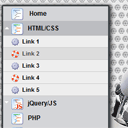
CSS3 onclick vertical metal menu. In our new tutorial we will create a cool CSS3 vertical menu with icons in metal style. The submenu will be opened by pressing the main menu items.
Here are final result (what we will creating):

Here are samples and downloadable package:
Live Demo
[sociallocker]
download in package
[/sociallocker]
Ok, download the example files and lets start coding !
Step 1. HTML
As usual, we start with the HTML. Here are full html code of our menu. As you can see – menu contain only 1 sub level. Hope this is will enough for you. Whole menu built on UL-LI elements.
index.html
<!DOCTYPE html>
<html lang="en" >
    <head>
        <meta charset="utf-8" />
        <title>CSS3 Onclick Vertical Metal menu | Script Tutorials</title>
        <link rel="stylesheet" href="css/layout.css" type="text/css" media="screen">
        <link rel="stylesheet" href="css/menu.css" type="text/css" media="screen">
    </head>
    <body>
        <div class="container">
            <ul id="nav">
                <li><a href="#"><img src="images/t1.png" /> Home</a></li>
                <li><a href="#" class="sub" tabindex="1"><img src="images/t2.png" />HTML/CSS</a><img src="images/up.gif" alt="" />
                    <ul>
                        <li><a href="#"><img src="images/empty.gif" />Link 1</a></li>
                        <li><a href="#"><img src="images/empty.gif" />Link 2</a></li>
                        <li><a href="#"><img src="images/empty.gif" />Link 3</a></li>
                        <li><a href="#"><img src="images/empty.gif" />Link 4</a></li>
                        <li><a href="#"><img src="images/empty.gif" />Link 5</a></li>
                    </ul>
                </li>
                <li><a href="#" class="sub" tabindex="1"><img src="images/t3.png" />jQuery/JS</a><img src="images/up.gif" alt="" />
                    <ul>
                        <li><a href="#"><img src="images/empty.gif" />Link 6</a></li>
                        <li><a href="#"><img src="images/empty.gif" />Link 7</a></li>
                        <li><a href="#"><img src="images/empty.gif" />Link 8</a></li>
                        <li><a href="#"><img src="images/empty.gif" />Link 9</a></li>
                        <li><a href="#"><img src="images/empty.gif" />Link 10</a></li>
                    </ul>
                </li>
                <li><a href="#"><img src="images/t2.png" />PHP</a></li>
                <li><a href="#"><img src="images/t2.png" />MySQL</a></li>
                <li><a href="#"><img src="images/t2.png" />XSLT</a></li>
            </ul>
        </div>
        <footer>
            <h2>CSS3 Onclick Vertical Metal menu</h2>
            <a href="https://www.script-tutorials.com/css3-onclick-vertical-metal-menu/" class="stuts">Back to original tutorial on <span>Script Tutorials</span></a>
        </footer>
    </body>
</html>
Step 2. CSS
Here are the CSS styles of our menu. Maybe you’ve noticed – that in our html – I have two CSS files: layout.css and menu.css. The first file (layout.css) contain the styles of our test page. We will not publish these styles in this article, but if you wish – you can find these styles in the package.
css/menu.css
#nav {
    border:3px solid #3e4547;
    box-shadow:2px 2px 8px #000000;
    border-radius:3px;
    -moz-border-radius:3px;
    -webkit-border-radius:3px;
}
#nav, #nav ul {
    list-style:none;
    padding:0;
    width:200px;
}
#nav ul {
    position:relative;
    z-index:-1;
}
#nav li {
    position:relative;
    z-index:100;
}
#nav ul li {
    margin-top:-23px;
    -moz-transition:  0.4s linear 0.4s;
    -ms-transition: 0.4s linear 0.4s;
    -o-transition: 0.4s linear 0.4s;
    -webkit-transition: 0.4s linear 0.4s;
    transition: 0.4s linear 0.4s;
}
#nav li a {
    background-color:#d4d5d8;
    color:#000;
    display:block;
    font-size:12px;
    font-weight:bold;
    line-height:28px;
    outline:0;
    padding-left:15px;
    text-decoration:none;
}
#nav li a.sub {
    background:#d4d5d8 url("../images/down.gif") no-repeat;
}
#nav li a + img {
    cursor:pointer;
    display:none;
    height:28px;
    left:0;
    position:absolute;
    top:0;
    width:200px;
}
#nav li a img {
    border-width:0px;
    height:24px;
    line-height:28px;
    margin-right:8px;
    vertical-align:middle;
    width:24px;
}
#nav li a:hover {
    background-color:#bcbdc1;
}
#nav ul li a {
    background-color:#eee;
    border-bottom:1px solid #ccc;
    color:#000;
    font-size:11px;
    line-height:22px;
}
#nav ul li a:hover {
    background-color:#ddd;
    color:#444;
}
#nav ul li a img {
    background: url("../images/bulb.png") no-repeat;
    border-width:0px;
    height:16px;
    line-height:22px;
    margin-right:5px;
    vertical-align:middle;
    width:16px;
}
#nav ul li:nth-child(odd) a img {
    background:url("../images/bulb2.png") no-repeat;
}
#nav a.sub:focus {
    background:#bcbdc1;
    outline:0;
}
#nav a:focus ~ ul li {
    margin-top:0;
    -moz-transition:  0.4s linear;
    -ms-transition: 0.4s linear;
    -o-transition: 0.4s linears;
    -webkit-transition: 0.4s linears;
    transition: 0.4s linear;
}
#nav a:focus + img, #nav a:active + img {
    display:block;
}
#nav a.sub:active {
    background:#bcbdc1;
    outline:0;
}
#nav a:active ~ ul li {
    margin-top:0;
}
#nav ul:hover li {
    margin-top:0;
}
Live Demo
Conclusion
Hope you enjoyed with our new vertical menu, don’t forget to tell thanks and leave a comment :) Good luck!





the links of the submenu doesn’t work with ie 9 !
Are you tried to apply own custom links?
I’ve tried my custom links and it works very well. God bless you!
wau nice tutorial brother.
Can you tell me how I can make work the submenu on IE?
The links doesn’t work there. I applied own once.
Thank you
Hi, I can’t get this to work with IE9, is there a fix?
Thanks
Mark
Hello Mark,
This menu should work for IE9 (not so smooth, but anyway)
Almost an identical copy of a menu on CSS play – http://www.cssplay.co.uk/menus/cssplay-click-click-slide.html as are several of this sites menus
Hello Fran, yes, this is similar menu, as I mentioned in the end of our article.
Hi there, I just wondering that can we make submenu stays active when new pages open? Thanks :)
Hello Flammy,
This is interesting moment, this is not ready in the current version, but this is possible. Pay attention to all ‘:focus’ styles. Basically, you will need to create a copy, but for another selector, for example, for an ‘.active’ element. After, you will use this class (‘active’) to define active submenus.
how can i put submenu open by default
thankyou very much ADMIN for your amazing website and easy understanding tutorials…….
Hi there, thanks for the tutorial! Very interesting!
However your example does not seem to work on Android device, or is my model too old?