
HTML5&CSS3 single page layout tutorial. Today I want to introduce new great masterpiece – new template with codename: ‘Mono’. This will nice HTML5/CSS3 template with nice light brown colors. Hope that you will like new styles and you will learn some new design methods.
I going to start step-by-step tutorial for creating html5-css3 layout.
Final Result

Live Demo
[sociallocker]
download result
[/sociallocker]
Get started
Ok, let`s start. Lets create new folder and several folders inside (to keep all well structured):
- css – which will contain our CSS stylesheets (nivo-slider.css, reset.css and style.css)
- images – which will contain all used images
- js – will contain JS files (html5.js, jquery.js, jquery.nivo.slider.pack.js and main.js)
Head section code
Now I am going to give you the usual HTML head area of index.html with the attached CSS/JS.
<!DOCTYPE html><!-- The new doctype -->
<html lang="en"><head>
<meta http-equiv="content-type" content="text/html; charset=UTF-8">
    <title>'Mono' single page layout | Script tutorials demo</title>
    <meta charset="utf-8">
    <!-- Linking styles -->
    <link rel="stylesheet" href="css/reset.css" type="text/css" media="screen">
    <link rel="stylesheet" href="css/style.css" type="text/css" media="screen">
    <link rel="stylesheet" href="css/nivo-slider.css" type="text/css" media="screen">
    <!-- Linking scripts -->
    <script src="js/jquery.js" type="text/javascript"></script>
    <script src="js/jquery.nivo.slider.pack.js" type="text/javascript"></script>
    <script src="js/main.js" type="text/javascript"></script>
    <!--[if lt IE 9]>
    <script type="text/javascript" src="js/html5.js"></script>
    <![endif]-->
</head>
Moving forward – Main layout (body)
Whole layout consist of 4 main section: header (with logo, navigation menu and search form), main section (slider, promo and first featured content area – 3 elements), second content section (two column layout for all your rest content) and footer (social icons and copyrights). It looks like:
<body>
<div class="container">
    <div class="subcontainer">
        <header><!-- Defining the header section of the page -->
            <div class="logo"><!-- Defining the logo element -->
                ........
            </div>
            <nav><!-- Defining the navigation menu -->
                ........
            </nav>
            <section id="search"><!-- Search form -->
                ........
            </section>
        </header>
        <div id="main"><!-- Defining the main content section -->
            <section id="slider-wrapper"><!-- Promo slider -->
                ........
            </section>
            <section id="promo"><!-- Defining the promo section -->
                .........
            </section>
            <section id="content"><!-- Defining the featured content section -->
                ........
            </section>
        </div>
        <div id="submain"><!-- Defining submain content section -->
            <section id="subcontent"><!-- Defining the content section #2 -->
                <div id="left">
                    ........
                </div>
                <div id="right">
                    ........
                </div>
                <div class="clear"></div>
            </section>
        </div>
    </div>
    <footer><!-- Defining the footer section of the page -->
        <ul id="social"><!-- Social profiles links -->
            ........
        </ul>
        <div id="privacy">
            ........
        </div>
    </footer>
</div>
</body>
here are you can see base CSS styles
/* base styles */
body {
    background:url(../images/bg.gif) repeat scroll center top #000;
    color: #666666;
    font-family: "Trebuchet MS",Arial,Helvetica,sans-serif;
    font-size: 13px;
    height: 100%;
    line-height: 20px;
}
a {
    color:#1799cf;
    text-decoration:underline;
}
a:hover {
    text-decoration:none;
}
.clear {
    clear:both;
    display:block;
    height:0;
    overflow:hidden;
    visibility:hidden;
    width:0;
}
.container {
    margin:0 auto;
    position:relative;
    width:988px;
    -moz-box-shadow:0 0 2px 2px #222222;
    -webkit-box-shadow:0 0 2px 2px #222222;
    box-shadow:0 0 2px 2px #222222;
    -o-box-shadow:0 0 2px 2px #222222;
}
.subcontainer {
    background-color: #FFFFFF;
    padding-left: 40px;
    padding-right: 40px;
}
.more {
    display:inline-block;
    color:#ca5d2c;
    line-height:13px;
    font-size:11px;
    text-transform:uppercase;
    border:solid 1px #edebea;
    border-left-color:#ddd6d2;
    border-bottom-color:#d3c9c3;
    text-decoration:none;
    padding:4px 9px 5px 9px;
    background: -moz-linear-gradient(#ffffff, #f0edeb); /* FF 3.6+ */
    background: -ms-linear-gradient(#ffffff, #f0edeb); /* IE10 */
    background: -webkit-gradient(linear, left top, left bottom, color-stop(0%, #ffffff), color-stop(100%, #f0edeb)); /* Safari 4+, Chrome 2+ */
    background: -webkit-linear-gradient(#ffffff, #f0edeb); /* Safari 5.1+, Chrome 10+ */
    background: -o-linear-gradient(#ffffff, #f0edeb); /* Opera 11.10 */
    filter: progid:DXImageTransform.Microsoft.gradient(startColorstr='#ffffff', endColorstr='#f0edeb'); /* IE6 & IE7 */
    -ms-filter: "progid:DXImageTransform.Microsoft.gradient(startColorstr='#ffffff', endColorstr='#f0edeb')"; /* IE8+ */
    background: linear-gradient(#ffffff, #f0edeb); /* the standard */
}
.more:hover {
    color:#fff;
    background:#ca5d2c;
}
Header section with logo and navigation

Our header will contain menu, search bar (at top right) and logo at left side. Here are HTML for that section:
    <header><!-- Defining the header section of the page -->
        <div class="logo"><!-- Defining the logo element -->
            <a href="https://www.script-tutorials.com/">
                <img src="images/logo.png" title="Mono template" alt="Mono template" />
            </a>
        </div>
        <nav><!-- Defining the navigation menu -->
            <ul>
                <li class="active"><a href="#">Home</a></li>
                <li><a href="#">Tutorials</a></li>
                <li><a href="#">About</a></li>
                <li><a href="https://www.script-tutorials.com/creating-new-html5css3-single-page-layout-mono/">To Tutorial</a></li>
            </ul>
        </nav>
        <section id="search"><!-- Search form -->
            <form action="#" onsubmit="return false;" method="get">
                <input type="text" onfocus="if (this.value =='Search..' ) this.value=''" onblur="if (this.value=='') this.value='Search..'" value="Search.." name="q">
                <input type="submit" value="">
            </form>
        </section>
    </header>
CSS for header section
/* header section */
header {
    background: url(../images/header_inner_bg.jpg) no-repeat scroll center 0 #CC5F2D;
    height: 125px;
    padding-top: 21px;
    position: relative;
    z-index: 10;
}
.logo {
    float: left;
    padding-left: 49px;
    position: relative;
}
.logo img {
    margin:0 auto 3px;
}
#search {
    overflow:hidden;
    position:absolute;
    right:10px;
    top:10px;
}
#search form {
    float:left;
    background:url(../images/search1.png) no-repeat scroll 0 0 transparent;
    height:28px;
    width:196px;
}
#search form input[type="text"] {
    background:none repeat scroll 0 0 transparent;
    border:medium none;
    float:left;
    height:18px;
    margin:0;
    overflow:hidden;
    padding:4px 4px 4px 11px;
    width:155px;
}
#search form input[type="submit"] {
    background:url(../images/search2.png) no-repeat scroll 0 0 transparent;
    border:medium none;
    cursor:pointer;
    float:left;
    height:28px;
    margin:0;
    overflow:hidden;
    padding:0;
    width:26px;
}
/*navigation menu*/
nav {
    float: right;
    padding-top: 75px;
}
nav ul {
    padding:0px 0px 0 0;
}
nav ul > li {
    float:left;
    line-height:14px;
    border-left:1px solid #ff9d4e;
    background:url(../images/menu_bg.gif) 0 0 repeat-x #df6a35;
    border-top:1px solid #ee8346;
    background: -moz-linear-gradient(#eb753f, #df6a35); /* FF 3.6+ */
    background: -ms-linear-gradient(#eb753f, #df6a35); /* IE10 */
    background: -webkit-gradient(linear, left top, left bottom, color-stop(0%, #eb753f), color-stop(100%, #df6a35)); /* Safari 4+, Chrome 2+ */
    background: -webkit-linear-gradient(#eb753f, #df6a35); /* Safari 5.1+, Chrome 10+ */
    background: -o-linear-gradient(#eb753f, #df6a35); /* Opera 11.10 */
    filter: progid:DXImageTransform.Microsoft.gradient(startColorstr='#eb753f', endColorstr='#df6a35'); /* IE6 & IE7 */
    -ms-filter: "progid:DXImageTransform.Microsoft.gradient(startColorstr='#eb753f', endColorstr='#df6a35')"; /* IE8+ */
    background: linear-gradient(#eb753f, #df6a35); /* the standard */
}
nav ul li {
    position:relative;
}
nav ul > li:first-child {
    border-left:solid 1px #e3773d;
}
nav ul > li:hover, nav ul > li.active, nav ul > li.sfHover {
    border-top:solid 1px #a2522a;
    background:url(../images/menu_bg.gif) 0 -148px repeat-x #652812;
    background: -moz-linear-gradient(#9e4926, #652712); /* FF 3.6+ */
    background: -ms-linear-gradient(#9e4926, #652712); /* IE10 */
    background: -webkit-gradient(linear, left top, left bottom, color-stop(0%, #9e4926), color-stop(100%, #652712)); /* Safari 4+, Chrome 2+ */
    background: -webkit-linear-gradient(#9e4926, #652712); /* Safari 5.1+, Chrome 10+ */
    background: -o-linear-gradient(#9e4926, #652712); /* Opera 11.10 */
    filter: progid:DXImageTransform.Microsoft.gradient(startColorstr='#9e4926', endColorstr='#652712'); /* IE6 & IE7 */
    -ms-filter: "progid:DXImageTransform.Microsoft.gradient(startColorstr='#9e4926', endColorstr='#652712')"; /* IE8+ */
    background: linear-gradient(#9e4926, #652712); /* the standard */
}
nav ul > li:hover > a, nav ul > li.active , nav ul > li.sfHover > a {
    color:#f9dcb4;
}
nav ul > li > a {
    display:inline-block;
    color:#fff;
    width:123px;
    text-align:center;
    line-height:18px;
    font-family:"Trebuchet MS", Arial, Helvetica, sans-serif;
    font-size:15px;
    text-transform:uppercase;
    padding:14px 0 16px;
    text-decoration:none;
}
Main content section
After our header area – we have main content area. This is pretty big section – in top we have slider (nivoSlider), after slider – promo section, and then – featured posts.

    <div id="main"><!-- Defining the main content section -->
        <section id="slider-wrapper"><!-- Promo slider -->
            <div id="slider" class="nivoSlider">
                <img style="display: none;" src="images/promo1.jpg" alt="" title="#htmlcaption-1">
                <img style="display: none;" src="images/promo2.jpg" alt="" title="#htmlcaption-2">
                <img style="display: none;" src="images/promo3.jpg" alt="" title="#htmlcaption-3">
            </div>
            <div id="htmlcaption-1" class="nivo-html-caption">
                <h5 class="p2">Your promo text 1</h5>
                <p>Promo text description here</p>
            </div>
            <div id="htmlcaption-1" class="nivo-html-caption">
                <h5 class="p2">Your promo text 2</h5>
                <p>Promo text description here</p>
            </div>
            <div id="htmlcaption-2" class="nivo-html-caption">
                <h5 class="p2">Your promo text 3</h5>
                <p>Promo text description here</p>
            </div>
            <div id="htmlcaption-3" class="nivo-html-caption">
                <h5 class="p2">Your promo text 4</h5>
                <p>Promo text description here</p>
            </div>
        </section>
        <section id="promo"><!-- Defining the promo section -->
            <img alt="" src="images/promo.jpg"> Welcome to test our 'Mono' templates. We making best templates for you.
        </section>
        <section id="content"><!-- Defining the featured content section -->
            <ul>
                <li>
                    <h1>APC caching</h1>
                    <p>Today I have another interesting article for PHP. We will talking about caching, and practice of using caching in php. I will make review of APC caching and will show you how you can use APC in PHP.</p>
                    <a class="more" href="https://www.script-tutorials.com/how-to-use-apc-caching-with-php/">Continue +</a>
                </li>
                <li>
                    <h1>3D WebGL</h1>
                    <p>Today we continue HTML5 canvas examples. And today we will try to begin learning WebGL. In my demonstration I will show you how to initialize WebGL and draw simple 3D object. Also we will animate this object too.</p>
                    <a class="more" href="https://www.script-tutorials.com/making-3d-webgl-demonstration/">Continue +</a>
                </li>
                <li>
                    <h1>Watermark</h1>
                    <p>Today is interesting tutorial for PHP. I will show you how to use GD library. And, main task today is adding watermark to image and generate result as PNG image into browser. We will using PHP and GD library.</p>
                    <a class="more" href="https://www.script-tutorials.com/watermark-processing-on-images-using-php-and-gd/">Continue +</a>
                </li>
            </ul>
        </section>
    </div>
CSS for Main content section
/* main section */
#promo {
    border-bottom: 1px solid;
    color: #704336;
    display: block;
    font-size: 40px;
    line-height: 50px;
    overflow:hidden;
    padding:20px 0;
    position: relative;
    width:908px;
}
#promo img {
    float:left;
    margin-right:20px;
}
#content {
    border-bottom: 1px solid;
    overflow:hidden;
    padding:20px 0;
    width:908px;
}
#content ul {
    list-style:none outside none;
    margin:0;
    padding:0;
}
#content ul li {
    float:left;
    margin:0 0 0 22px;
    width:288px;
}
#content ul li:first-child {
    margin:0;
}
#content ul li h1 {
    color: #CA5D2C;
    font-size: 30px;
    line-height: 1.2em;
    margin: 0 0 19px;
    padding-left: 20px;
}
#content ul li p {
    padding-bottom: 11px;
}
Customized styles of our slider (nivoSlider) will in external file
css/nivo-slider.css
This file always available in our package. After main section I decided to make another one section for content
    <div id="submain"><!-- Defining submain content section -->
        <section id="subcontent"><!-- Defining the content section #2 -->
            <div id="left">
                <ul>
                    <li>
                        <h3>HTML5&CSS3 single page layout – Art theme</h3>
                        <img alt="" src="images/post.jpg">
                        <p>Today I will like to product new great masterpiece – new template with codename: ‘Art theme’. This will nice HTML5 template with nice gray colors. Hope that you will like new styles and you will learn some new coding lessons.</p>
                        <a class="more" href="https://www.script-tutorials.com/creating-new-html5css3-single-page-layout-art-theme/">Continue +</a>
                    </li>
                    <li>
                        <h3>HTML CSS Anime Theme Website Layout</h3>
                        <img alt="" src="images/post.jpg">
                        <p>Today I will like to product new masterpiece – new template with codename: ‘Anime theme’. This will nice HTML5 template with good colors. Hope that you can learn some new coding lessons and download our result and use it at your own site.</p>
                        <a class="more" href="https://www.script-tutorials.com/creating-new-html-css-website-layout-5-anime-theme/">Continue +</a>
                    </li>
                </ul>
            </div>
            <div id="right">
                <dl id="acc">
                    <dt class="active">
                        <a href="#">Short reviews</a>
                    </dt>
                    <dd class="active" style="display: block;">
                        <p>Here are text of short review of something ...</p>
                        <a class="more" href="#">Continue +</a>
                    </dd>
                    <dt class="">
                        <a href="#">Short reviews #1</a>
                    </dt>
                    <dd style="display: none;">
                        <p>Here are text of short review of something ...</p>
                        <a class="more" href="#">Continue +</a>
                    </dd>
                    <dt>
                        <a href="#">Short reviews #3</a>
                    </dt>
                    <dd>
                        <p>Here are text of short review of something ...</p>
                        <a class="more" href="#">Continue +</a>
                    </dd>
                </dl>
            </div>
            <div class="clear"></div>
        </section>
    </div>
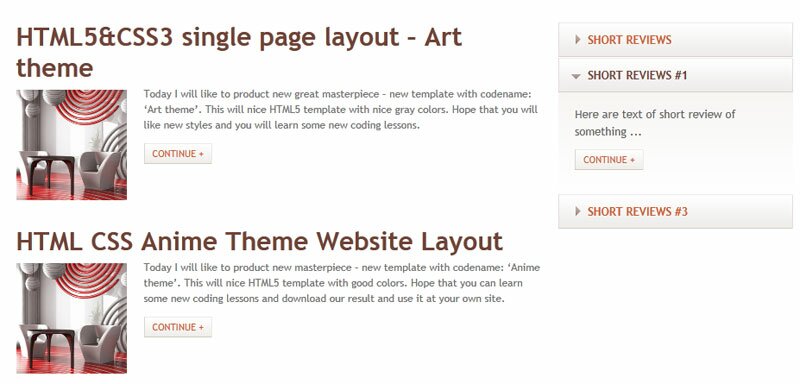
Here you can keep all another your posts (or another necessary content) of your website, also I made nice sliding element at right side. Here are related CSS styles:
/* submain section */
#submain {
    padding:20px 0;
}
#subcontent #left {
    float:left;
    width:69%;
}
#subcontent #right {
    float:left;
    margin-left:1%;
    width:30%;
}
#subcontent ul {
    list-style:none outside none;
    margin:0;
    padding:0;
}
#subcontent ul li {
    color:#737373;
    font-size:12px;
    line-height:18px;
    margin-bottom:10px;
    overflow:hidden;
    padding:7px;
}
#subcontent ul li h3 {
    color: #704336;
    font-size: 30px;
    line-height: 1.2em;
    margin-bottom: 3px;
}
#subcontent ul li img {
    float:left;
    height:128px;
    margin:5px 20px 5px 0;
    width:128px;
}
#subcontent ul li p {
    padding:0 0 13px;
}
/*acc*/
dl#acc{
    height:auto !important;
    list-style-type:none;
    padding:8px 0px 8px 0;
}
dl#acc dt{
    margin-bottom:0;
    margin-top:1px !important;
}
#acc dt {
    background:url(../images/acc_a_bg.gif) 0 0 repeat-x #efedeb;
    position:relative;
}
#acc dt.first {
    padding-bottom:1px;
}
#acc dt a {
    display:block;
    background:url(../images/acc_marker.png) 19px -34px no-repeat;
    position:relative;
    padding:9px 0px 9px 33px;
    overflow:hidden;
    color:#ca5d2c;
    font-size:13px;
    font-weight:bold;
    border:solid 1px #e3dedc;
    border-top-color:#eeeceb;
    border-bottom-color:#d7cfcb;
    text-transform:uppercase;
    text-decoration:none;
}
#acc dt a:hover, #acc dt.active a {
    background-position:13px 18px;
    color:#704336;
}
#acc dt strong {
    color:#000;
    float:left;
    font-size:19px;
    font-weight:normal;
    line-height:1.2em;
    padding-top:4px;
    text-decoration:none;
}
#acc dd {
    background:url(../images/acc_content_bg.gif) 0 0 repeat-x #fff;
    display:none;
    font-size:13px;
    line-height:20px;
    margin:0 !important;
    padding:15px 20px 27px 19px;
}
#acc dd p {
    padding-bottom:11px;
}
#acc dd.active {
    display:block;
}
Footer section
Finally, here are our footer area

    <footer><!-- Defining the footer section of the page -->
        <ul id="social"><!-- Social profiles links -->
            <li><a href="#" title="facebook" rel="external nofollow"><img alt="" src="images/facebook.png"></a></li>
            <li><a href="#" title="twitter" rel="external nofollow"><img alt="" src="images/twitter.png"></a></li>
            <li><a href="#" title="linkedin" rel="external nofollow"><img alt="" src="images/linkedin.png"></a></li>
            <li><a href="#" title="rss" rel="external nofollow"><img alt="" src="images/rss.png"></a></li>
        </ul>
        <div id="privacy">
            Mono template © 2011 <a class="link" href="https://www.script-tutorials.com/">Privacy Policy</a><br />
            <a class="link" href="https://www.script-tutorials.com/creating-new-html5css3-single-page-layout-mono/">Template by Script Tutorials</a>
        </div>
    </footer>
CSS for footer section
/* footer section */
footer {
    padding:20px 40px;
    text-align:right;
    font-size:11px;
    background-color:#f6f4f2;
    overflow:hidden;
}
footer a{
    text-decoration:none;
    color:#5E5956;
}
#social {
    float:left;
    list-style:none outside none;
    margin:0;
    padding:0;
}
#social li {
    float:left;
    padding:0 0 0 3px;
}
#social li a:hover img {
    margin-top:1px;
}
footer #privacy {
    float:right;
}
JS for our template
Here are all necessary JS scripts:
js/html5.js, js/jquery.js and js/jquery.nivo.slider.pack.js
All these libraries already available in package
js/main.js
$(window).load(function() {
    $('#slider').nivoSlider({
        effect:'random',
        slices:15,
        boxCols:8,
        boxRows:8,
        animSpeed:500,
        pauseTime:4000,
        directionNav:false,
        directionNavHide:false,
        controlNav:false,
        captionOpacity:1
    });
});
$(document).ready(function() {
    $("#acc dt").click(function(){
        $(this).next("#acc dd")
            .slideToggle("slow")
            .siblings("#acc dd:visible")
            .slideUp("slow");
        $(this).toggleClass("active");
        $(this).siblings("#acc dt").removeClass("active");
        return false
    })
});
nivoSlider itself have very easy initialization – so I hope that all easy here too.
Live Demo
Conclusion
Congrats, our new template ‘Mono’ is complete! You can use this as is, but please leave the back link to us intact. Don`t forget to say thanks :) Good luck!





A superb tutorial and a great result.
The template is very beautiful to look at too.
Thanks bud.
Great tutorial, a very good and impressive start point for me. Thank you very much, guy!
Explained nicely!!! Thank u very much:-) Ur code practicing n presenting it is too good, even novice can easily grab the point!!! All tutorials r very helpful to kick off web development!!!
Hello,
This is by far one of the best tutorials I have ever followed, thank you. I have learned so much and it has given me a lot to think about. I have realised more code and how it goes into a good design.
If I change some of the layout and add a few bits and pieces may I use the template in the future?
Thank you,
Best wishes
Graeme
Hello Graeme,
Yes, sure, you always can use our materials as you like, but please do not copy the entire articles as your own (it includes translation of the articles in different languages). It would be kind of you to keep back link to the original article (or to our website) as well.
Nice tutorials! Thanks for sharing…
Hello,
This tutorial is amazing, thank you for sharing it. I’m going to work my way through it, I’ve learned so much already.
Best wishes
Graeme
Thanks
Excellent. Thanks for sharing useful article.