
Multi-level CSS3 dropdown menu tutorial. Nowadays, pure CSS3 menus still very popular. Mostly – this is UL-LI based menus. Today we will continue making nice menus for you. This will multilevel dropdown menu, but today submenus will appear not onhover, but onclick action.
Here are final result (what we will creating):
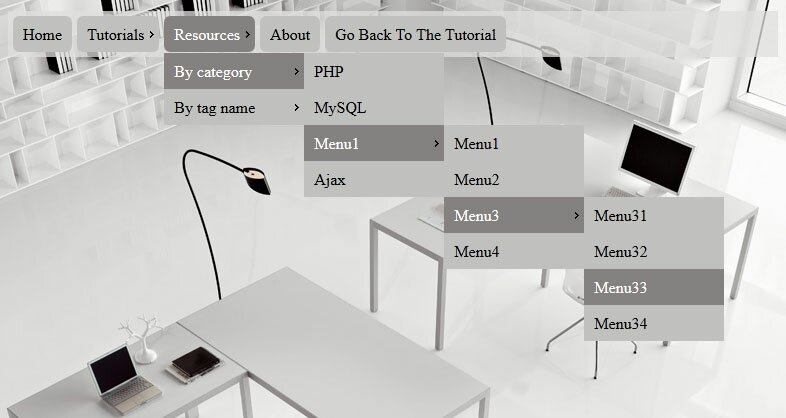
Here are samples and downloadable package:
Live Demo
[sociallocker]
download in package
[/sociallocker]
Ok, download the example files and lets start coding !
Step 1. HTML
As usual, we start with the HTML.
Here are full html code with our menu. As you can see – this is multi-level menu. I hope that you can easy to understand it. Whole menu built on UL-LI elements.
index.html
<link rel="stylesheet" href="css/style.css" type="text/css" media="screen">
<div class="example">
    <ul id="nav">
        <li><a href="https://www.script-tutorials.com/">Home</a></li>
        <li><a class="fly" href="#" tabindex="1">Tutorials</a>
            <ul class="dd">
                <li><a href="https://www.script-tutorials.com/category/html-css/">HTML / CSS</a></li>
                <li><a class="fly" href="#" tabindex="1">JS / jQuery</a>
                    <ul>
                        <li><a href="https://www.script-tutorials.com/category/jquery/">jQuery</a></li>
                        <li><a href="https://www.script-tutorials.com/category/javascript/">JS</a></li>
                    </ul>
                </li>
                <li><a href="https://www.script-tutorials.com/category/php/">PHP</a></li>
                <li><a href="https://www.script-tutorials.com/category/mysql/">MySQL</a></li>
                <li><a href="https://www.script-tutorials.com/category/xslt/">XSLT</a></li>
                <li><a href="https://www.script-tutorials.com/category/ajax/">Ajax</a></li>
            </ul>
        </li>
        <li><a class="fly" href="#" tabindex="1">Resources</a>
            <ul class="dd">
                <li><a class="fly" href="#" tabindex="1">By category</a>
                    <ul>
                        <li><a href="https://www.script-tutorials.com/category/php/">PHP</a></li>
                        <li><a href="https://www.script-tutorials.com/category/mysql/">MySQL</a></li>
                        <li><a class="fly" href="#" tabindex="1">Menu1</a>
                            <ul>
                                <li><a href="#">Menu1</a></li>
                                <li><a href="#">Menu2</a></li>
                                <li><a class="fly" href="#" tabindex="1">Menu3</a>
                                    <ul>
                                        <li><a href="#">Menu31</a></li>
                                        <li><a href="#">Menu32</a></li>
                                        <li><a href="#">Menu33</a></li>
                                        <li><a href="#">Menu34</a></li>
                                    </ul>
                                </li>
                                <li><a href="#">Menu4</a></li>
                            </ul>
                        </li>
                        <li><a href="https://www.script-tutorials.com/category/ajax/">Ajax</a></li>
                    </ul>
                </li>
                <li><a class="fly" href="#" tabindex="1">By tag name</a>
                    <ul>
                        <li><a href="https://www.script-tutorials.com/tag/captcha/">captcha</a></li>
                        <li><a href="https://www.script-tutorials.com/tag/gallery/">gallery</a></li>
                        <li><a href="https://www.script-tutorials.com/tag/animation/">animation</a></li>
                    </ul>
                </li>
            </ul>
        </li>
        <li><a href="https://www.script-tutorials.com/about/">About</a></li>
        <li><a href="https://www.script-tutorials.com/click-action-multilevel-css3-dropdown-menu/">Go Back To The Tutorial</a></li>
    </ul>
</div>
Step 2. CSS
Here are used CSS styles. First two selectors – layout of our demo page. All rest – belong to menu.
css/style.css
/* demo page styles */
body {
    background:#eee;
    margin:0;
    padding:0;
}
.example {
    background:#fff url(../images/tech.jpg);
    width:770px;
    height:570px;
    border:1px #000 solid;
    margin:20px auto;
    padding:15px;
    border-radius:3px;
    -moz-border-radius:3px;
    -webkit-border-radius:3px;
}
/* main menu styles */
#nav,#nav ul {
    background-image:url(../images/tr75.png);
    list-style:none;
    margin:0;
    padding:0;
}
#nav {
    height:41px;
    padding-left:5px;
    padding-top:5px;
    position:relative;
    z-index:2;
}
#nav ul {
    left:-9999px;
    position:absolute;
    top:37px;
    width:auto;
}
#nav ul ul {
    left:-9999px;
    position:absolute;
    top:0;
    width:auto;
}
#nav li {
    float:left;
    margin-right:5px;
    position:relative;
}
#nav li a {
    background:#c1c1bf;
    color:#000;
    display:block;
    float:left;
    font-size:16px;
    padding:8px 10px;
    text-decoration:none;
}
#nav > li > a {
    -moz-border-radius:6px;
    -webkit-border-radius:6px;
    -o-border-radius:6px;
    border-radius:6px;
    overflow:hidden;
}
#nav li a.fly {
    background:#c1c1bf url(../images/arrow.gif) no-repeat right center;
    padding-right:15px;
}
#nav ul li {
    margin:0;
}
#nav ul li a {
    width:120px;
}
#nav ul li a.fly {
    padding-right:10px;
}
/*hover styles*/
#nav li:hover > a {
    background-color:#858180;
    color:#fff;
}
/*focus styles*/
    #nav li a:focus {
    outline-width:0;
}
/*popups*/
#nav li a:active + ul.dd,#nav li a:focus + ul.dd,#nav li ul.dd:hover {
    left:0;
}
#nav ul.dd li a:active + ul,#nav ul.dd li a:focus + ul,#nav ul.dd li ul:hover {
    left:140px;
}
Step 3. Images
Our menu using only three images: arrow.gif, tech.jpg and tr75.png. I don`t included them into tutorial, just because two of them very small (will difficult to locate it) and last one – just background image. All images will in package.
Live Demo
Conclusion
Hope you enjoyed with this tutorial, don’t forget to tell thanks and leave a comment :) Good luck!





Hi,
Thanks for this great tutorial, but on my computer, it only works on firefox and opera.
It doesn’t work on chrome (v.14.0.835.187 m for windows) / IE 8 / safari 4.0.5 but :(
So that’s damage for these reason.
Many Thanks
I not tested it in safary (don`t have it installed). But I tried in IE8 – it working here.
This menu does indeed not work in Safari, Chrome and IE8. I’m not sure which IE8 you test, but IE9 in IE8 mode is not reliable for testing. I’m not sure why Microsoft even put that function in IE9, because IE8 mode and IE8 alone is not the same. I happen to see more differences in rendering between them. The best way to test pages in different IE’s is a Virtual Machine. IE-tester is also not accurate.
And why not install Safari and Chrome on your PC to test? The menu looks and behave nice, but if it doesn’t work in all the major browsers and IE8/IE7, then it’s quite useless.
Hello Ralph,
Finally I have solved this, we have to add ‘tabindex="1"’ to all A tags with class ‘fly’
I have updated HTML structure of our menu – check it !
Still not working on IE8 :/
What happens when you have multiple submenus which come up against the right side of the browser window? I didn’t notice anything which detects that so the submenus would automatically fly to the left. That would take jQuery or JS, correct?
Hello Carla,
I think that yes, in this moment we have to use help of javascript, or, we can customize css styles for right elements too (and make them open to the left side)
great one, i love it
The menu does not work on the android phones. Any click dropdown/fly menus for android phones/tabs
Hello Aswath,
It is possible that I will develop something for mobile devices in the coming future
Hi Andrew,
Great Job that you have posted this script .
But all menu will works on click please suggested how to make it on scroll.
Hello Pranesh,
The default browser’s action when we use the middle mouse button (scroll) – ‘Open in new tab/window’. If you need to customize it, you may use javascript, for example:
$("#element").live(‘click’, function(e) {
if( e.which == 2 ) {
e.preventDefault();
alert("middle button");
}
});
When i view your sample site in chrome and click on a dropdown it opens correctly.
If i download your files and open it locally and do the same, the dropdown opens and closes immediately. This only happens in chrome. In IE and firefox it works fine.
Any ideas?
Thanks!
Hi Jeremy,
To tell the truth, I have not ideas. Your local version should work in the same (exactly) way as our remote version
How would you place a different type arrow in ul class=”dd” ?
Kindly copy to my e-address.
Thanks
Hi Jim,
What do you mean? ul class (dd) doesn’t contain any arrows. Arrows belong only to #nav li a.fly