
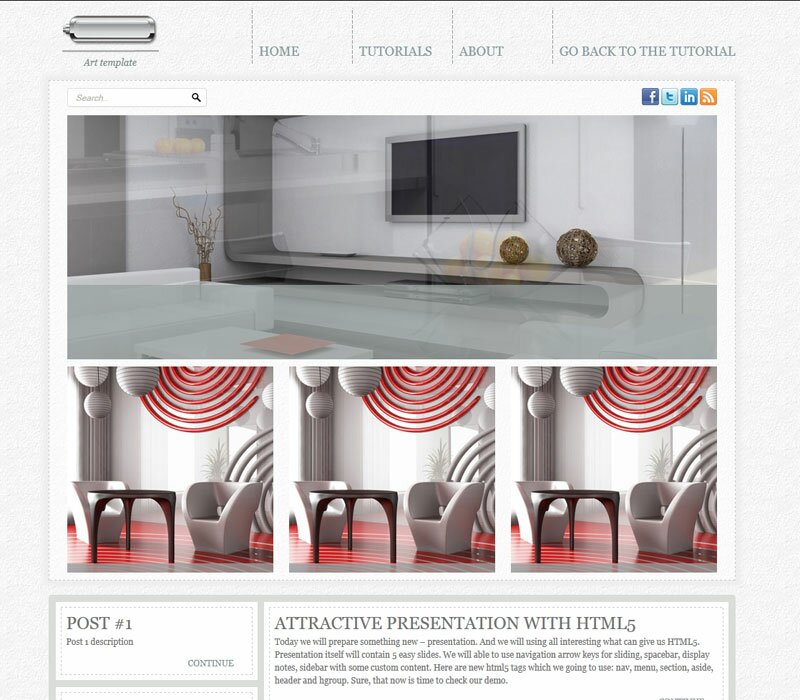
HTML5/CSS3 single page layout – Art theme. Today I will like to product new great masterpiece – new template with codename: ‘Art theme’. This will nice HTML5 template with nice gray colors. Hope that you will like new styles and you will learn some new coding lessons.
I going to start step-by-step tutorial for creating html5-css3 layout.
Final Result
Live Demo
[sociallocker]
download result
[/sociallocker]
Get started
Well, let’s start. Lets create new folder and several folders inside (to keep all well structured):
- css – which will contain our CSS stylesheets (nivo-slider.css, reset.css and style.css)
- images – which will contain all used images
- js – will contain JS files (html5.js, jquery.js, jquery.nivo.slider.pack.js and main.js)
Head section code
Now I am going to give you the usual HTML head area of index.html with the attached CSS/JS.
<!DOCTYPE html><!-- The new doctype -->
<html lang="en"><head>
<meta http-equiv="content-type" content="text/html; charset=UTF-8">
<title>Art HTML5&CSS3 single page layout | Script tutorials demo</title>
<meta charset="utf-8">
<!-- Linking styles -->
<link rel="stylesheet" href="css/reset.css" type="text/css" media="screen">
<link rel="stylesheet" href="css/style.css" type="text/css" media="screen">
<link rel="stylesheet" href="css/nivo-slider.css" type="text/css" media="screen">
<!-- Linking scripts -->
<script src="js/jquery.js" type="text/javascript"></script>
<script src="js/jquery.nivo.slider.pack.js" type="text/javascript"></script>
<script src="js/main.js" type="text/javascript"></script>
<!--[if lt IE 9]>
<script type="text/javascript" src="js/html5.js"></script>
<![endif]-->
</head>
Moving forward – Main layout (body)
Whole layout consist of 4 main section: header (with logo and navigation menu), main section (search form, social icons, slider area and first featured content area – 3 elements), second content section (two column layout for all your rest content) and footer. It looks like:
<body>
<div class="container">
    <header><!-- Defining the header section of the page -->
        <div class="logo"><!-- Defining the logo element -->
            .........
        </div>
        <nav><!-- Defining the navigation menu -->
            .........
        </nav>
    </header>
    <div id="main">
        <section id="social"><!-- Search form and social icons -->
            .........
        </section>
        <section id="slider-wrapper"><!-- Promo slider -->
            .........
        </section>
        <section id="content"><!-- Defining the content section -->
            .........
        </section>
    </div>
    <div id="submain">
        <section id="subcontent"><!-- Defining the content section #2 -->
            <div id="left">
                .........
            </div>
            <div id="right">
                .........
            </div>
            <div class="clear"></div>
        </section>
    </div>
    <footer><!-- Defining the footer section of the page -->
        .........
    </footer>
</div>
</body>
here are you can see base CSS styles
/* base styles */
body {
    background:url(../images/bg.jpg) repeat scroll center top #000;
    background-attachment:fixed;
    color:#737373;
    font-family:Georgia, "Times New Roman", Times, serif;
    font-size:100%/1.125em;
}
a {
    color:#c46501;
    text-decoration:underline;
}
a:hover {
    text-decoration:none;
}
.clear {
    clear:both;
    display:block;
    height:0;
    overflow:hidden;
    visibility:hidden;
    width:0;
}
.container{
    margin:0 auto;
    position:relative;
    width:960px
}
Header section with logo and navigation

Our header will contain search bar, social icons (at top) and logo at left side. Here are HTML for that section:
    <header><!-- Defining the header section of the page -->
        <div class="logo"><!-- Defining the logo element -->
            <a href="https://www.script-tutorials.com/">
                <img src="images/logo.png" title="Art template" alt="Art template" />
            </a>
            <p>Art template</p>
        </div>
        <nav><!-- Defining the navigation menu -->
            <ul>
                <li><a href="https://www.script-tutorials.com/">Home</a></li>
                <li><a href="https://www.script-tutorials.com/category/html-css/">Tutorials</a></li>
                <li><a href="https://www.script-tutorials.com/about/">About</a></li>
                <li><a href="https://www.script-tutorials.com/creating-new-html5css3-single-page-layout-art-theme/">Go Back To The Tutorial</a></li>
            </ul>
        </nav>
    </header>
CSS for header section
/* header section */
header {
    height:105px;
    margin:0 0 6px;
    position:relative;
    width:100%;
    z-index:2
}
.logo {
    left:19px;
    position:absolute;
    text-align:center;
    top:20px;
}
.logo img {
    margin:0 auto 3px;
}
.logo p {
    color:#808D8D;
    font-size:13px;
    font-style:italic;
    line-height:16px;
}
/*navigation menu*/
nav {
    position:absolute;
    top:10px;
    right:0px;
    z-index:2;
}
nav ul, nav ul * {
    margin:0;
    padding:0;
    list-style:none;
}
nav ul li {
    float:left;
    position:relative;
    background:url(../images/menudiv.png) no-repeat scroll 0 0 transparent;
    padding:0 0 0 2px;
}
nav ul li a {
    color:#8A9CA0;
    display:block;
    font-size:18px;
    height:85px;
    line-height:120px;
    padding:0 0 0 8px;
    text-decoration:none;
    text-transform:uppercase;
    min-width:130px;
}
Main content section
After our header area – we have main content area. This is pretty big section – in top we having search form and social icons, then we have slider (nivoSlider), and after slider – featured posts.
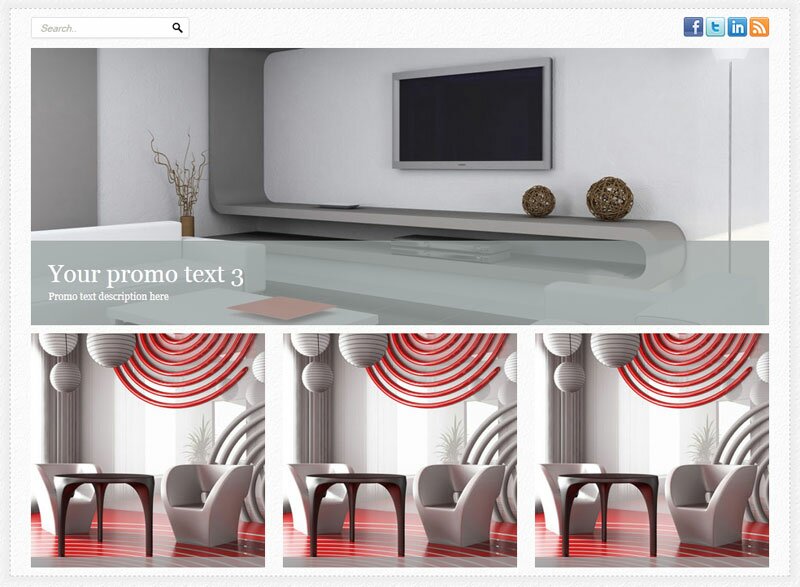
    <div id="main">
        <section id="social"><!-- Search form and social icons -->
            <form action="#" onsubmit="return false;" method="get">
                <input type="text" onfocus="if (this.value =='Search..' ) this.value=''" onblur="if (this.value=='') this.value='Search..'" value="Search.." name="q">
                <input type="submit" value="">
            </form>
            <ul>
                <li><a href="#" title="facebook" rel="external nofollow"><img alt="" src="images/facebook.png"></a></li>
                <li><a href="#" title="twitter" rel="external nofollow"><img alt="" src="images/twitter.png"></a></li>
                <li><a href="#" title="linkedin" rel="external nofollow"><img alt="" src="images/linkedin.png"></a></li>
                <li><a href="#" title="rss" rel="external nofollow"><img alt="" src="images/rss.png"></a></li>
            </ul>
        </section>
        <section id="slider-wrapper"><!-- Promo slider -->
            <div id="slider" class="nivoSlider">
                <img style="display: none;" src="images/promo1.jpg" alt="" title="#htmlcaption-1">
                <img style="display: none;" src="images/promo2.jpg" alt="" title="#htmlcaption-2">
                <img style="display: none;" src="images/promo3.jpg" alt="" title="#htmlcaption-3">
            </div>
            <div id="htmlcaption-1" class="nivo-html-caption">
                <h5 class="p2">Your promo text 1</h5>
                <p>Promo text description here</p>
            </div>
            <div id="htmlcaption-1" class="nivo-html-caption">
                <h5 class="p2">Your promo text 2</h5>
                <p>Promo text description here</p>
            </div>
            <div id="htmlcaption-2" class="nivo-html-caption">
                <h5 class="p2">Your promo text 3</h5>
                <p>Promo text description here</p>
            </div>
            <div id="htmlcaption-3" class="nivo-html-caption">
                <h5 class="p2">Your promo text 4</h5>
                <p>Promo text description here</p>
            </div>
        </section>
        <section id="content"><!-- Defining the content section -->
            <ul>
                <li>
                    <img src="images/post.jpg" alt="">
                    <div class="desc"><p>Creating A CSS3 Animated Menu</p>
                        <a class="more" href="https://www.script-tutorials.com/creating-css3-animated-menu/">Continue</a>
                    </div>
                </li>
                <li>
                    <img src="images/post.jpg" alt="">
                    <div class="desc"><p>Animated jQuery Progressbar Plugin</p>
                        <a class="more" href="https://www.script-tutorials.com/animated-jquery-progressbar/">Continue</a>
                    </div>
                </li>
                <li>
                    <img src="images/post.jpg" alt="">
                    <div class="desc">
                        <p>Fresh collection of Original Captchas</p>
                        <a class="more" href="https://www.script-tutorials.com/fresh-collection-of-original-captchas/">Continue</a>
                    </div>
                </li>
            </ul>
        </section>
    </div>
CSS for Main content section
/* main section */
#main {
    background:url(../images/mainbg.png) repeat scroll left top transparent;
    border:1.5px dashed #CBC9C7;
    -moz-box-shadow:0 0 5px 7px #eeeeee;
    -webkit-box-shadow:0 0 5px 7px #eeeeee;
    box-shadow:0 0 5px 7px #eeeeee;
    -o-box-shadow:0 0 5px 7px #eeeeee;
}
#social {
    margin:10px auto;
    width:908px;
    overflow:hidden;
}
#social form {
    float:left;
    background:url(../images/search1.png) no-repeat scroll 0 0 transparent;
    height:28px;
    width:196px;
}
#social form input[type="text"] {
    background:none repeat scroll 0 0 transparent;
    border:medium none;
    color:#B5B2AA;
    float:left;
    font-size:12px;
    font-style:italic;
    height:18px;
    line-height:1.4em;
    margin:0;
    overflow:hidden;
    padding:4px 4px 4px 11px;
    width:155px;
}
#social form input[type="submit"] {
    background:url(../images/search2.png) no-repeat scroll 0 0 transparent;
    border:medium none;
    cursor:pointer;
    float:left;
    height:28px;
    margin:0;
    overflow:hidden;
    padding:0;
    width:26px;
}
#social ul {
    float:right;
    list-style:none outside none;
    margin:0;
    padding:0;
}
#social ul li {
    float:left;
    padding:0 0 0 3px;
}
#social ul li a:hover img {
    margin-top:1px;
}
#content {
    margin:10px auto;
    width:908px;
    overflow:hidden;
}
#content ul {
    list-style:none outside none;
    margin:0;
    padding:0;
}
#content ul li {
    color:#FFFFFF;
    float:left;
    height:288px;
    margin:0 0 0 22px;
    overflow:hidden;
    padding:0;
    position:relative;
    width:288px;
}
#content ul li:first-child {
    margin:0;
}
#content ul li img {
    float:left;
}
#content ul li div {
    background:url(../images/s_caption.png) repeat scroll 0 0 transparent;
    bottom:-50px;
    left:0;
    padding:14px 18px 13px 15px;
    position:absolute;
    width:255px;
    -moz-transition:bottom 0.25s linear;
    -ms-transition:bottom 0.25s linear;
    -o-transition:bottom 0.25s linear;
    -webkit-transition:bottom 0.25s linear;
    transition:bottom 0.25s linear;
}
#content ul li:hover div {
    bottom:0;
}
#content ul li div p {
    color:#FFFFFF;
    font-size:13px;
    line-height:16px;
    padding:0 0 2px;
}
#content ul li div a.more {
    color:#FFFFFF;
    float:right;
    font-size:15px;
    font-style:italic;
    line-height:1.2em;
    text-decoration:underline;
}
Customized styles of our slider (nivoSlider) I decided to move to external file
css/nivo-slider.css
This file always available in our package. After main section I decided to make another one section for content
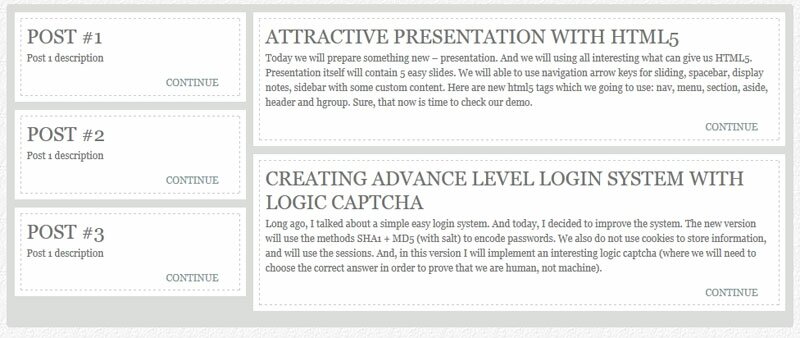
    <div id="submain">
        <section id="subcontent"><!-- Defining the content section #2 -->
            <div id="left">
                <ul>
                    <li>
                        <div>
                            <h3>Post #1</h3>
                            <p>Post 1 description</p>
                            <a class="more" href="#">Continue</a>
                        </div>
                    </li>
                    <li>
                        <div>
                            <h3>Post #2</h3>
                            <p>Post 1 description</p>
                            <a class="more" href="#">Continue</a>
                        </div>
                    </li>
                    <li>
                        <div>
                            <h3>Post #3</h3>
                            <p>Post 1 description</p>
                            <a class="more" href="#">Continue</a>
                        </div>
                    </li>
                </ul>
            </div>
            <div id="right">
                <ul>
                    <li>
                        <div>
                            <h3>Attractive Presentation with HTML5</h3>
                            <p>Today we will prepare something new – presentation. And we will using all interesting what can give us HTML5. Presentation itself will contain 5 easy slides. We will able to use navigation arrow keys for sliding, spacebar, display notes, sidebar with some custom content. Here are new html5 tags which we going to use: nav, menu, section, aside, header and hgroup. Sure, that now is time to check our demo.</p>
                            <a class="more" href="https://www.script-tutorials.com/creating-an-attractive-presentation-with-html5/">Continue</a>
                        </div>
                    </li>
                    <li>
                        <div>
                            <h3>Creating Advance Level Login system with Logic captcha</h3>
                            <p>Long ago, I talked about a simple easy login system. And today, I decided to improve the system. The new version will use the methods SHA1 + MD5 (with salt) to encode passwords. We also do not use cookies to store information, and will use the sessions. And, in this version I will implement an interesting logic captcha (where we will need to choose the correct answer in order to prove that we are human, not machine).</p>
                            <a class="more" href="https://www.script-tutorials.com/creating-advance-level-login-system-with-logic-captcha/">Continue</a>
                        </div>
                    </li>
                </ul>
            </div>
            <div class="clear"></div>
        </section>
    </div>
Here you can keep all another your posts (or another necessary content) of your website. Here are related CSS styles:
/* submain section */
#submain {
    background-color:#dbddda;
    margin-top:20px;
    padding:10px;
    border-radius:4px;
    -moz-border-radius:4px;
    -webkit-border-radius:4px;
}
#subcontent #left {
    float:left;
    width:30%;
}
#subcontent #right {
    float:left;
    margin-left:1%;
    width:69%;
}
#subcontent ul {
    list-style:none outside none;
    margin:0;
    padding:0;
}
#subcontent ul li {
    background-color:#FFFFFF;
    color:#737373;
    font-size:12px;
    line-height:18px;
    padding:7px;
    margin-bottom:10px;
    overflow:hidden;
}
#subcontent ul li:hover {
    color:#434343;
}
#subcontent ul li div {
    border:1px dashed #CBC9C7;
    padding:7px;
    overflow:hidden;
}
#subcontent ul li:hover div {
    border-color:#434343;
}
#subcontent ul li h3 {
    font-size:24px;
    font-weight:normal;
    line-height:1.2em;
    margin:0;
    padding:0 0 3px;
    text-transform:uppercase;
}
#subcontent ul li p {
    padding:0 0 13px;
}
#subcontent ul li a.more {
    color:#829597;
    float:right;
    font-size:12px;
    line-height:16px;
    padding:0 18px 0 0;
    text-decoration:none;
    text-transform:uppercase;
}
#subcontent ul li:hover a.more {
    color:#434343;
    -moz-transition:color 0.5s linear;
    -ms-transition:color 0.5s linear;
    -o-transition:color 0.5s linear;
    -webkit-transition:color 0.5s linear;
    transition:color 0.5s linear;
}
Footer section
Finally, here are our footer area

    <footer><!-- Defining the footer section of the page -->
            Art template © 2011 <a class="link" href="https://www.script-tutorials.com/">Privacy Policy</a><br />
            <a class="link" href="https://www.script-tutorials.com/creating-new-html5css3-single-page-layout-art-theme/">Template by Script Tutorials</a>
    </footer>
CSS for footer section
/* footer section */
footer{
    padding:25px 0;text-align:center;
    color:#979590;
    font-size:12px;
}
footer a{
    text-decoration:none;
    color:#979590;
}
JS for our template
Here are all necessary JS scripts:
js/html5.js, js/jquery.js and js/jquery.nivo.slider.pack.js
All these libraries already available in package
js/main.js
$(window).load(function() {
    $('#slider').nivoSlider({
        effect:'random',
        slices:15,
        boxCols:8,
        boxRows:8,
        animSpeed:500,
        pauseTime:4000,
        directionNav:false,
        directionNavHide:false,
        controlNav:false,
        captionOpacity:1
    });
});
nivoSlider have very easy initialization – so I hope that all easy here too.
Live Demo
Conclusion
Congrats, our new template ‘Art theme’ is complete! You can use this as is, but please leave the back link to us intact. Don`t forget to say thanks :) Good luck!





hello
is nivoSlider something we can all use – or do we pay for it – or have to credit them?
thank you for this wonderful, wonderful tutoria.
Hello Wilbur,
Check here: http://nivo.dev7studios.com/pricing/
As I see – it is free as jQuery plugin (without support). In case if you need some official support or some extra – you can select paid way.
Hi
Found this nice tutorial – I know its a year old :)
but I have a question about code for the slider.
could be that there is a typo? 2 times the id ‘htmlcaption-1’
and also only 3 images.
Your promo text 1Promo text description here
Your promo text 2Promo text description here
realy nice style
thank you
Hello Tim,
Yes, you are right, I made this minor error in my layout. Basically we need to have only three ‘nivo-html-caption’ elements (With ID’s from 1 to 3). We don’t need forth caption element here.