

Vimeo API – OAuth and Upload Example
Today I would like to continue talking about video. Last time we talked about Youtube, but today I decided to select Vimeo. Maybe you are owner of your own video website, maybe you are thinking about it, but anyway I think that our information will be useful for you. As you know, video usually means that you need to have a lot of space at hard disk of your hosting account. And it is true in case if you store video files at your own server. But, you can avoid all these difficulties (video storing and conversion) – you can try to work with 3-rd party video hostings. Our second example – Vimeo. In our new tutorial I will tell you how you can create Vimeo cross-uploader for your website.
To achieve our idea we will use
Vimeo Upload API. In the beginning, we should register at Vimeo here. After, please open this page. Now, we shoud create our own application (upload application). Please click ‘Create a new app’ button at the right. Here we should fill all the fields. As ‘App URL’ – you should use your result application URL, as ‘App Callback URL’ – you can use the same url (as App URL). As result – we should obtain Vimeo’s Consumer Key and Secret keys. We are going to use them in our project. Don’t forget to send request to Vimeo in order to get access to upload feature. Once you get it – you can continue.
Live Demo
[sociallocker]
download in package
[/sociallocker]
Now – download the source files and lets start coding !
Step 1. PHP
Now, please create an empty index.php file and put next code:
index.php
<?php
// prepare our Consumer Key and Secret
$consumer_key = 'CONSUMER_KEY';
$consumer_secret = 'CONSUMER_SECRET';
require_once('vimeo.php');
session_start();
$sUploadResult = '';
switch ($_REQUEST['action']) {
    case 'clear': // Clear session
        session_destroy();
        session_start();
        break;
    case 'upload': // Upload video
        $vimeo = new phpVimeo($consumer_key, $consumer_secret, $_SESSION['oauth_access_token'], $_SESSION['oauth_access_token_secret']);
        $video_id = $vimeo->upload($_FILES['file']['tmp_name']);
        if ($video_id) {
            $sUploadResult = 'Your video has been uploaded and available <a href="http://vimeo.com/'.$video_id.'">here</a> !';
            $vimeo->call('vimeo.videos.setPrivacy', array('privacy' => 'nobody', 'video_id' => $video_id));
            $vimeo->call('vimeo.videos.setTitle', array('title' => $_POST['title'], 'video_id' => $video_id));
            $vimeo->call('vimeo.videos.setDescription', array('description' => $_POST['description'], 'video_id' => $video_id));
        } else {
            $sUploadResult = 'Video Fails to Upload, try again later.';
        }
        break;
    default:
        // Create the object and enable caching
        $vimeo = new phpVimeo($consumer_key, $consumer_secret);
        $vimeo->enableCache(phpVimeo::CACHE_FILE, './cache', 300);
        break;
}
// Setup initial variables
$state = $_SESSION['vimeo_state'];
$request_token = $_SESSION['oauth_request_token'];
$access_token = $_SESSION['oauth_access_token'];
// Coming back
if ($_REQUEST['oauth_token'] != NULL && $_SESSION['vimeo_state'] === 'start') {
    $_SESSION['vimeo_state'] = $state = 'returned';
}
// If we have an access token, set it
if ($_SESSION['oauth_access_token'] != null) {
    $vimeo->setToken($_SESSION['oauth_access_token'], $_SESSION['oauth_access_token_secret']);
}
$bUploadCase = false;
switch ($_SESSION['vimeo_state']) {
    default:
        // Get a new request token
        $token = $vimeo->getRequestToken();
        // Store it in the session
        $_SESSION['oauth_request_token'] = $token['oauth_token'];
        $_SESSION['oauth_request_token_secret'] = $token['oauth_token_secret'];
        $_SESSION['vimeo_state'] = 'start';
        // Build authorize link
        $authorize_link = $vimeo->getAuthorizeUrl($token['oauth_token'], 'write');
        break;
    case 'returned':
        // Store it
        if ($_SESSION['oauth_access_token'] === NULL && $_SESSION['oauth_access_token_secret'] === NULL) {
            // Exchange for an access token
            $vimeo->setToken($_SESSION['oauth_request_token'], $_SESSION['oauth_request_token_secret']);
            $token = $vimeo->getAccessToken($_REQUEST['oauth_verifier']);
            // Store
            $_SESSION['oauth_access_token'] = $token['oauth_token'];
            $_SESSION['oauth_access_token_secret'] = $token['oauth_token_secret'];
            $_SESSION['vimeo_state'] = 'done';
            // Set the token
            $vimeo->setToken($_SESSION['oauth_access_token'], $_SESSION['oauth_access_token_secret']);
        }
        // display upload videofile form
        $bUploadCase = true;
        break;
}
?>
<!DOCTYPE html>
<html lang="en" >
    <head>
        <meta charset="utf-8" />
        <title>Vimeo API - OAuth and Upload Example | Script Tutorials</title>
        <link href="css/main.css" rel="stylesheet" type="text/css" />
    </head>
    <body>
        <header>
            <h2>Vimeo API - OAuth and Upload Example</h2>
            <a href="https://www.script-tutorials.com/vimeo-api-oauth-and-upload-example/" class="stuts">Back to original tutorial on <span>Script Tutorials</span></a>
        </header>
        <img src="vim.png" class="vim" alt="vimeo" />
    <?php if ($_SESSION['vimeo_state'] == 'start'): ?>
        <center>
        <h1>Step 1. OAuth</h1>
        <h2>Click the link to go to Vimeo to authorize your account.</h2>
        <p><a href="<?= $authorize_link ?>"><?php echo $authorize_link ?></a></p>
        </center>
    <?php endif ?>
    <?php if ($bUploadCase && $sUploadResult == ''): ?>
        <center>
        <h1>Step 2. Video info</h1>
        <h2>Now we should send video file, title and description to Vimeo</h2>
        </center>
        <form enctype="multipart/form-data" action="index.php" method="post">
            <input type="hidden" name="action" value="upload" />
            <label for="file">Please choose a file:</label><input name="file" type="file" />
            <label for="title">Title:</label><input name="title" type="text" />
            <label for="description">Description:</label><input name="description" type="text" />
            <input type="submit" value="Upload" />
        </form>
    <?php endif ?>
    <?php if ($sUploadResult): ?>
        <center>
        <h1>Step 4. Final</h1>
        <h2><?php echo $sUploadResult ?></h2>
        </center>
    <?php endif ?>
        <br /><center><h2>(<a href="?action=clear">Click here to start over</a>)</h2></center>
    </body>
</html>
In the beginning – we should attach ‘vimeo.php’ library, you can download this library here. This is a very convenient library to work with Vimeo. All the logic functionality are more easy than in case of Youtube. In case of Vimeo we should: (a) send request to vimeo website in order to obtain oauth_access_token and oauth_access_token_secret, (b) then we should send to vimeo file itself (via POST), and also title and description of our file (as text). In the result – our file should be uploaded. All this code is commented very well, so I hope that you don’t have difficulties with understanding.
Step 2. CSS
Now we can stylize our page elements:
css/main.css
.vim {
    display: block;
    margin: 40px auto;
}
form {
    background-color: #ddd;
    display: block;
    margin: 20px auto;
    padding: 15px;
    width: 400px;
}
label {
    display: block;
    margin-bottom: 5px;
}
input, select {
    border-style: groove;
    font-size: 16px;
    height: 25px;
    margin-bottom: 10px;
    width: 400px;
    /*css3 border radius*/
    -moz-border-radius: 5px;
    -ms-border-radius: 5px;
    -o-border-radius: 5px;
    -webkit-border-radius: 5px;
    border-radius: 5px;
    /* CSS3 Box sizing property */
    -moz-box-sizing: border-box;
    -webkit-box-sizing: border-box;
    -o-box-sizing: border-box;
    box-sizing: border-box;
}
input[type=submit], input[type=file]{
    cursor: pointer;
    font-weight: bold;
    height: 35px;
    padding: 5px;
}
Live Demo
Conclusion
Today we have made our next really useful tutorial. Sure that this information will be useful for your own projects. Good luck in your work!







It’s amazing but can we make something like “Live feed of uploaded videos” ???
Hello Adnan,
Yes, of course, in order to make our cross-uploader we used Advanced api (https://developer.vimeo.com/apis/advanced).
But the easiest way to get information about videos, users, groups, channels, albums, and activity is Simple API (https://developer.vimeo.com/apis/simple). You don’t need to register or authenticate your app to use the Simple API, but it’s limited to public data and is read-only.
Please check all the possible functions of Simple API to understand that you can.
This fails on the upload function for me every time from both the PC and from mobile… any ideas what it could be?
I’ve tried a 2 second video clip to cancel out any timeout issues.
Thanks
Hello Luke, The first thing you need to do is request upload access for your application. You can do so from your My Apps page (https://developer.vimeo.com/apps).
Awesome and extremely helpful, you sir deserve a pint!
Excuse me,
I run the demo, it can’t upload.
I don’t know whether it need to notice?
Thanks
Hi Elsa,
Maybe they deactivated our demo account? :-)
have you tried to work with your own api keys?
Hi Andrew,
Thanks for your help.
I think my problem is the php.ini setting about the upload file size.
It can work.
Thanks
Hi Elsa again,
In case of php.ini you can increase your upload limits with:
upload_max_filesize = 20M
post_max_size = 20M
Or, in case of .htaccess:
php_value upload_max_filesize 20M
php_value post_max_size 20M
(20M means – 20 megabytes)
I trying, but something wrong.
1. Downloaded files
2. Upload to my site
3. Go by link in dem-page to authorization page in vimeo and make “Allow”
4. Vimeo say me: To start using “Test App”, go back to the application and enter the following code: widget-akhto
5. I going to my page and did not see place where need to enter this code. Nad did not see input place for select file for upload…
?
Hi Nikita,
As we mentioned in the beginning, you have to:
1. register at Vimeo …
2. create our own application (upload application)…
3. send request to Vimeo in order to get access to upload feature…
It is very good tutorial and working very fine but can I use this code in to a Symfony 2.1 application , if yes pls give me some code help .
Thanks in Advance !
Hello Sir,
Thank you for this tutorial. But can you be more specific or give us more detailed instructions? I am not a developer and I’d really want to have this feature implemented on my website.
Thank you very much
Hello Mauro,
What exactly do you want to know? Just ask
Hi andrew. Great tutorial!
One Question?
If I have several users in a cms and each of them has their own vimeo account, will this script work, Or do I need to register for a auth, pass for each single user?
Maybe my questions is a bit off, topic?
Hello Sofus,
You can create your own application on Vimeo, and your members will be able to use it to upload videos to their own accounts
Hey Thanks for the tutorial.
I am building a website that will have video upload function just like the one you posted here using the advanced vimeo api.
I have successfully requested and received the permission to upload videos but couldn’t get your code working and I just tried to upload a 2 seconds long video I took on my phone using your “live demo” page but I get the “Video Fails to Upload, try again later.” message. Could you help me and tell me why it’s failing?
Thanks!
Hi Jay,
I have just checked our code, and it works good, I was able to upload an example video.
If you got this error (Fails to Upload), there are several things that you have to check:
1. index.php, make sure that you put your customer ID and customer Secret codes in the beginning of this file
2. to understand an error (of failed upload), you can wrap the code with try-catch, something like that:
try {
$vimeo = new phpVimeo($consumer_key, $consumer_secret, $_SESSION[‘oauth_access_token’], $_SESSION[‘oauth_access_token_secret’]);
$video_id = $vimeo->upload($_FILES[‘file’][‘tmp_name’]);
}
catch (VimeoAPIException $e) {
echo “Encountered an API error — code {$e->getCode()} – {$e->getMessage()}”;
exit;
}
hello sir andrew, i try to implement the package u provide, but i got some error
Warning: scandir(./cache) [function.scandir]: failed to open dir: No such file or directory in /home/content/27/10760327/html/ibukreatif/vimeovideo/vimeo.php on line 290
Warning: scandir() [function.scandir]: (errno 2): No such file or directory in /home/content/27/10760327/html/ibukreatif/vimeovideo/vimeo.php on line 290
Warning: Invalid argument supplied for foreach() in /home/content/27/10760327/html/ibukreatif/vimeovideo/vimeo.php on line 291
i already used my consumer key and consumer secret
maybe u can help me with my problem
Hello Vico,
The ‘scandir’ operator? That’s strange, .. try to comment this line:
$vimeo->enableCache
(in the index.php)
Hello.
I would like to ask for help – I am trying to “Mirror” my VIMEO videos into my HTML5 web page. Basically I need to upload video to VIMEO and see it on the HTML web page – any suggestions, please? Thank You
Hi Vladimirs, I suppose that you can use our script to upload your videos to your Vimeo account.
hi dear sir, i m beggienr in php, i m making a small site for videos, i m looking for a free script that where i can upload video file like we uplaod image and rename it. Can u please help me in this matter, or if you have any simple basic script uplaod videos and give video name and store in data base pleas eit a request
Hello Shahbaz,
Do you mean – a basic script to upload videos on a server with storing videos (its info) in database?
Hi,,
your article was very nice.
but i follow the same steps but im geeting errors.
================
Warning: scandir(./cache) [function.scandir]: failed to open dir: No such file or directory in /home/content/s/u/r/suresh86/html/godavari/vimeo/sources/vimeo.php on line 290
Warning: scandir() [function.scandir]: (errno 2): No such file or directory in /home/content/s/u/r/godavari/vimeo/sources/vimeo.php on line 290
Warning: Invalid argument supplied for foreach() in /home/content/s/u/r//html/godavari/vimeo/sources/vimeo.php on line 291
Vimeo API – OAuth and Upload ExampleBack to original tutorial on Script Tutorialsvimeo
Step 1. OAuth
Click the link to go to Vimeo to authorize your account.
http://vimeo.com/oauth/authorize?oauth_token=9f428946b354c46b8aa0048aa3dec72b&permission=write
(Click here to start over)
============
what i will do after clicking the URL ?
can you send me the sample/simple code for how to upload video into vimeo’s site.
Hi kolluri,
The demo package is already attached to this tutorial, you may download and then investigate it.
With regards to your warning .. it looks strange, I’ve never received anything similar, but .. try to create the ‘cache’ directory in the root of your project
Dear sir,
I noticed that you replied below:
”
Hello Sofus,
You can create your own application on Vimeo, and your members will be able to use it to upload videos to their own accounts
”
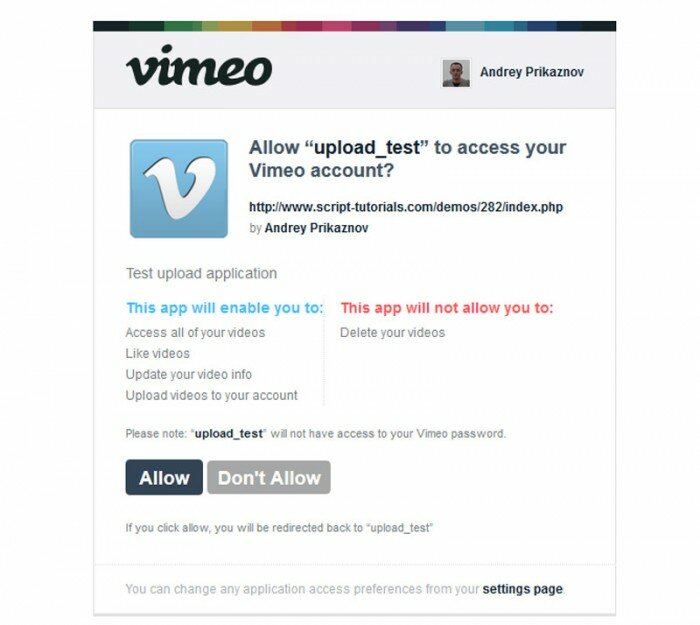
First, I tried with your live demo, and get the error is “Encountered an API error — code 401 – Permission Denied”. I found that when authorized your app with my account, one warning is displayed:
”
This app will not allow you to:
Upload videos to your account
Delete your videos
”
I am not sure it cause by my account or settings in your application. I tried developing that feature base on vimeo.php library. Your account (which create app to get keys) can upload successfully. But other account of members in my site, they cannot upload and get same error/issue.
Please help me fix the issue. Should I change any setting in my account or application?
Thank you
Hello Bean,
Yes, everybody who want to upload videos to Vimeo, should be eligible to do this action. By default, an usual account doesn’t have this opportunity. This possibilities should be granted.
Hi,
Can we upload video from our local server (http://localhost/vimeo/). I have tried but not working.
Please help me.
Thanks
Ronny
Hi Ronny,
I suppose that it should work, did you try to debug the process?
Hello Andrey,
It’s a very good tutorial. However, I have the following problem:
I had a warning issue with scandir() therefore, i followed your advice and comment the line $vimeo->enableCache.
Then It worked, I managed to access the ‘allow app request’ page and the step2 to upload a video of 2Mo. After that, I message error appears saying Fatal error: Uncaught exception ‘VimeoAPIException’ with message ‘Cannot upload’ in /home/flotau/public_html/vimeo/vimeo.php:239
Any ideas why?
Thanks in advance
Hello Flotau,
I don’t have a certain idea, but, maybe you forgot to get the permission to upload videos to your account?
Hi,
Can you please help me out finding a way to display this uploaded video on my site .
Actually i want user to upload video from my site and video to be converted and compressed through vimeo and displayed on my site only.
Hi Simar,
I think that there should be a certain code to display the vimeo video player (for websites), try to search for the code of this player
It’s simply great example, thanks for sharing! :)
I am in trouble with Advanced API, getting error of “Invalid consumer key”. Can you please help me? tried your code and even the one given in Vimeo Documentation..
Hello Mehdia,
I suggest that you check for all your api keys, there shouldn’t be any empty spaces in the beginning or end. Check the PHP syntax as well.
Hello,
I havev authorization problem.
1. Downloaded files
2. Upload to my site
3. Go by link in index page to authorize in vimeo and make “Allow”
4. Vimeo say me: To start using “bla bla bla”, go back to the application and enter the following code: group-ituay
5. I going to my page(app I created in vimeo) and did not see place where need to enter this code.
I have already created my app in vimeo and got upload access.
So, where I am missing?
Hi Priya, what exactly did it say? Did it ask you to validate your domain or what?
If I understand this, the form first uploads the video to the webserver this form is on then sends it up to vimeo correct?
I am having a problem with files larger than about 50mb the form fails and I see a php error of PHP Warning: POST Content-Length of 106998044 bytes exceeds the limit of 8388608 bytes in Unknown on line 0
How can I get around this limitation on the webserver where I have the upload form?
Thanks
Hi Mark,
Not exactly. First, it asks you to grant access to your account, if you grant – it returns oauth_access_token. after, you select a file, and click ‘upload’ button. It start uploading the file to your host and then (immediately) to vimeo server. So, video is not saved at your host. With regards to the upload limit – just expand it (this is one of server params)
Hi sir
I have use your code below 20mb file is working well but above 20mb is not working. If any reason Please help me. I have changed my server php.ini .
Hi Durai,
Try to increase upload limits for your server
Hi,
I want to direct link, when i set privacy videos. I did tried program upload above the command. I am beginners in php. help me..
Hi karthikeyan, do you use vimeo API or not? I checked your code, it looks like you don’t use vimeo api.
I added everything to my server but the authorization does not go back to my page. It says ‘authorization successfull’ and gives me a code that I am supposed to enter in app.
In your example it goes back to your page automatically… what am I missing?
Thanks
Hi Alexander,
You probably forgot to put URL for your page in settings of your vimeo application. Make sure that you put into ‘App Callback URL’ the same address as for ‘App URL’. It should be actual address of your page.