
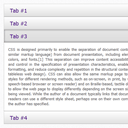
Pure CSS3 Accordion
Today I’ll tell you about another one great thing that you can implement with CSS3 – it’s an accordion. I think that accordion is still pretty popular in web. This is nice and compact way to keep some information at page. Of course, we always can use javascript (jQuery) plugins in order to set accordion, but sometimes this is not so necessary. We can use only CSS3 to achieve the same effect, today I will tell you exactly how this can be done.
Here are samples and downloadable package:
Live Demo
[sociallocker]
download in package
[/sociallocker]
Ok, download the example files and lets start coding !
Step 1. HTML Markup
Here are html source code of our demo:
index.html
<div class="accordion">
    <span id="tab1"></span>
    <span id="tab2"></span>
    <span id="tab3"></span>
    <span id="tab4"></span>
    <div class="tabs">
        <dl class="tab1">
            <dd>
                <a href="#tab1">Tab #1</a>
                <div><p>Cascading Style Sheets (CSS) is a style sheet language used to describe the presentation semantics (the look and formatting) of a document written in a markup language. Its most common application is to style web pages written in HTML and XHTML, but the language can also be applied to any kind of XML document, including plain XML, SVG and XUL.</p></div>
            </dd>
        </dl>
        <dl class="tab2">
            <dd>
                <a href="#tab2">Tab #2</a>
                <div>
                    <p>
                    <iframe width="560" height="315" src="http://www.youtube.com/embed/8o_uw_zwdEs" frameborder="0" allowfullscreen></iframe>
                    </p>
                </div>
            </dd>
        </dl>
        <dl class="tab3">
            <dd>
                <a href="#tab3">Tab #3</a>
                <div><p>CSS is designed primarily to enable the separation of document content (written in HTML or a similar markup language) from document presentation, including elements such as the layout, colors, and fonts.[1] This separation can improve content accessibility, provide more flexibility and control in the specification of presentation characteristics, enable multiple pages to share formatting, and reduce complexity and repetition in the structural content (such as by allowing for tableless web design). CSS can also allow the same markup page to be presented in different styles for different rendering methods, such as on-screen, in print, by voice (when read out by a speech-based browser or screen reader) and on Braille-based, tactile devices. It can also be used to allow the web page to display differently depending on the screen size or device on which it is being viewed. While the author of a document typically links that document to a CSS style sheet, readers can use a different style sheet, perhaps one on their own computer, to override the one the author has specified.</p></div>
            </dd>
        </dl>
        <dl class="tab4">
            <dd>
                <a href="#tab4">Tab #4</a>
                <div><p><img src="images/icons.jpg" alt="" /></p></div>
            </dd>
        </dl>
    </div>
</div>
We will use list of hidden span objects, and list of custom tabs, where you can put everything you want (any custom html content). Every tab have own ID (in order to slide).
Step 2. CSS
Here are the CSS styles of our accordion:
css/accordion.css
.accordion {
    color: #000000;
    margin: 50px auto;
    position: relative;
    width: 590px;
}
.accordion span {
    display: none
}
.tabs {
    background-color: #FFFFFF;
    overflow: hidden;
}
.tabs dl dd a {
    background-color: #C8CEFF;
    border: 1px solid;
    border-color:#ccc;border-bottom-color:#aaa;
    display: block;
    font-size: 18px;
    line-height: 32px;
    padding: 5px 20px;
    text-decoration: none;
    filter:progid:DXImageTransform.Microsoft.Gradient(GradientType=0,StartColorStr=#ffffffff,EndColorStr=#ffe0e0e0);
    background-image: -moz-linear-gradient(top,#fff 0,#e0e0e0 100%);
    background-image: -ms-linear-gradient(top,#fff 0,#e0e0e0 100%);
    background-image:-o-linear-gradient(top,#fff 0,#e0e0e0 100%);
    background-image: -webkit-gradient(linear,left top,left bottom,color-stop(0,#fff),color-stop(100%,#e0e0e0));
    background-image: -webkit-linear-gradient(top,#fff 0,#e0e0e0 100%);
    background-image: linear-gradient(to bottom,#fff 0,#e0e0e0 100%);
    -moz-transition: 0.3s;
    -ms-transition: 0.3s;
    -o-transition: 0.3s;
    -webkit-transition: 0.3s;
    transition: 0.3s;
}
.tabs dl dd div {
    background-color: #FFF;
    height: 0;
    overflow: hidden;
    box-shadow: 0 0 1px rgba(0, 0, 0, 1) inset;
    -moz-box-shadow: 0 0 1px rgba(0, 0, 0, 1) inset;
    -webkit-box-shadow: 0 0 1px rgba(0, 0, 0, 1) inset;
    -webkit-transition: all 0.3s ease-in-out;
    -moz-transition: all 0.3s ease-in-out;
    -o-transition: all 0.3s ease-in-out;
    -ms-transition: all 0.3s ease-in-out;
    transition: all 0.3s ease-in-out;
}
.tabs dl dd div p {
    color: #444444;
    font-size: 13px;
    padding: 15px;
    text-align: justify;
}
.tabs dl dd a:hover {
    box-shadow: 0px 0px 5px rgba(0, 0, 0, 0.5) inset;
    -moz-box-shadow: 0px 0px 5px rgba(0, 0, 0, 0.5) inset;
    -webkit-box-shadow: 0px 0px 5px rgba(0, 0, 0, 0.5) inset;
}
.tabs dl dd a:active {
    filter:progid:DXImageTransform.Microsoft.Gradient(GradientType=0,StartColorStr=#e6e6e6,EndColorStr=#dcdcdc);
    background-image: -moz-linear-gradient(top,#e6e6e6 0,#dcdcdc 100%);
    background-image: -ms-linear-gradient(top,#e6e6e6 0,#dcdcdc 100%);
    background-image: -o-linear-gradient(top,#e6e6e6 0,#dcdcdc 100%);
    background-image: -webkit-gradient(linear,left top,left bottom,color-stop(0,#e6e6e6),color-stop(100%,#dcdcdc));
    background-image: -webkit-linear-gradient(top,#e6e6e6 0,#dcdcdc 100%);
    background-image: linear-gradient(to bottom,#e6e6e6 0,#dcdcdc 100%);
}
#tab1:target ~ .tabs .tab1 dd div {
    height: 100px;
}
#tab2:target ~ .tabs .tab2 dd div {
    height: 345px;
}
#tab3:target ~ .tabs .tab3 dd div {
    height: 235px;
}
#tab4:target ~ .tabs .tab4 dd div {
    height: 235px;
}
#tab1:target ~ .tabs .tab1 dd a,
#tab2:target ~ .tabs .tab2 dd a,
#tab3:target ~ .tabs .tab3 dd a,
#tab4:target ~ .tabs .tab4 dd a {
    filter:progid:DXImageTransform.Microsoft.Gradient(GradientType=0,StartColorStr=#e6e6e6,EndColorStr=#dcdcdc);
    background-image: -moz-linear-gradient(top,#e6e6e6 0,#dcdcdc 100%);
    background-image: -ms-linear-gradient(top,#e6e6e6 0,#dcdcdc 100%);
    background-image: -o-linear-gradient(top,#e6e6e6 0,#dcdcdc 100%);
    background-image: -webkit-gradient(linear,left top,left bottom,color-stop(0,#e6e6e6),color-stop(100%,#dcdcdc));
    background-image: -webkit-linear-gradient(top,#e6e6e6 0,#dcdcdc 100%);
    background-image: linear-gradient(to bottom,#e6e6e6 0,#dcdcdc 100%);
    box-shadow: 0px 0px 5px rgba(0, 0, 0, 0.5) inset;
    -moz-box-shadow: 0px 0px 5px rgba(0, 0, 0, 0.5) inset;
    -webkit-box-shadow: 0px 0px 5px rgba(0, 0, 0, 0.5) inset;
}
How to slide – pretty easy: I have added transition for the height of our tabs.
Live Demo
Conclusion
Thats all. Looks great, isn’t it? If you have got any good ideas you would like to share, be sure to drop those in the comments as well. Good luck!






I am getting tab 2 stuck with the video as I tab down. Using Google Chorme (17.0.963.56).
Hi Consltr,
This is strange, I have exactly same Chrome version, and I even can play video (from youtube) and switch tabs in the same time
Do you think that the browser support for this would be high enough for me to replace a jQuery accordion with it?
This is just so much easier :)
Hi Dean,
I quite sure (that in coming future css3 will provide many different styles to cover most of user needs) :-)
Dear Admin,
Appreciate this useful package.
Here is a question:
1. Can I add more tab’s?
2. When answer for Q1 is yes, how?
So far I have tried adding an extra tab entitled tab#5, somehow the content is not displayed when it’s clicked.
Please do help me out.
Hello Daniel,
Please pay attention to the HTML markup. It contains only the tabs. And you will see that there are only 4 tabs, you can copy forth tab and add it as fifth, plus, you will need to make small update for the SQL too
Hello,
Is there a way to make this work in IE?
Also, is there a way to have the tab jump to the top of the page once clicked?
I am not a developer, and am trying to add an accordion function to my squarespace site. I appreciate any assistance.
Hello Brian,
Unfortunately, css3 transitions don’t work in IE browser. But, we can hope that it will work in IE10.
Yes, it is possible to push tab to the top once clicked, but you have to implement it by self.
Hello,
I have another question. I’d like to include links in the content area. However, the links are being styled as boxes. Is there a way to correct this? I appreciate your time and information.
Hello Brian again,
This is answer to your second question: yes, this is possible, but, you have only 2 ways: a) modify elements of tab and modify CSS code accordingly to your changes
b) or, you can use text-based elements (span as example) and add onclick handlers
Nice tutorial. What commands would I need to set the menu to open with the contents of one tab displayed?
Hi Alan,
You can pass these ‘commands’ in GET address, example: index.html#tab3
Thanks a lot! Exactly what I searched.
good one dude
i have added images to the titlle code it looks great but i cant scroll down. what i means is when the page is full i cant scroll down when i click on the last tab to see what the content is. can i do somethng abou it????
Hi, you should have all possibilities to scroll, it means, that you should get exactly the same result as on our demo. I have just tried to add more content on the page and inside of accordion slides, and, when I open the last one slide, I still can scroll down (to see the end of its content)
Hello,
Many thanks for this splendid accordion, it’s what I have been looking for as I didn’t want to use JavaScript.
However, I do have a couple of questions:
1: You have set height to each div, can this be set to auto so depending on the contents and screen size it will scale to fit?
2: I plan to use this on a fluid grid layout webpage and I would like all divs to scale to fit screen width?
I do this as a hobby and very green when it comes to code, so any tips would be very welcome.
Hi Lee,
Yes, it will work with height:auto, but not so smooth (sliding effect) as with using the certain height.
hey admin,
I love this and thank you for it but I do have an issue. I’m trying to link into the accordion with anchor links but they wont work. how do i go about do thing so i can have a client click a link and it will go to the right tab in the accordion.
thank you for your help.
Hi Chris,
In order to create a link to a certain tab, you can make:
<a href="#tab1">link to the first tab</a>
I implements same code its workign fine in firfox but did’t work in IE
Hi Manjeey,
What version is your IE? Try to update it in case if it is too old
Hi.
I just found this.
Is there a way to stop the video, when the ta is closed?
Thanks.
Markus
Hi Markus,
What video do you mean?
thank you very much.
but I can not make it work on Android (smartphone and tablet) browser
Hi Gerard,
What browser do you use on Android?
Thank you, this is an awesome tutorial. Quick question:
How do I make accordion self close when I click on itself ?
It seems that the only way to close an accordion option is to select another option.
Hello,
Yes, in order to deselect an opened section, you need to select any other internal object (to release the dom-selection)