
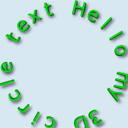
HTML5 3D circle text with shadows. Another one great HTML5 tutorial. It tells us how to draw 3D text and display it in a circle. Also it tells us about applying shadow and 3D effect to text. Plus I am going to rotate text in a circle.
Here are our demo and downloadable package:
Live Demo
[sociallocker]
download in package
[/sociallocker]
Ok, download the source files and lets start coding !
Step 1. HTML
As usual – very small HTML code with canvas element inside
index.html
<!DOCTYPE html>
<html lang="en" >
    <head>
        <meta charset="utf-8" />
        <title>HTML5 3D circle text with shadows | Script Tutorials</title>
        <link href="css/main.css" rel="stylesheet" type="text/css" />
        <script type="text/javascript" src="js/script.js"></script>
    </head>
    <body>
        <header>
            <h2>HTML5 3D circle text with shadows</h2>
            <a href="https://www.script-tutorials.com/html5-3d-circle-text-with-shadows/" class="stuts">Back to original tutorial on <span>Script Tutorials</span></a>
        </header>
        <div class="container">
            <div class="contr">
                <input type="radio" name="mode" onchange="bPlay = false" checked /><label>Pause</label>
                <input type="radio" name="mode" onchange="bPlay = true" /><label>Play</label>
            </div>
            <canvas id="panel" width="600" height="600"></canvas>
        </div>
    </body>
</html>
Step 2. CSS
css/main.css
We are going to skip of publishing styles today again.
Step 3. JS
js/script.js
// variables
var canvas, ctx;
var bPlay = false;
var iAngle = 0;
var sText = 'Hello my 3D circle text ';
// drawing functions
function clear() { // clear canvas function
    ctx.clearRect(0, 0, ctx.canvas.width, ctx.canvas.height);
}
function drawScene() { // main drawScene function
    if (bPlay == 1) {
        clear(); // clear canvas
        // fill background
        ctx.fillStyle = '#d7e8f1';
        ctx.fillRect(0, 0, ctx.canvas.width, ctx.canvas.height);
        // change angle
        iAngle+=0.005;
        // and draw text circle in center of canvas with radius = 200
        draw3DTextCircle(sText, canvas.width / 2, canvas.height / 2, 200, Math.PI / 2 - iAngle);
    }
}
function draw3DTextCircle(s, x, y, radius, iSAngle){
    // rarian per letter
    var fRadPerLetter = 2*Math.PI / s.length;
    // save context, translate and rotate it
    ctx.save();
    ctx.translate(x,y);
    ctx.rotate(iSAngle);
    // amount of extra bottom layers
    var iDepth = 4;
    // set dark green color for extra layers
    ctx.fillStyle = '#168d1e';
    // pass through each letter of our text
    for (var i=0; i<s.length; i++) {
        ctx.save();
        ctx.rotate(i*fRadPerLetter);
        // draw extra layers
        for (var n = 0; n < iDepth; n++) {
            ctx.fillText(s[i], n, n - radius);
        }
        // shadow params
        ctx.fillStyle = '#00d50f';
        ctx.shadowColor = 'black';
        ctx.shadowBlur = 10;
        ctx.shadowOffsetX = iDepth + 2;
        ctx.shadowOffsetY = iDepth + 2;
        // draw letter
        ctx.fillText(s[i], 0, -radius);
        ctx.restore();
   }
   ctx.restore();
}
// binding onload event
if (window.attachEvent) {
    window.attachEvent('onload', main_init);
} else {
    if(window.onload) {
        var curronload = window.onload;
        var newonload = function() {
            curronload();
            main_init();
        };
        window.onload = newonload;
    } else {
        window.onload = main_init;
    }
}
function main_init() {
    // create canvas and context objects
    canvas = document.getElementById('panel');
    ctx = canvas.getContext('2d');
    // initial text settings
    ctx.font = '64px Verdana';
    ctx.textAlign = 'center';
    ctx.textBaseline = 'middle';
    // fill background
    ctx.fillStyle = '#d7e8f1';
    ctx.fillRect(0, 0, ctx.canvas.width, ctx.canvas.height);
    // draw text circle in center of canvas with radius = 200
    draw3DTextCircle(sText, canvas.width / 2, canvas.height / 2, 200, Math.PI / 2 - iAngle);
    setInterval(drawScene, 40); // loop drawScene
}
I have defined own function to draw 3d text circle – draw3DTextCircle. This function have next params – text itself, coordinates, radius and angle. This function will split all text by letters, then I will draw each letter separately with rotation (and 3d effect).
Live Demo
Conclusion
Welcome back to read something new and interesting about HTML5. Good luck in your projects.





Thanks for sharing the code to create 3D circle text with shadows. I am going to use it in my blog.
hello thanks for sharing this..
i need to use images not text and the same rotate effect….can u help me please?
thanks
Hi pankaj,
Try to use translate and rotate functions in your code to rotate custom objects.
Exactly what I was looking for…THANK YOU. Also, How could I have the text circling around an image?
Hi Brandy,
It depends only on your requirements. Just because it can be usual square image (some JPG), or it can be transparent image (PNG).