
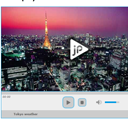
jPlayer video player. Today we continue jQuery lessons, and will talk about adding customizable player for audio or video files to our website. This new plugin jPlayer is pretty good: it allows play media files, pause, change volume, it even have all necessary controls (which you can see in any media player). Also it allow us to change all its styles (all styles of interface loceted in single css file). More, it support HTML5 and able to work quite in all possible browsers. Here are supported formats of media files: mp3, ogg, m4a, m4v, ogv, wav etc. So, lets start to create our own players?
Here are sample and downloadable package:
Live Demo
[sociallocker]
download in package
[/sociallocker]
Ok, download the example files and lets start coding !
Step 1. HTML
As usual, we start with the HTML.
This is our main page code with all samples.
index.html
<link rel="stylesheet" href="css/jplayer.blue.monday.css" type="text/css" media="all" />
<link rel="stylesheet" href="css/main.css" type="text/css" media="all" />
<script src="js/jquery.min.js" type="text/javascript"></script>
<script src="js/jquery.jplayer.min.js" type="text/javascript"></script>
<script src="js/main.js" type="text/javascript"></script>
<div class="example">
    <div>
        <div class="players">
            <h2>Audio player</h2>
            <div class="jp-audio">
                <div class="jp-type-single">
                    <div id="jquery_jplayer_1" class="jp-jplayer"></div>
                    <div id="jp_interface_1" class="jp-interface">
                        <ul class="jp-controls">
                            <li><a href="#" class="jp-play" tabindex="1">play</a></li>
                            <li><a href="#" class="jp-pause" tabindex="1">pause</a></li>
                            <li><a href="#" class="jp-stop" tabindex="1">stop</a></li>
                            <li><a href="#" class="jp-mute" tabindex="1">mute</a></li>
                            <li><a href="#" class="jp-unmute" tabindex="1">unmute</a></li>
                        </ul>
                        <div class="jp-progress">
                            <div class="jp-seek-bar">
                                <div class="jp-play-bar"></div>
                            </div>
                        </div>
                        <div class="jp-volume-bar">
                            <div class="jp-volume-bar-value"></div>
                        </div>
                        <div class="jp-current-time"></div>
                        <div class="jp-duration"></div>
                    </div>
                    <div id="jp_playlist_1" class="jp-playlist">
                        <ul>
                            <li>Audio track</li>
                        </ul>
                    </div>
                </div>
            </div>
        </div>
        <div class="players">
            <h2>Video player</h2>
            <div class="jp-video jp-video-270p">
                <div class="jp-type-single">
                    <div id="jquery_jplayer_2" class="jp-jplayer"></div>
                    <div id="jp_interface_2" class="jp-interface">
                        <div class="jp-video-play"></div>
                        <ul class="jp-controls">
                            <li><a href="#" class="jp-play" tabindex="1">play</a></li>
                            <li><a href="#" class="jp-pause" tabindex="1">pause</a></li>
                            <li><a href="#" class="jp-stop" tabindex="1">stop</a></li>
                            <li><a href="#" class="jp-mute" tabindex="1">mute</a></li>
                            <li><a href="#" class="jp-unmute" tabindex="1">unmute</a></li>
                        </ul>
                        <div class="jp-progress">
                            <div class="jp-seek-bar">
                                <div class="jp-play-bar"></div>
                            </div>
                        </div>
                        <div class="jp-volume-bar">
                            <div class="jp-volume-bar-value"></div>
                        </div>
                        <div class="jp-current-time"></div>
                        <div class="jp-duration"></div>
                    </div>
                    <div id="jp_playlist_2" class="jp-playlist">
                        <ul>
                            <li>Tokyo weather</li>
                        </ul>
                    </div>
                </div>
            </div>
        </div>
    </div>
</div>
Here I draw 2 players – for audio and for video. Both have similar code.
Step 2. CSS
Here are used CSS styles.
css/main.css
body{background:#eee;font-family:Verdana, Helvetica, Arial, sans-serif;margin:0;padding:0}
.example{background:#FFF;width:1000px;height:500px;font-size:80%;border:1px #000 solid;margin:0.5em 10% 0.5em;padding:1em 2em 2em;-moz-border-radius:3px;-webkit-border-radius:3px}
.example .players{float:left;margin:10px}
Other css files (with related images):
css/jplayer.blue.monday.css, css/jplayer.blue.monday.jpg, css/jplayer.blue.monday.video.play.png, css/jplayer.blue.monday.video.play.hover.png and css/pbar-ani.gif
no need to show here. It always available as a download package (all just because its just part of our jPlayer plugin)
Step 3. JS
Here are necessary JS files to our project.
js/main.js
$(document).ready(function(){
    $("#jquery_jplayer_1").jPlayer({
        ready: function () {
            $(this).jPlayer("setMedia", {
                mp3: "media/track.mp3",
            }).jPlayer("play"); // auto play
        },
        ended: function (event) {
            $(this).jPlayer("play");
        },
        swfPath: "swf",
        supplied: "mp3"
    })
    .bind($.jPlayer.event.play, function() { // pause other instances of player when current one play
            $(this).jPlayer("pauseOthers");
    });
    $("#jquery_jplayer_2").jPlayer({
        ready: function () {
            $(this).jPlayer("setMedia", {
                m4v: "media/tokyo.m4v",
                ogv: "media/tokyo.ogv",
                poster: "media/poster.jpg"
            });
        },
        ended: function (event) {
            $("#jquery_jplayer_2").jPlayer("play", 0);
        },
        swfPath: "js",
        supplied: "m4v, ogv",
        cssSelectorAncestor: "#jp_interface_2"
    })
    .bind($.jPlayer.event.play, function() { // pause other instances of player when current one play
            $(this).jPlayer("pauseOthers");
    });
});
This is most interesting and important part of our lesson. Here are initializations of both players. Via ‘jPlayer’ function we starting initialization of our players. Via first method ‘setMedia’ we defining media which will play. You can check my code to understand format – how need to put it here. When media finished to play (‘ended’ event), player jump to begining ($("#jquery_jplayer_2").jPlayer("play", 0);). Second param – time. Param ‘swfPath’ – path to Jplayer.swf file. Param ‘supplied’ – defines formats supplied to player. This is most important details.
js/jquery.min.js and js/jquery.jplayer.min.js
This is common files – jQuery library with player plugin. No need to give full code of that file here. It always available in package
Step 4. SWF
Single used flash swf file: (our main player)
swf/Jplayer.swf
Seems we quite finished. All media files I put to ‘media’ folder. This is our audio file – track.mp3, video files: tokyo.m4v + tokyo.ogv, and thumbnail (poster): poster.jpg
If you have strange behaviour and ogg files (oga, ogv, ogg) not working well, possible .htaccess file (in folder with media files) will help you:
AddType audio/ogg .oga
AddType video/ogg .ogv .ogg
Live Demo
Conclusion
So, now you will able to put audio/video players to pages of your website. Congratulations. Sure that you will happy play with it. You can use this material in your startups. Good luck!





Nice post. But there is no seek bar for video player. in code that div is there. why it is not working. If seek bar work it will work for .swf files???
Seek bar (progress of video play) already working here (my browser is FF). Try to re-check it. About swf files – sure that swf? As I know – flash video files have FLV format, swf – executable flash objects. No, as I read – current player don`t support SWF files.
Nice Players thanks for sharing.
I downloaded your package, but the music player is not working. When I click on play nothing happens. The video player is working fine though.
Can you help me as what can be the problem???
2 Ankz
Are this don`t working only at your side? What about our demo?
If you have firebug plugin installed – you should notice that when page loading – attached MP3 file loading too.
I like,
It is nice work done by the Programmer, But Please I am facing one problem it is not working on I>E.
When i open this in I.E nothing hapen.
The video is not playing, I also check the Live demo not working on I.E
Hello shahid,
What about music player? Does it working for you?
Yes, possible that plugin have (or had) difficulties with IE browser.
This is great but it only seems to work in Chrome and Safari. Is there a simple way to add ogg files for the audio player?
Hello scotteh,
Did you try something like this?
$(this).jPlayer("setMedia", {
oga: "/ogg/elvis.ogg"
});
As I read at official website – it should be available in most browsers, even at IE6 (http://jplayer.org/)
Not working in any browser apart from chrome. Please publish only when working please. Wasted my time
Hi Joe,
Even this pretty old demo (it was published 1 year ago) works well in Chrome and FF, but yes, not in IE browser.
But I sure that updated library will work well in IE too. Check its fresh version at: http://www.jplayer.org/
-Every where on the web same tutorial – all the tracks given are given upfront.
There is no example showing how to change the tracks from a different playlist
etc. Very frustrating.
Hi Smith,
Were you looking for possibility to set custom videos on-fly?
Basically, I can recommend you to use jQuery as example, and, you have to clear media array in the first:
$(id).jPlayer(‘clearMedia’)
and after, you can $(id).jPlayer(‘setMedia’, Object: media) again (to add new videos into player).
Hey,
Out of all the various info sites out there on the subject, this looks to be my best op to make my want happen. In Drupal 7, there is a module for jplayer that works alongside the development pack from the jplayer site (2.0). On the homepage of my drupal site,there are blocks that can be used to house html code (I’d like to get the audio player to show up on main page in one of these blocks). I then need the player to be able to access a limited number of mp3 files on the server,for playback (no automatic playback). How can I go about making this happen?
Thanks
Hello Earl,
I use ‘set media‘ function in order to add mp3 file to the player, try to read their official documentation to check if you can add multiple files (like playlist). I am sure that this is possible.
In this case – you can just use updated initialize code for your HTML page for Drupal 7.
Hi, the demo doesn’t work on Firefox 16 ! It’s ok for the video, not for the MP3 !
Both woks good in Chrome 21 ! Can you help me please ?
Hi Didikiki,
FF doesn’t support MP3 format, but it supports OGG audio
hi and thanks for the tutorial, however may you show us how to add audio files of our own rather than the default “Cro Magnon Man” found on th official jplayer site. i need to add my own audio files and replace these, how do i do that ? is there a url i can link to or what?
Hello Governor,
Please look at our js/main.js. Do you see this code ‘mp3: ‘media/track.mp3’ ?
This is a way how we can set our own mp3 files. Of course, you always can set your own files, example: my_file.mp3
Hey thank you so much,you just lift of a huge burden off my head
this post was too useful,and word perfect
:)
hello all,
I want to have a all controls in the video player. Can any one help for this.??
Hello pradeep,
What controls exactly? Most possible controls are already here by default (play/pause, stop, mute, volume).
Jplayer is nice.
but if i have 100 video and i want to play them dynamically..
then how would i do that??
Hello Sunny,
As I know, in this case you can use playlists (jPlayerPlaylist), you can find example here: http://www.jplayer.org/latest/demo-02-video/
Hi
Is their way of listing more that one tacks in audio and more than one video in the respective players for users to select and after selection it automatically plays the audio track or the video.
Hi Naniv,
Yes, I think so, I think that playlists should help you
Hi,
I would like to play live stream (shoutcast). How can I do that?
As it is written on the official website:
> jPlayer works with Icecast and ShoutCast servers that serve MP3 or M4A (AAC) audio.
example:
var stream = {
title: “ABC Jazz”,
mp3: “http://listen.radionomy.com/abc-jazz”
},
ready = false;
$(“#jquery_jplayer_1”).jPlayer({
ready: function (event) {
ready = true;
$(this).jPlayer(“setMedia”, stream);
},
pause: function() {
$(this).jPlayer(“clearMedia”);
},
error: function(event) {
if(ready && event.jPlayer.error.type === $.jPlayer.error.URL_NOT_SET) {
// Setup the media stream again and play it.
$(this).jPlayer(“setMedia”, stream).jPlayer(“play”);
}
},
swfPath: “../js”,
supplied: “mp3”,
preload: “none”,
wmode: “window”,
keyEnabled: true
});
Hi,
I have the blue monday skin working okay and have been trying unsuccessfully to make a jplayer playlist with the pink flag skin as in the demo on the jplayer site. Being an amateur with the code, I find it difficult to understand the official instructions. I have tried following the methods you used for the blue monday skin but no success. So do you have a step by step tutorial similar to the blue monday example to help with this please ? and thank you.
Barry
Hi Barry,
All skin-related files are located in the ‘css’ directory. Try to understand how it was made.
hi
Audio player is Working but Video Player not Working Why I Using Your Download Package. please help me.?
Hi Mitesh,
Does it depend on browser? Try to repeat your test in another browser (FF/Chrome/Safari)
Trying to setup a Playlist with muliple mp3 urls but the demo they give on JPlayer website is not very thorough. Can you help?
Hi Michael,
Did you try to use the playlist as I already suggested (for Sunny) ?
Example:
myPlaylist.setPlaylist([
{
title:’Cro Magnon Man’,
artist:’The Stark Palace’,
mp3:’mp3/TSP-01-Cro_magnon_man.mp3′,
oga:’ogg/TSP-01-Cro_magnon_man.ogg’,
poster: ‘poster/The_Stark_Palace_640x360.png’
},
{
title:’Hidden’,
artist:’Miaow’,
free: true,
mp3:’mp3/Miaow-02-Hidden.mp3′,
oga:’ogg/Miaow-02-Hidden.ogg’,
poster: ‘poster/Miaow_640x360.png’
}
]);
I liked and shared this article but somehow i can’t see the “download package” section. pls help
Hi Nntien,
Are you sure? Can you tell me what sharing option you uses? Because I tested this plugin with few networks – it worked.
It works like this: you click the ‘share’ button (any), it opens the popup, you finalize it, popup closes, the page (with our article) refreshes, and you should have the possibility to download the result.
oh, after refresh the page, the download show up. Thanks for your quick reply.
Ok, that’s great