
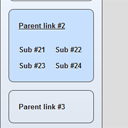
CSS3 multilevel menu with transition and animation
In our new tutorial we’ll create a new nice CSS3 menu with interesting behavior, where I use css3 transition and animation. This is UL-LI-based multilevel menu.
Here are samples and downloadable package:
Live Demo
download in package
Ok, download the example files and lets start coding !
Step 1. HTML
As usual, we start with the HTML. Here are full html code of our menu. As you can see – this is multilevel menu built on UL-LI elements. But, it is a little unusual. I don’t wrap submenus into own UL element, I am going to hide them, and display if necessary.
index.html
<!DOCTYPE html>
<html lang="en" >
    <head>
        <meta charset="utf-8" />
        <title>CSS3 multilevel menu with transition and animation | Script Tutorials</title>
        <link href="css/layout.css" type="text/css" rel="stylesheet">
        <link href="css/menu.css" type="text/css" rel="stylesheet">
    </head>
    <body>
        <header>
            <h2>CSS3 multilevel menu with transition and animation</h2>
            <a href="https://www.script-tutorials.com/css3-multilevel-menu-with-transition-and-animation/" class="stuts">Back to original tutorial on <span>Script Tutorials</span></a>
        </header>
        <div class="container">
            <ul id="nav">
                <li>
                    <a href="#">Parent link #1</a>
                    <a href="#">Sub #11</a>
                    <a href="#">Sub #12</a>
                    <a href="#">Sub #13</a>
                    <a href="#">Sub #14</a>
                </li>
                <li>
                    <a href="#">Parent link #2</a>
                    <a href="#">Sub #21</a>
                    <a href="#">Sub #22</a>
                    <a href="#">Sub #23</a>
                    <a href="#">Sub #24</a>
                </li>
                <li>
                    <a href="#">Parent link #3</a>
                    <a href="#">Sub #31</a>
                    <a href="#">Sub #32</a>
                    <a href="#">Sub #33</a>
                    <a href="#">Sub #34</a>
                </li>
                <li>
                    <a href="#">Parent link #4</a>
                    <a href="#">Sub #41</a>
                    <a href="#">Sub #42</a>
                    <a href="#">Sub #43</a>
                    <a href="#">Sub #44</a>
                </li>
            </ul>
        </div>
    </body>
</html>
Step 2. CSS
Here are the CSS styles of our menu. Maybe you’ve noticed – that in our html – I have two CSS files: layout.css and menu.css. The first file (layout.css) contain the styles of our test page. We will not publish these styles in this article, but if you wish – you can find these styles in our package.
css/menu.css
ul#nav {
    border: 1px solid #454545;
    display: block;
    height: 400px;
    margin: 0;
    padding: 15px;
    width: 160px;
    -moz-border-radius: 9px;
    -ms-border-radius: 9px;
    -webkit-border-radius: 9px;
    -o-border-radius: 9px;
    border-radius: 9px;
    background: -moz-linear-gradient(#f1f7ff, #d9e1ec);
    background: -ms-linear-gradient(#f1f7ff, #d9e1ec);
    background: -webkit-gradient(linear, left top, left bottom, color-stop(0%, #f1f7ff), color-stop(100%, #d9e1ec));
    background: -webkit-linear-gradient(#f1f7ff, #d9e1ec);
    background: -o-linear-gradient(#f1f7ff, #d9e1ec);
    filter: progid:DXImageTransform.Microsoft.gradient(startColorstr='#f1f7ff', endColorstr='#d9e1ec');
    -ms-filter: "progid:DXImageTransform.Microsoft.gradient(startColorstr='#f1f7ff', endColorstr='#d9e1ec')";
    background: linear-gradient(#f1f7ff, #d9e1ec);
}
@-moz-keyframes custom_effect {
    0% {
        background:rgba(255, 255, 255, 0.0);
        height: 60px;
    }
    33% {
        background:rgba(255, 255, 255, 0.0);
        height: 160px;
    }
    66% {
        background:rgba(255, 255, 255, 1.0);
    }
    100% {
        background:rgba(190, 220, 255, 0.8);
        height: 135px;
    }
}
@-webkit-keyframes custom_effect {
    0% {
        background:rgba(255, 255, 255, 0.0);
        height: 60px;
    }
    33% {
        background:rgba(255, 255, 255, 0.0);
        height: 160px;
    }
    66% {
        background:rgba(255, 255, 255, 1.0);
    }
    100% {
        background:rgba(190, 220, 255, 0.8);
        height: 135px;
    }
}
ul#nav li {
    -moz-border-radius: 9px;
    -ms-border-radius: 9px;
    -webkit-border-radius: 9px;
    -o-border-radius: 9px;
    border-radius: 9px;
    background-color:transparent;
    border: 1px solid #454545;
    display: block;
    height: 60px;
    line-height: 60px;
    margin-bottom: 15px;
    overflow: hidden;
}
ul#nav li:hover {
    -moz-animation-name: custom_effect;
    -moz-animation-duration: 0.4s;
    -moz-animation-timing-function: ease;
    -moz-animation-iteration-count: 1;
    -moz-animation-direction: normal;
    -moz-animation-delay: 0;
    -moz-animation-play-state: running;
    -moz-animation-fill-mode: forwards;
    -webkit-animation-name: custom_effect;
    -webkit-animation-duration: 0.4s;
    -webkit-animation-timing-function: ease;
    -webkit-animation-iteration-count: 1;
    -webkit-animation-direction: normal;
    -webkit-animation-delay: 0;
    -webkit-animation-play-state: running;
    -webkit-animation-fill-mode: forwards;
    background:rgba(190, 220, 255, 0.8);
    height: 135px;
}
ul#nav a {
    border-style: none;
    border-width: 0;
    color: #181818;
    cursor: pointer;
    float: left;
    font-size: 13px;
    font-weight: bold;
    line-height: 30px;
    margin-top: 100px;
    padding-left: 18px;
    text-align: left;
    text-decoration: none;
    text-shadow: 0 1px 1px #FFFFFF;
    vertical-align: middle;
    -moz-transition: all 0.1s 0.4s;
    -ms-transition: all 0.1s 0.4s;
    -o-transition: all 0.1s 0.4s;
    -webkit-transition: all 0.1s 0.4s;
    transition: all 0.1s 0.4s;
}
ul#nav a:hover {
    text-decoration: underline;
}
ul#nav li a:first-child {
    display: block;
    float: none;
    line-height: 60px;
    margin-top: 0;
}
ul#nav li:hover a:first-child {
    line-height: 60px;
}
ul#nav li:hover a {
    margin-top: 0;
}
Live Demo
download in package
Conclusion
Hope you enjoyed with new menu, don’t forget to tell thanks and leave a comment :) Good luck!






You obviously know what you are doing!
For me as a beginner in coding journey I really appreciate your effort to help others borrow and learn things.
Thanks Andrey!
Looks really great! In which browsers will this work?
Many thanks for the explanations and for the demo files – I didn´t find any license in the package, could you please tell me, if this can be used in commercial work, too?
Regards, SiGa!
Hi SiGa,
I have prepared license recently: https://www.script-tutorials.com/terms-of-use/
May Allah you live long. I downloaded this menu. it works very well, a lot of thanks.
Nice work…
is there any workaround to show sub items in open mode on selecting the main link?
Hello AK,
The most easy way – to mark an active menu element with some certain class name, and, add this class near :hover styles (to simulate hover styles)
Awesome tutorial. Love to read.
Great tutorial..
Thank you for sharing :)