
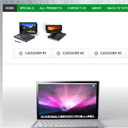
Creating new HTML5&CSS3 single page layout – E-Store
Today I want to introduce new great masterpiece – new template with codename: ‘E-Store’. This will nice HTML5/CSS3 template with nice light gray colors. This is template for online stores. Hope that you will like new styles and you will learn some new design methods.
I going to start step-by-step tutorial for creating html5-css3 layout.
Final Result
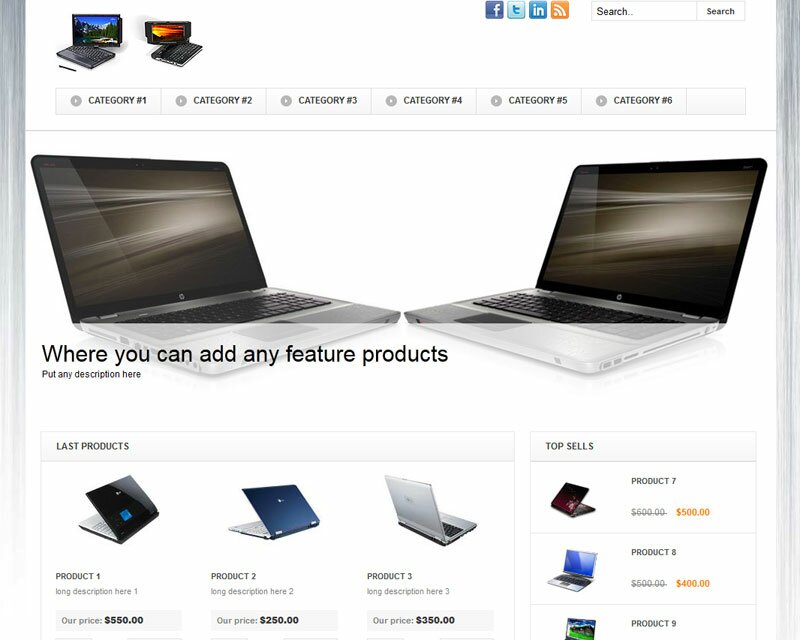
Live Demo
[sociallocker]
download result
[/sociallocker]
Get started
Ok, let`s start. Lets create new folder and several folders inside (to keep all well structured):
- css – which will contain our CSS stylesheets (nivo-slider.css, reset.css and style.css)
- images – which will contain all used images
- js – will contain JS files (html5.js, jquery.js, jquery.nivo.slider.pack.js and main.js)
Head section code
Now I am going to give you the usual HTML head area of index.html with the attached CSS/JS.
<!DOCTYPE html>
<html lang="en"><head>
<meta http-equiv="content-type" content="text/html; charset=UTF-8">
    <title>E-Store single page layout | Script Tutorials</title>
    <meta charset="utf-8">
    <!-- Linking styles -->
    <link rel="stylesheet" href="css/reset.css" type="text/css" media="screen">
    <link rel="stylesheet" href="css/style.css" type="text/css" media="screen">
    <link rel="stylesheet" href="css/nivo-slider.css" type="text/css" media="screen">
    <!-- Linking scripts -->
    <script src="js/jquery.js"></script>
    <script src="js/jquery.nivo.slider.pack.js"></script>
    <script src="js/main.js"></script>
    <!--[if lt IE 9]>
    <script type="text/javascript" src="js/html5.js"></script>
    <![endif]-->
</head>
Moving forward – Main layout (body)
Whole layout consist of 4 main section: header (with navigation menu, logo, search form, social icons, plus submenu with categories), slider section (nivoSlider), main content section (two column layout for all your rest content) and footer (with copyrights). It looks like:
<body>
<div class="container">
        <header><!-- Defining the header section of the page -->
            <nav><!-- Defining the navigation menu -->
                <ul>
                    <li class="selected"><a href="#">Home</a></li>
                    <li><a href="#">Specials</a></li>
                    .......
                </ul>
            </nav>
            <div class="top_head"><!-- Defining the top head element -->
                <div class="logo"><!-- Defining the logo element -->
                    <a href="https://www.script-tutorials.com/">
                        <img src="images/logo.jpg" title="E-Store template" alt="E-Store template" />
                    </a>
                </div>
                <section id="search"><!-- Search form -->
                    <form action="#" onsubmit="return false;" method="get">
                        .......
                    </form>
                    <ul id="social"><!-- Social profiles links -->
                        .......
                    </ul>
                </section>
            </div>
            <section id="submenu"><!-- Defining the sub menu -->
                <ul>
                    <li><a href="#">Category #1</a></li>
                    <li><a href="#">Category #2</a></li>
                    .......
                </ul>
            </section>
        </header>
        <div id="slider"><!-- Defining the main content section -->
        <!-- Promo slider -->
            <section id="slider-wrapper">
                .......
            </section>
        </div>
        <div id="main"><!-- Defining submain content section -->
            <section id="content"><!-- Defining the content section #2 -->
                <div id="left">
                    <h3>Last products</h3>
                    <ul>
                        ............
                    </ul>
                </div>
                <div id="right">
                    <h3>Top sells</h3>
                    <ul>
                        ............
                    </ul>
                </div>
            </section>
        </div>
    <footer><!-- Defining the footer section of the page -->
        <div id="privacy">
        </div>
    </footer>
</div>
</body>
here are you can see base CSS styles
/* base styles */
* {
    margin: 0;
    padding: 0;
}
body {
    background: url("../images/body-bg.jpg") no-repeat fixed center top #FFFFFF;
    color: #7F7F7F;
    font-family: Arial,Helvetica,sans-serif;
    font-size: 12px;
    line-height: 17px;
}
img {
    border: 0 none;
}
.container {
    margin:30px auto 0;
    position:relative;
    text-align:left;
    width:1000px;
    padding-left: 20px;
    padding-right: 20px;
}
Header section with nav menu, logo, search bar, submenu etc

Here are HTML for this section:
<header><!-- Defining the header section of the page -->
    <nav><!-- Defining the navigation menu -->
        <ul>
            <li class="selected"><a href="#">Home</a></li>
            <li><a href="#">Specials</a></li>
            <li><a href="#">All Products</a></li>
            <li><a href="#">Contact us</a></li>
            <li><a href="#">About</a></li>
            <li><a href="https://www.script-tutorials.com/creating-new-html5css3-single-page-layout-e-store/">Back To Tutorial</a></li>
        </ul>
    </nav>
    <div class="top_head"><!-- Defining the top head element -->
        <div class="logo"><!-- Defining the logo element -->
            <a href="https://www.script-tutorials.com/">
                <img src="images/logo.jpg" title="E-Store template" alt="E-Store template" />
            </a>
        </div>
        <section id="search"><!-- Search form -->
            <form action="#" onsubmit="return false;" method="get">
                <input type="text" onfocus="if (this.value =='Search..' ) this.value=''" onblur="if (this.value=='') this.value='Search..'" value="Search.." name="q">
                <input type="submit" value="Search">
            </form>
            <ul id="social"><!-- Social profiles links -->
                <li><a href="#" title="facebook" rel="external nofollow"><img alt="" src="images/facebook.png"></a></li>
                <li><a href="#" title="twitter" rel="external nofollow"><img alt="" src="images/twitter.png"></a></li>
                <li><a href="#" title="linkedin" rel="external nofollow"><img alt="" src="images/linkedin.png"></a></li>
                <li><a href="#" title="rss" rel="external nofollow"><img alt="" src="images/rss.png"></a></li>
            </ul>
        </section>
    </div>
    <section id="submenu"><!-- Defining the sub menu -->
        <ul>
            <li><a href="#">Category #1</a></li>
            <li><a href="#">Category #2</a></li>
            <li><a href="#">Category #3</a></li>
            <li><a href="#">Category #4</a></li>
            <li><a href="#">Category #5</a></li>
            <li><a href="#">Category #6</a></li>
        </ul>
    </section>
</header>
CSS for header section
/* header section */
header {
    background: url("../images/header-bg.png") repeat scroll left top #fff;
    border-bottom:2px solid #e0e0e0;
    position: relative;
    z-index: 10;
}
.top_head {
    overflow: hidden;
    position: relative;
}
.logo {
    float: left;
    padding: 37px 0 0 39px;
}
#search {
    float: right;
    margin: 21px 41px 0 0;
    text-align: right;
}
#search form {
    float:right;
}
#search form input[type="text"] {
    background: none repeat scroll 0 0 #FFFFFF;
    border: 1px solid #E0E0E0;
    float: left;
    font-family: Arial,Helvetica,sans-serif;
    height: 15px;
    padding: 5px;
    width: 129px;
}
#search form input[type="submit"] {
    background-color: #FFFFFF;
    border: 1px solid #E0E0E0;
    border-left-width:0px;
    color: #383838;
    cursor:pointer;
    float: left;
    font-family: Arial,Helvetica,sans-serif;
    font-size: 11px;
    font-weight: bold;
    height: 27px;
    padding: 0;
    width: 64px;
}
#social {
    float:right;
    list-style:none outside none;
    margin:0 30px 0 0;
    padding:0;
}
#social li {
    float:left;
    padding:0 0 0 5px;
}
#social li a:hover img {
    margin-top:1px;
}
/*navigation menu*/
nav {
    background-color:#00942f;
    overflow: hidden;
}
nav ul {
    margin: 0;
    padding: 0;
}
nav ul li {
    float: left;
}
nav ul li a {
    color: #FFFFFF;
    display: block;
    font-size: 11px;
    font-weight: bold;
    height: 20px;
    line-height: 20px;
    padding: 4px 10px 4px 11px;
    position: relative;
    text-decoration: none;
    text-transform: uppercase;
}
nav ul li a:hover, nav ul li.selected a {
    background: none repeat scroll 0 0 #353535;
}
#submenu {
    background: -moz-linear-gradient(#ffffff, #f6f6f6); /* FF 3.6+ */
    background: -ms-linear-gradient(#ffffff, #f6f6f6); /* IE10 */
    background: -webkit-gradient(linear, left top, left bottom, color-stop(0%, #ffffff), color-stop(100%, #f6f6f6)); /* Safari 4+, Chrome 2+ */
    background: -webkit-linear-gradient(#ffffff, #f6f6f6); /* Safari 5.1+, Chrome 10+ */
    background: -o-linear-gradient(#ffffff, #f6f6f6); /* Opera 11.10 */
    filter: progid:DXImageTransform.Microsoft.gradient(startColorstr='#ffffff', endColorstr='#f6f6f6'); /* IE6 & IE7 */
    -ms-filter: "progid:DXImageTransform.Microsoft.gradient(startColorstr='#ffffff', endColorstr='#f6f6f6')"; /* IE8+ */
    background: linear-gradient(#ffffff, #f6f6f6); /* the standard */
    border: 1px solid #E0E0E0;
    height: 34px;
    margin: 20px 40px;
}
#submenu ul {
    margin: 0;
    padding: 0;
}
#submenu li {
    float: left;
    line-height: 1em;
    list-style: none outside none;
    margin: 0;
    position: relative;
}
#submenu li a {
    background: url("../images/smenup.png") no-repeat scroll 0 9px transparent;
    border-right: 1px solid #E0E0E0;
    color: #383838;
    display: block;
    font-size: 12px;
    font-weight: bold;
    line-height: 14px;
    margin: 0 0 0 19px;
    padding: 9px 18px 11px 24px;
    text-decoration: none;
    text-transform: uppercase;
}
#submenu li a:hover {
    background-image: url("../images/smenua.png");
}
Slider and Main content section
After our header area – we have next two areas – slider (nivoSlider) and main content area.
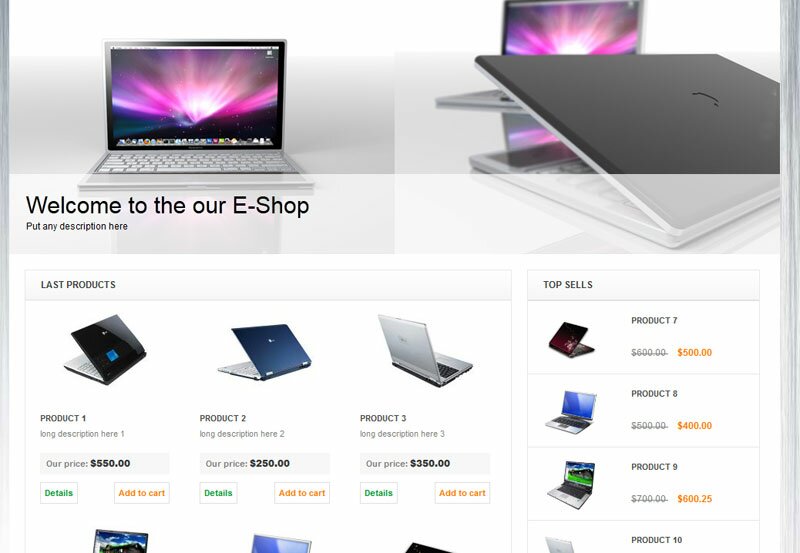
<div id="slider"><!-- Defining the main content section -->
<!-- Promo slider -->
<section id="slider-wrapper">
<div id="slider" class="nivoSlider">
<img style="display: none;" src="images/promo1.jpg" alt="" title="#htmlcaption-1">
<img style="display: none;" src="images/promo2.jpg" alt="" title="#htmlcaption-2">
<img style="display: none;" src="images/promo3.jpg" alt="" title="#htmlcaption-3">
</div>
<div id="htmlcaption-1" class="nivo-html-caption">
<h5 class="p2">Welcome to the our E-Shop</h5>
<p>Put any description here</p>
</div>
<div id="htmlcaption-1" class="nivo-html-caption">
<h5 class="p2">This is promo area</h5>
<p>Put any description here</p>
</div>
<div id="htmlcaption-2" class="nivo-html-caption">
<h5 class="p2">Where you can add any feature products</h5>
<p>Put any description here</p>
</div>
<div id="htmlcaption-3" class="nivo-html-caption">
<h5 class="p2">Or something else</h5>
<p>Put any description here</p>
</div>
</section>
</div>
<div id="main"><!-- Defining submain content section -->
<section id="content"><!-- Defining the content section #2 -->
<div id="left">
<h3>Last products</h3>
<ul>
<li>
<div class="img"><a href="#"><img alt="" src="images/post1.jpg"></a></div>
<div class="info">
<a class="title" href="#">Product 1</a>
<p>long description here 1</p>
<div class="price">
<span class="st">Our price:</span><strong>$550.00</strong>
</div>
<div class="actions">
<a href="#">Details</a>
<a href="#">Add to cart</a>
</div>
</div>
</li>
<li>
<div class="img"><a href="#"><img alt="" src="images/post2.jpg"></a></div>
<div class="info">
<a class="title" href="#">Product 2</a>
<p>long description here 2</p>
<div class="price">
<span class="st">Our price:</span><strong>$250.00</strong>
</div>
<div class="actions">
<a href="#">Details</a>
<a href="#">Add to cart</a>
</div>
</div>
</li>
<li>
<div class="img"><a href="#"><img alt="" src="images/post3.jpg"></a></div>
<div class="info">
<a class="title" href="#">Product 3</a>
<p>long description here 3</p>
<div class="price">
<span class="st">Our price:</span><strong>$350.00</strong>
</div>
<div class="actions">
<a href="#">Details</a>
<a href="#">Add to cart</a>
</div>
</div>
</li>
<li>
<div class="img"><a href="#"><img alt="" src="images/post4.jpg"></a></div>
<div class="info">
<a class="title" href="#">Product 4</a>
<p>long description here 1</p>
<div class="price">
<span class="st">Our price:</span><strong>$550.00</strong>
</div>
<div class="actions">
<a href="#">Details</a>
<a href="#">Add to cart</a>
</div>
</div>
</li>
<li>
<div class="img"><a href="#"><img alt="" src="images/post5.jpg"></a></div>
<div class="info">
<a class="title" href="#">Product 5</a>
<p>long description here 2</p>
<div class="price">
<span class="st">Our price:</span><strong>$250.00</strong>
</div>
<div class="actions">
<a href="#">Details</a>
<a href="#">Add to cart</a>
</div>
</div>
</li>
<li>
<div class="img"><a href="#"><img alt="" src="images/post6.jpg"></a></div>
<div class="info">
<a class="title" href="#">Product 6</a>
<p>long description here 3</p>
<div class="price">
<span class="st">Our price:</span><strong>$350.00</strong>
</div>
<div class="actions">
<a href="#">Details</a>
<a href="#">Add to cart</a>
</div>
</div>
</li>
</ul>
</div>
<div id="right">
<h3>Top sells</h3>
<ul>
<li>
<div class="img"><a href="#"><img alt="" src="images/post6.jpg"></a></div>
<div class="info">
<a class="title" href="#">Product 7</a>
<div class="price">
<span class="usual">$600.00 </span>
<span class="special">$500.00</span>
</div>
</div>
</li>
<li>
<div class="img"><a href="#"><img alt="" src="images/post5.jpg"></a></div>
<div class="info">
<a class="title" href="#">Product 8</a>
<div class="price">
<span class="usual">$500.00 </span>
<span class="special">$400.00</span>
</div>
</div>
</li>
<li>
<div class="img"><a href="#"><img alt="" src="images/post4.jpg"></a></div>
<div class="info">
<a class="title" href="#">Product 9</a>
<div class="price">
<span class="usual">$700.00 </span>
<span class="special">$600.25</span>
</div>
</div>
</li>
<li>
<div class="img"><a href="#"><img alt="" src="images/post3.jpg"></a></div>
<div class="info">
<a class="title" href="#">Product 10</a>
<div class="price">
<span class="usual">$805.00 </span>
<span class="special">$714.25</span>
</div>
</div>
</li>
<li>
<div class="img"><a href="#"><img alt="" src="images/post2.jpg"></a></div>
<div class="info">
<a class="title" href="#">Product 11</a>
<div class="price">
<span class="usual">$1205.00 </span>
<span class="special">$1000.25</span>
</div>
</div>
</li>
<li>
<div class="img"><a href="#"><img alt="" src="images/post1.jpg"></a></div>
<div class="info">
<a class="title" href="#">Product 12</a>
<div class="price">
<span class="usual">$200.00 </span>
<span class="special">$190.25</span>
</div>
</div>
</li>
</ul>
</div>
</section>
</div>
CSS for Main content section
/* main section */
#main {
    background-color: #fff;
    padding:20px 0;
}
#content {
    overflow: hidden;
}
#content #left, #content #right {
    border: 1px solid #E9E9E9;
    float: left;
    margin: 0 2%;
    width: 63%;
}
#content #right {
    margin-left: 0;
    width: 30%;
}
#content h3 {
    background: -moz-linear-gradient(#ffffff, #F6F6F6); /* FF 3.6+ */
    background: -ms-linear-gradient(#ffffff, #F6F6F6); /* IE10 */
    background: -webkit-gradient(linear, left top, left bottom, color-stop(0%, #ffffff), color-stop(100%, #F6F6F6)); /* Safari 4+, Chrome 2+ */
    background: -webkit-linear-gradient(#ffffff, #F6F6F6); /* Safari 5.1+, Chrome 10+ */
    background: -o-linear-gradient(#ffffff, #F6F6F6); /* Opera 11.10 */
    filter: progid:DXImageTransform.Microsoft.gradient(startColorstr='#ffffff', endColorstr='#F6F6F6'); /* IE6 & IE7 */
    -ms-filter: "progid:DXImageTransform.Microsoft.gradient(startColorstr='#ffffff', endColorstr='#F6F6F6')"; /* IE8+ */
    background: linear-gradient(#ffffff, #F6F6F6); /* the standard */
    border-bottom: 1px solid #E0E0E0;
    color: #3C3C3C;
    font-size: 12px;
    font-weight: bold;
    line-height: 15px;
    padding: 11px 0 12px 20px;
    text-transform: uppercase;
}
#content ul {
    list-style:none outside none;
    margin:0;
    padding:0;
}
#content #left ul li {
    float:left;
    padding-bottom: 21px;
    width: 33%;
}
#content #left ul li:hover {
    background-color: #fbfbfb;
}
#content #right ul li {
    border-top: 1px solid #E7E7E7;
    overflow: hidden;
}
#content #right ul li:hover {
    background-color: #fbfbfb;
}
#content #right ul li:first-child {
    border-width: none;
}
#content #left ul li .img {
    text-align: center;
}
#content #right ul li .img {
    background-color: #FFFFFF;
    float: left;
    height: 94px;
    text-align: center;
    width: 113px;
}
#content #left ul li .img img {
    height:128px;
    width:128px;
}
#content #right ul li .img img {
    height:70px;
    margin-top: 11px;
    width:70px;
}
#content #left ul li .info {
    padding: 17px 20px 0 19px;
}
#content #right ul li .info {
    float: left;
    overflow: hidden;
    padding: 17px 0 0 21px;
    width: 164px;
}
#content ul li .info .title {
    color: #4B4B4B;
    display: inline-block;
    font-size: 11px;
    font-weight: bold;
    line-height: 16px;
    text-decoration: none;
    text-transform: uppercase;
    width: 150px;
}
#content ul li .info .title:hover {
    color: #049733;
}
#content #left ul li .info p {
    color: #7F7F7F;
    font-size: 11px;
    line-height: 16px;
    padding-top: 3px;
}
#content #left ul li .info .price {
    background: none repeat scroll 0 0 #F7F7F7;
    color: #383838;
    font-size: 12px;
    font-weight: bold;
    line-height: 16px;
    margin: 17px 0 10px;
    padding: 6px 0 6px 8px;
}
#content #right ul li .info .price {
    color: #383838;
    font-size: 12px;
    font-weight: bold;
    line-height: 16px;
    padding-top: 25px;
}
#content #left ul li .info .price .st {
    color: #7F7F7F;
    font-size: 11px;
    line-height: 16px;
    margin-right: 3px;
}
#content #right ul li .info .price .usual, #content #right ul li .info .price .special {
    color: #7F7F7F;
    font-size: 12px;
    font-weight: normal;
    line-height: 16px;
    padding-right: 6px;
    text-decoration: line-through;
}
#content #right ul li .info .price .special {
    color: #FD7A01;
    font-weight: bold;
    text-decoration: none;
}
#content #left ul li .info .actions {
    overflow:hidden;
}
#content #left ul li .info .actions a {
    border: 1px solid #E0E0E0;
    color: #fd7a01;
    display: block;
    float:right;
    font-size: 11px;
    font-weight: bold;
    line-height: 16px;
    padding: 5px;
    text-decoration: none;
}
#content #left ul li .info .actions a:first-child {
    color: #009832;
    float:left;
}
Customized styles of our slider (nivoSlider) will in external file
css/nivo-slider.css
This file always available in our package.
Footer section
Finally, here are our footer area

<footer><!-- Defining the footer section of the page -->
    <div id="privacy">
        E-Store template © 2011 <a class="link" href="https://www.script-tutorials.com/">Privacy Policy</a><br />
        <a class="link" href="https://www.script-tutorials.com/creating-new-html5css3-single-page-layout-e-store/">Template by Script Tutorials</a>
    </div>
</footer>
CSS for footer section
/* footer section */
footer {
    background: none repeat scroll 0 0 #FFFFFF;
    border-top: 1px solid #E0E0E0;
    margin: 0 0 5px;
    padding: 15px 0 15px 20px;
}
footer #privacy {
    color: #9B9B9B;
    font-size: 12px;
    line-height: 20px;
    overflow: hidden;
    width: 100%;
}
footer a{
    color: #9B9B9B;
    text-decoration: none;
}
JS for our template
Here are all necessary JS scripts:
js/html5.js, js/jquery.js and js/jquery.nivo.slider.pack.js
All these libraries already available in package
js/main.js
$(window).load(function() {
    $('#slider').nivoSlider({
        effect:'random',
        slices:15,
        boxCols:8,
        boxRows:8,
        animSpeed:500,
        pauseTime:4000,
        directionNav:false,
        directionNavHide:false,
        controlNav:false,
        captionOpacity:1
    });
});
nivoSlider itself have very easy initialization – so I hope that all easy here too.
Live Demo
Conclusion
Congrats, our new template ‘E-Store’ is complete! You can use this as is, but please leave the back link to us intact. Don`t forget to say thanks :) Good luck!






Nivo Slider does not work in you demo, I have checked their website, their demo is , however, in you demo, you have two divs with id of “slider”. I tried to change outer div with another id, then the nivo slider works!
Thanks Yang,
Yes, it seems that I miss it.
I changed first instance
<div id="slider">
to
<div id="slider2">
and now slider works well
Andrew, you are great tutor and a designer.
You do take all the pain to present everything very systematically and you explain well.
I am loving your tutorials.
The end products are very beautiful too.
Thanks bud and Namaste from India.
Hye thanks for the good tutoriaL.But i have some confusion in js section.I have downloaded your source code you have there js file”html5.js , jquery.js , jquery.nivo.slider.pack.js ,main.js ” and you have showed only main.js for silder.
So i have one question to you that you have “html5.js , jquery.js , jquery.nivo.slider.pack.js” are plugins or not for slider.Please
reply to my question please as soon as possible.
Thanks for the good tutorial.
Reply me..
Hello John,
html5.js is a small library for old IE browsers (to display all new HTML5 tag elements properly),
jquery.js – is just jQuery library,
jquery.nivo.slider.pack.js – is nivoSlider jQuery plugin.
You have to link all these libraries in your header section as I explained in the beginning. All these libraries are linked below ‘Linking scripts’ comment’
Hi,
Nice tuts, I’ll do the another one like this you have on your site.
I’ve just some little word to say :
“header-bg.png” is missing
And sometime in CSS you can make code shorted like :
padding-left: 20px;
padding-right: 20px;
use only :
padding:0 20px;
But your skill lvl is very hight dude i like, and the tuto is dating from 2011 !
Thx again and stay in touch :).
One of these is enought, you make a repetition, the first one is the “long” and the twice is “short” code (recomanded by w3c)
Une only the second one, is better ^^ !
Thank you Nyco for your contribution here.
I hope that I made the good template in the far 2011 :-)
Great Tutorial!! I’m trying to incorporate this into ASP.NET. I’m where the style went wrong but I ran into the following issues:
1. Green menu doesn’t have the white fonts (remains the default color)
2. The sub-menu does not render the UI properly
3. The slider section does not fit or is the same size as the container
4. The main content, I put this into a webform using master pages and did not render correctly
I have this project setup to use HTML5
I can provide a screen shot, but I follow your tutorial exactly.
Struggling a bit
Regards,
Hi Joe,
Yes, you may contact with me directly (using the contact form on the bottom of the website). I am not sure about several your questions, because:
1) the green menu uses the white color font (it is in styles)
2) there is no any submenu which you mentioned, or you mean the second menu bar?
this is exactly what I was looking for for a project I have to do at school. I just wish you added more samples pages like contact us and/or about us etc..
Hi Angel,
If you wish – just do it!
It won’t be difficult, mainly – you need to clone the index page, and adjust it accordingly your needs (you may put here any desired text content and images)