
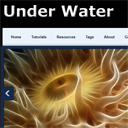
Single page template ‘Under water’ tutorial. Today we will create another one HTML5 web template (named as Under Water) with combination of CSS3 and jQuery. Current template contains such elements as header area (with logo and navigation menu), promo area (jCarouselLite Slider), center area with some content, bottom footer area (which you can use for footer links as example, or social icons).
Live Demo
[sociallocker]
download in package
[/sociallocker]
Now, you can download package, check our prepared demo and lets start!
Step 1. Photoshop
As usual, quite each webmaster (designer) start thinking about initial idea which he like to build. And, I can suggest to use Photoshop to draw main layout – how all should looks
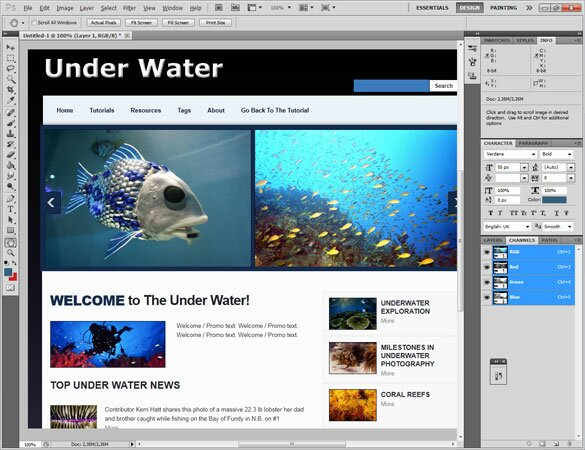
And only after – we can start thinking about main layout of that page – HTML
Step 2. HTML
I separated whole layout to few sections:
- header section – place, where we will put our logo, menu, promo (carousel) slider
- central section – place for main content with some custom content
- footer section – where you will able to put any custom links, company name, social icons
In HTML code I will use next HTML5 tags: <header>, <nav>, <section>, <article>, <figure> and <footer>. Ok, lets check code of our sample
index.html
<!DOCTYPE html><!-- The new doctype -->
<html lang="en">
<head>
<title>Creating a HTML5 & CSS3 Single Page Web Layout #2 Under Water | Script tutorials</title>
<meta charset="utf-8">
<!-- Linking styles -->
<link rel="stylesheet" href="css/reset.css" type="text/css" media="screen">
<link rel="stylesheet" href="css/style.css" type="text/css" media="screen">
<link rel="stylesheet" href="css/menu.css" type="text/css" media="screen">
<!-- Linking scripts -->
<script src="js/jquery.js" type="text/javascript"></script>
<script src="js/superfish.js" type="text/javascript"></script>
<script src="js/script.js" type="text/javascript"></script>
<script src="js/jquery.easing.1.3.js" type="text/javascript"></script>
<script src="js/jcarousellite_1.0.1.js" type="text/javascript"></script>
<!--[if lt IE 9]>
<script type="text/javascript" src="js/html5.js"></script>
<![endif]-->
</head>
<body id="page1">
<header><!-- Defining the header section of the page -->
<div class="main">
<div class="container">
<div class="wrapper p1">
<div class="grid_18">
<h1><a class="logo" href="#">Under Water</a></h1>
</div>
<div class="grid_6">
<form id="search-form" action="" method="post">
<fieldset>
<div class="wrapper">
<input type="text" name="search" />
<a href="#" onclick="">Search</a>
</div>
</fieldset>
</form>
</div>
</div>
<div class="grid_24">
<nav><!-- Defining the navigation menu -->
<ul class="menu">
<li class="first"><a class="item" href="https://www.script-tutorials.com/">Home</a></li>
<li><a class="item" href="https://www.script-tutorials.com/">Tutorials</a>
<ul style="display: none; visibility: hidden;">
<li><a href="https://www.script-tutorials.com/category/html-css/">HTML / CSS</a></li>
<li><a href="https://www.script-tutorials.com/category/jquery/">JS / jQuery</a></li>
<li><a href="https://www.script-tutorials.com/category/php/">PHP</a></li>
<li><a href="https://www.script-tutorials.com/category/mysql/">MySQL</a></li>
<li><a href="https://www.script-tutorials.com/category/xslt/">XSLT</a></li>
<li><a href="https://www.script-tutorials.com/category/ajax/">Ajax</a></li>
</ul>
</li>
<li><a class="item" href="https://www.script-tutorials.com/category/resources/">Resources</a></li>
<li><a class="item" href="https://www.script-tutorials.com/tag/html5/">Tags</a>
<ul>
<li><a href="https://www.script-tutorials.com/tag/animation/">animation</a></li>
<li><a href="https://www.script-tutorials.com/tag/html5/">html5</a></li>
<li><a href="https://www.script-tutorials.com/tag/captcha/">captcha</a></li>
<li><a href="https://www.script-tutorials.com/tag/gallery/">gallery</a></li>
<li><a href="https://www.script-tutorials.com/tag/animation/">animation</a></li>
</ul>
</li>
<li><a class="item" href="https://www.script-tutorials.com/about/">About</a></li>
<li><a class="item" href="https://www.script-tutorials.com/html5-css3-page-template-2-under-water/">Go Back To The Tutorial</a></li>
</ul>
</nav>
</div>
<div class="clear"></div>
</div>
<div class="carousel gallery"><!-- Promo slider -->
<a class="prev" href="#">prev</a>
<div class="jCarouselLite">
<ul>
<li><img src="images/promo/p1.jpg" alt="" /></li>
<li><img src="images/promo/p2.jpg" alt="" /></li>
<li><img src="images/promo/p3.jpg" alt="" /></li>
<li><img src="images/promo/p4.jpg" alt="" /></li>
<li><img src="images/promo/p5.jpg" alt="" /></li>
<li><img src="images/promo/p6.jpg" alt="" /></li>
</ul>
</div>
<a class="next" href="#">next</a>
</div>
</div>
</header>
<section id="content"><!-- Defining the main content section of the page -->
<div class="main">
<div class="container">
<div class="bg">
<div class="wrapper">
<article class="grid_16 alpha">
<div class="pref">
<h2><strong>Welcome</strong> to The Under Water!</h2>
<div class="wrapper img-indent-bot">
<figure class="img-indent frame"><img src="images/about.jpg" alt="" /></figure>
<div class="extra-wrap">
Welcome / Promo text. Welcome / Promo text. Welcome / Promo text. Welcome / Promo text.
</div>
</div>
<h3 class="p3">Top Under Water News</h3>
<div class="wrapper margin-bot">
<figure class="img-indent2"><img src="images/tn1.jpg" alt="" /></figure>
<div class="extra-wrap">
<p class="p0">Contributor Kerri Hatt shares this photo of a massive 22.3 lb lobster her dad and brother caught while fishing on the Bay of Fundy in N.B. on #1</p>
<a class="link" href="#">More</a>
</div>
</div>
<div class="wrapper margin-bot">
<figure class="img-indent2"><img src="images/tn2.jpg" alt="" /></figure>
<div class="extra-wrap">
<p class="p0">Contributor Kerri Hatt shares this photo of a massive 22.3 lb lobster her dad and brother caught while fishing on the Bay of Fundy in N.B. on #2</p>
<a class="link" href="#">More</a>
</div>
</div>
<div class="wrapper margin-bot">
<figure class="img-indent2"><img src="images/tn3.jpg" alt="" /></figure>
<div class="extra-wrap">
<p class="p0">Contributor Kerri Hatt shares this photo of a massive 22.3 lb lobster her dad and brother caught while fishing on the Bay of Fundy in N.B. on #3</p>
<a class="link" href="#">More</a>
</div>
</div>
<div class="wrapper margin-bot">
<figure class="img-indent2"><img src="images/tn4.jpg" alt="" /></figure>
<div class="extra-wrap">
<p class="p0">Contributor Kerri Hatt shares this photo of a massive 22.3 lb lobster her dad and brother caught while fishing on the Bay of Fundy in N.B. on #4</p>
<a class="link" href="#">More</a>
</div>
</div>
</div>
</article>
<article class="grid_8 omega">
<div class="suf">
<div class="box"><div class="wrapper">
<figure class="img-indent3 frame"><img src="images/imgp1.jpg" alt="" /></figure>
<div class="extra-wrap">
<h4>Underwater Exploration</h4>
<a class="link" href="#">More</a>
</div>
</div></div>
<div class="box"><div class="wrapper">
<figure class="img-indent3 frame"><img src="images/imgp2.jpg" alt="" /></figure>
<div class="extra-wrap">
<h4>Milestones in Underwater Photography</h4>
<a class="link" href="#">More</a>
</div>
</div></div>
<div class="box"><div class="wrapper">
<figure class="img-indent3 frame"><img src="images/imgp3.jpg" alt="" /></figure>
<div class="extra-wrap">
<h4>Coral Reefs</h4>
<a class="link" href="#">More</a>
</div>
</div></div>
<div class="box"><div class="wrapper">
<figure class="img-indent3 frame"><img src="images/imgp4.jpg" alt="" /></figure>
<div class="extra-wrap">
<h4>Underwater Portraits</h4>
<a class="link" href="#">More</a>
</div>
</div></div>
<div class="box"><div class="wrapper">
<figure class="img-indent3 frame"><img src="images/imgp5.jpg" alt="" /></figure>
<div class="extra-wrap">
<h4>Marine Marvels</h4>
<a class="link" href="#">More</a>
</div>
</div></div>
<div class="box"><div class="wrapper">
<figure class="img-indent3 frame"><img src="images/imgp6.jpg" alt="" /></figure>
<div class="extra-wrap">
<h4>Coral</h4>
<a class="link" href="#">More</a>
</div>
</div></div>
<div class="box"><div class="wrapper">
<figure class="img-indent3 frame"><img src="images/imgp7.jpg" alt="" /></figure>
<div class="extra-wrap">
<h4>Underwater Landscapes</h4>
<a class="link" href="#">More</a>
</div>
</div></div>
<div class="box"><div class="wrapper">
<figure class="img-indent3 frame"><img src="images/imgp8.jpg" alt="" /></figure>
<div class="extra-wrap">
<h4>Colorful Sea Creatures</h4>
<a class="link" href="#">More</a>
</div>
</div></div>
</div>
</article>
</div>
</div>
</div>
</div>
</section>
<footer><!-- Defining the footer section of the page -->
<div class="main">
<div class="row-1">
<ul class="list-services">
<li><a title="Facebook" href="#"><img src="images/facebook.png" alt="" /></a></li>
<li><a title="Flickr" href="#"><img src="images/flickr.png" alt="" /></a></li>
<li><a title="Twitter" href="#"><img src="images/twitter.png" alt="" /></a></li>
<li><a title="RSS" href="#"><img src="images/rss.png" alt="" /></a></li>
</ul>
</div>
<div class="row-2">
<div class="container">
<div class="bg">
<div class="wrapper">
<div class="grid_24">
<div class="indent">
Under Water © 2011 : <a class="link" href="#">Privacy</a> </div>
</div>
</div>
</div>
</div>
</div>
</div>
</footer>
</body>
</html>
Step 3. JS
js/html5.js, js/jcarousellite_1.0.1.js, js/jquery.js, js/jquery.easing.1.3.js and js/superfish.js
This is all used libraries: jQuery, jCarouselLite and Superfish (available in package). Rest custom JS code located in another file:
js/script.js
$(document).ready(function() {
    $('ul.menu').superfish({
        delay: 500,
        animation: {opacity:'show',height:'show'},
        speed: 'normal',
        autoArrows: false,
        dropShadows: false
    });
    $('.gallery .jCarouselLite').jCarouselLite({
        btnNext: '.gallery .next', btnPrev: '.gallery .prev',
        scroll: 1,
        mouseWheel: true,
        auto: 10000,
        speed: 1000,
        vertical: false,
        circular: true,
        visible: 3,
        start: 0
    });
    $('.box').hover(function(){
        $(this).addClass('alt');
    }, function(){
        $(this).removeClass('alt');
    });
    $('.list-services li a').hover(function(){
            $(this).stop(true,false).animate({marginTop:'-8px'}, {easing:'easeOutBounce', duration: 500});
            $(this).css('paddingBottom','8px');
        },function(){
            $(this).stop(true,false).animate({marginTop:'0'}, {easing:'easeOutBounce', duration: 500});
            $(this).css('paddingBottom','0');
    });
});
Step 4. CSS
css/reset.css
This is reset file to reset stylesheet, and, here are result minimized css file with all necessary styles for our demo:
css/style.css
article, aside, audio, canvas, command, datalist, details, embed, figcaption, figure, footer, header, hgroup, keygen, meter, nav, output, progress, section, source, video {display:block;}
mark, rp, rt, ruby, summary, time {display:inline;}
html {
width:100%;
}
body {
background:url(../images/body.gif) repeat-x scroll center top #fff;
border-top:5px solid #162d50;
color:#3a3a3a;
font-family:Arial, Helvetica, sans-serif;
font-size:100%;
min-width:938px;
}
.bg {
background:#fcfcfc;
margin:0 auto;
padding:45px 0 28px;
width:930px;
}
.main {
font-size:0.8125em;
line-height:1.538em;
margin:0 auto;
padding:0;
width:938px;
}
a {
color:#274b83;
outline:none;
}
a:hover {
text-decoration:none;
}
.wrapper {
overflow:hidden;
width:100%;
}
.extra-wrap {
overflow:hidden;
}
p {
margin-bottom:18px;
}
.p0 {
margin-bottom:0;
}
.p1 {
margin-bottom:8px;
}
.p3 {
margin-bottom:30px;
}
.frame {
background:#00102d;
padding:1px;
}
/*other*/
.margin-bot {
margin-bottom:35px;
}
.spacing {
margin-right:35px;
}
.indent {
padding:0 0 0 14px;
}
.indent2 {
padding:0 9px 0 23px;
}
.pref {
padding:0 23px 0 18px;
}
.suf {
padding-right:18px;
}
.indent-bot {
margin-bottom:20px;
}
.indent-bot2 {
margin-bottom:30px;
}
.indent-bot3 {
margin-bottom:45px;
}
.img-indent-bot {
margin-bottom:25px;
}
.img-indent {
float:left;
margin:0 25px 0 0;
}
.img-indent2 {
float:left;
margin:0 18px 0 0;
}
.img-indent3 {
float:left;
margin:0 10px 0 0;
}
.prev-indent-bot {
margin-bottom:10px;
}
.menu li a,.link,.logo {
text-decoration:none;
}
/*header*/
header {
min-height:490px;
position:relative;
width:100%;
z-index:2;
}
h1 {
margin:0 0 0 -2px;
padding:6px 0 0;
position:relative;
}
.logo {
background:url(../images/logo.png) no-repeat scroll left top transparent;
color:transparent;
display:inline-block;
font-size:80px;
line-height:1.2em;
}
#search-form {
overflow:hidden;
padding-top:75px;
}
#search-form input {
background:#3C7ABD;
border-bottom:none;
border-left:1px solid #3C7ABD;
border-right:none;
border-top:1px solid #3C7ABD;
color:#fff;
float:left;
font-family:Arial, Helvetica, sans-serif;
font-size:13px;
line-height:1.2em;
margin:0;
padding:5px 10px;
width:144px;
}
#search-form a {
background:#fcfcfc;
border:1px solid #00102d;
color:#363636;
display:inline-block;
font-family:Arial, Helvetica, sans-serif;
font-size:12px;
font-weight:700;
line-height:1.2em;
padding:6px 10px 5px 11px;
text-decoration:none;
}
#search-form a:hover {
background:#3C7ABD;
color:#fcfcfc;
}
/*carousel promo*/
.carousel {
background:url(../images/carousel-tail.gif) 0 0 repeat;
height:300px;
padding:10px;
position:relative;
width:918px;
}
.carousel .prev {
background:url(../images/carousel-prev.png) left top no-repeat;
display:block;
height:49px;
left:10px;
position:absolute;
text-indent:-5000px;
top:146px;
width:35px;
z-index:99;
}
.carousel .next {
background:url(../images/carousel-next.png) left top no-repeat;
display:block;
height:49px;
position:absolute;
right:10px;
text-indent:-5000px;
top:146px;
width:35px;
z-index:99;
}
.carousel .prev:hover,.carousel .next:hover {
background-position:left bottom;
}
.carousel li {
border:1px solid #00102d;
margin-right:7px;
}
.jCarouselLite {
height:100%;
overflow:hidden;
width:918px !important;
}
/*center content*/
#content {
padding:0;
position:relative;
width:100%;
z-index:1;
}
h2 {
color:#1f232c;
font-size:30px;
letter-spacing:-1px;
line-height:1.2em;
margin:0 0 28px;
}
h2 strong {
color:#162d50;
text-transform:uppercase;
}
h3 {
color:#1f232c;
font-size:22px;
line-height:1.2em;
margin:0 0 35px;
text-transform:uppercase;
}
h4 {
color:#1f232c;
font-size:15px;
line-height:1.2em;
margin:3px 0;
text-transform:uppercase;
}
.border-bot {
background:url(../images/pic-3.gif) 0 bottom repeat-x;
padding-bottom:45px;
width:100%;
}
.box {
background:#f9f9f9;
border:1px solid #e9e9e9;
color:#adadad;
cursor:pointer;
line-height:16px;
margin-bottom:1px;
padding:12px 5px 12px 12px;
}
.box.alt {
background:url(../images/carousel-tail.gif) 0 0 repeat;
color:#fcfcfc;
}
.box.alt h4 {
color:#fcfcfc;
}
.link {
color:#888;
cursor:pointer;
font-size:13px;
}
.link:hover {
color:#AAA;
}
/*footer*/
footer {
width:100%;
}
footer .main {
color:#3a3a3a;
font-size:12px;
line-height:18px;
}
footer .bg {
padding:10px 0;
text-align:center;
}
.row-1 {
background:url(../images/carousel-tail.gif) 0 0 repeat;
min-height:62px;
padding:15px 0 0;
position:relative;
width:100%;
}
.list-services {
float:right;
margin:0;
padding:0 20px;
}
.list-services li {
float:left;
padding:8px 5px 0 0;
}
.list-services li a {
display:inline-block;
}
/*for layout*/
.container {
margin-left:auto;
margin-right:auto;
width:935px;
}
.grid_6,.grid_8,.grid_16,.grid_18,.grid_24 {
display:inline;
float:left;
margin-left:5px;
margin-right:5px;
position:relative;
}
.alpha {
margin-left:0;
}
.omega {
margin-right:0;
}
.container .grid_6 {
width:230px;
}
.container .grid_8 {
width:310px;
}
.container .grid_16 {
width:605px;
}
.container .grid_18 {
width:670px;
}
.container .grid_24 {
width:915px;
}
.clear {
clear:both;
display:block;
height:0;
overflow:hidden;
visibility:hidden;
width:0;
}
Plus one more file – styles for navigation menu:
css/menu.css
.menu {
background:url(../images/menu-tail.gif) 0 0 repeat-x #b9c0c5;
min-height:64px;
padding:0;
width:100%;
}
.menu li {
float:left;
padding:0;
position:relative;
}
.menu li.first {
padding:0 0 0 12px;
}
.menu li a {
background:none;
color:#00102d;
display:block;
font-family:Arial, Helvetica, sans-serif;
font-size:13px;
font-weight:700;
line-height:44px;
padding:10px 18px;
position:relative;
}
.menu li a:hover,.menu li a.active,.menu li.sfHover > a {
background:#3c7abd;
color:#fcfcfc;
}
.menu ul {
background:#3c7abd;
padding:3px;
position:absolute;
top:-999em;
width:138px;
}
.menu ul li {
width:100%;
}
.menu li:hover {
visibility:inherit;
}
.menu li li {
padding:0;
}
.menu li li a {
color:#ced6db !important;
font-size:13px;
font-weight:400;
line-height:30px;
padding:0 0 0 15px;
text-align:left;
}
.menu li li a:hover {
background:#142a4b;
}
.menu li:hover ul,.menu li.sfHover ul {
left:0;
top:64px;
z-index:999;
}
ul.menu li:hover li ul,ul.menu li.sfHover li ul {
top:-999em;
}
Live Demo
Conclusion
Now, our new template ‘Under Water’ is complete! You can use this as is, but please leave the back link intact. Don`t forget to say thanks :)






Your posting are very fine. Sir i am the bigginer in this field. I was so impressed by your tutorials.
I have a task. If it is possible please help me.
As your modern Pagination using Jquery example, I am requiring the following things:
content tobe split depending upon the div height irrespective of pharagraphs. (split by lines). And rest of the content tobe shown when clicking the keys.
If possible each div can have diff. column widths (using css column counts settings)
Thanks…
2 sajjakumar
Thanks my friend, sorry – was unable to answer before in pagination-related topic, but will, hope today
Hi
There seems to be an issue with the javascript for the carousel, when i but the code live on the web the images go into small blocks and do not rotate and it loads all the images instead of 2 at a time, only once you refresh does it display correctly? only happening on live site does not happen on preview from own machine with files on the harddrive
Hello John,
Yes, this is pretty strange. Maybe you can just prepare remove demonstration (and then will pass url to your page by PM) ? Then possible I will be able to suggest you something.