
Flying CSS3 Navigation Menu
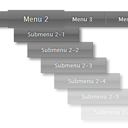
Today, I would like to show you another pure css3 navigation menu where I implemented several nice animate effects. I have just taught our sub menus to fly from nothing, and beat as the heart when you hover your mouse over elements. If you are ready, lets start.
Here are samples and downloadable package:
Live Demo
[sociallocker]
download in package
[/sociallocker]
Ok, download the sources and lets start coding !
Step 1. HTML
In the beginning, we have to prepare HTML layout of our menu. Here is the html code. As usual – this is usual UL-LI based navigation menu. The most interesting thing is CSS styles of course.
index.html
<ul id="nav">
    <li><a href="https://www.script-tutorials.com/">Home</a></li>
    <li><a class="hsubs" href="#">Menu 1</a>
        <ul class="subs">
            <li><a href="#">Submenu 1</a></li>
            <li><a href="#">Submenu 2</a></li>
            <li><a href="#">Submenu 3</a></li>
            <li><a href="#">Submenu 4</a></li>
            <li><a href="#">Submenu 5</a></li>
        </ul>
    </li>
    <li><a class="hsubs" href="#">Menu 2</a>
        <ul class="subs">
            <li><a href="#">Submenu 2-1</a></li>
            <li><a href="#">Submenu 2-2</a></li>
            <li><a href="#">Submenu 2-3</a></li>
            <li><a href="#">Submenu 2-4</a></li>
            <li><a href="#">Submenu 2-5</a></li>
            <li><a href="#">Submenu 2-6</a></li>
            <li><a href="#">Submenu 2-7</a></li>
            <li><a href="#">Submenu 2-8</a></li>
        </ul>
    </li>
    <li><a class="hsubs" href="#">Menu 3</a>
        <ul class="subs">
            <li><a href="#">Submenu 3-1</a></li>
            <li><a href="#">Submenu 3-2</a></li>
            <li><a href="#">Submenu 3-3</a></li>
            <li><a href="#">Submenu 3-4</a></li>
            <li><a href="#">Submenu 3-5</a></li>
        </ul>
    </li>
    <li><a href="#">Menu 4</a></li>
    <li><a href="#">Menu 5</a></li>
    <li><a href="#">Menu 6</a></li>
    <li><a href="https://www.script-tutorials.com/flying-css3-navigation-menu/">Back</a></li>
</ul>
Step 2. CSS
Here are the CSS styles of our flying menu.
css/menu.css
#nav,#nav ul {
    list-style: none outside none;
    margin: 0;
    padding: 0;
}
#nav {
    font-family: "Lucida Sans Unicode",Verdana,Arial,sans-serif;
    font-size: 13px;
    height: 36px;
    list-style: none outside none;
    margin: 40px auto;
    text-shadow: 0 -1px 3px #202020;
    width: 980px;
    /* border radius */
    -moz-border-radius:4px;
    -webkit-border-radius:4px;
    border-radius:4px;
    /* box shadow */
    -moz-box-shadow: 0px 3px 3px #cecece;
    -webkit-box-shadow: 0px 3px 3px #cecece;
    box-shadow: 0 3px 4px #8b8b8b;
    /* gradient */
    background-image: -webkit-gradient(linear, left bottom, left top, color-stop(0, #787878), color-stop(0.5, #5E5E5E), color-stop(0.51, #707070), color-stop(1, #838383));
    background-image: -moz-linear-gradient(center bottom, #787878 0%, #5E5E5E 50%, #707070 51%, #838383 100%);
    background-color:#5f5f5f;
}
#nav ul {
    left: -9999px;
    position: absolute;
    top: -9999px;
    z-index: 2;
}
#nav li {
    border-bottom: 1px solid #575757;
    border-left: 1px solid #929292;
    border-right: 1px solid #5d5d5d;
    border-top: 1px solid #797979;
    display: block;
    float: left;
    height: 34px;
    position: relative;
    width: 105px;
}
#nav li:first-child {
    border-left: 0 none;
    margin-left: 5px;
}
#nav li a {
    color: #FFFFFF;
    display: block;
    line-height: 34px;
    outline: medium none;
    text-align: center;
    text-decoration: none;
    /* gradient */
    background-image: -webkit-gradient(linear, left bottom, left top, color-stop(0, #787878), color-stop(0.5, #5E5E5E), color-stop(0.51, #707070), color-stop(1, #838383));
    background-image: -moz-linear-gradient(center bottom, #787878 0%, #5E5E5E 50%, #707070 51%, #838383 100%);
    background-color:#5f5f5f;
}
/* keyframes #animation1 */
@-webkit-keyframes animation1 {
    0% {
        -webkit-transform: scale(1);
    }
    30% {
        -webkit-transform: scale(1.3);
    }
    100% {
        -webkit-transform: scale(1);
    }
}
@-moz-keyframes animation1 {
    0% {
        -moz-transform: scale(1);
    }
    30% {
        -moz-transform: scale(1.3);
    }
    100% {
        -moz-transform: scale(1);
    }
}
#nav li > a:hover {
    /* css3 animation */
    -moz-animation-name: animation1;
    -moz-animation-duration: 0.7s;
    -moz-animation-timing-function: linear;
    -moz-animation-iteration-count: infinite;
    -moz-animation-direction: normal;
    -moz-animation-delay: 0;
    -moz-animation-play-state: running;
    -moz-animation-fill-mode: forwards;
    -webkit-animation-name: animation1;
    -webkit-animation-duration: 0.7s;
    -webkit-animation-timing-function: linear;
    -webkit-animation-iteration-count: infinite;
    -webkit-animation-direction: normal;
    -webkit-animation-delay: 0;
    -webkit-animation-play-state: running;
    -webkit-animation-fill-mode: forwards;
}
#nav li:hover > a {
    z-index: 4;
}
#nav li:hover ul.subs {
    left: 0;
    top: 34px;
    width: 150px;
}
#nav ul li {
    background: none repeat scroll 0 0 #838383;
    box-shadow: 5px 5px 5px rgba(0, 0, 0, 0.5);
    opacity: 0;
    width: 100%;
    /*-webkit-transition:all 0.3s ease-in-out;
    -moz-transition:all 0.3s ease-in-out;
    -o-transition:all 0.3s ease-in-out;
    -ms-transition:all 0.3s ease-in-out;
    transition:all 0.3s ease-in-out;*/
}
/* keyframes #animation2 */
@-webkit-keyframes animation2 {
    0% {
        margin-left:185px;
    }
    100% {
        margin-left:0px;
        opacity:1;
    }
}
@-moz-keyframes animation2 {
    0% {
        margin-left:185px;
    }
    100% {
        margin-left:0px;
        opacity:1;
    }
}
#nav li:hover ul li {
    /* css3 animation */
    -moz-animation-name: animation2;
    -moz-animation-duration: 0.3s;
    -moz-animation-timing-function: linear;
    -moz-animation-iteration-count: 1;
    -moz-animation-direction: normal;
    -moz-animation-delay: 0;
    -moz-animation-play-state: running;
    -moz-animation-fill-mode: forwards;
    -webkit-animation-name: animation2;
    -webkit-animation-duration: 0.3s;
    -webkit-animation-timing-function: linear;
    -webkit-animation-iteration-count: 1;
    -webkit-animation-direction: normal;
    -webkit-animation-delay: 0;
    -webkit-animation-play-state: running;
    -webkit-animation-fill-mode: forwards;
    /*-webkit-transition:all 0.3s ease-in-out;
    -moz-transition:all 0.3s ease-in-out;
    -o-transition:all 0.3s ease-in-out;
    -ms-transition:all 0.3s ease-in-out;
    transition:all 0.3s ease-in-out;*/
}
/* animation delays */
#nav li:hover ul li:nth-child(1) {
    -moz-animation-delay: 0;
    -webkit-animation-delay: 0;
}
#nav li:hover ul li:nth-child(2) {
    -moz-animation-delay: 0.05s;
    -webkit-animation-delay: 0.05s;
}
#nav li:hover ul li:nth-child(3) {
    -moz-animation-delay: 0.1s;
    -webkit-animation-delay: 0.1s;
}
#nav li:hover ul li:nth-child(4) {
    -moz-animation-delay: 0.15s;
    -webkit-animation-delay: 0.15s;
}
#nav li:hover ul li:nth-child(5) {
    -moz-animation-delay: 0.2s;
    -webkit-animation-delay: 0.2s;
}
#nav li:hover ul li:nth-child(6) {
    -moz-animation-delay: 0.25s;
    -webkit-animation-delay: 0.25s;
}
#nav li:hover ul li:nth-child(7) {
    -moz-animation-delay: 0.3s;
    -webkit-animation-delay: 0.3s;
}
#nav li:hover ul li:nth-child(8) {
    -moz-animation-delay: 0.35s;
    -webkit-animation-delay: 0.35s;
}
CSS3 does their miracle job. And we have just taught our sub menus to fly from nothing, and beat as the heart when you hover your mouse.
Live Demo
Conclusion
Hope you enjoyed with our new CSS3 menu, don’t forget to tell thanks and leave a comment :) Good luck!






Sorry friends, but it is not working in IE9. I opened demo tab, css3 navigation flying effect not working. I bookmark this page, solve this issue. I will visit tomorrow.
Hello Blue,
And mostly because of keyframes and css3 animation. I’ve provided styles for -moz and -webkit in this tutorial. You can try to add styles with -ms prefix.
Awesome Menu. Thanks a lot.
Exelente menu me cirvio de mucho
Hi,
Your tutorials are great. For beginners like me, it is very intimidating task to figure out how properties like ‘left:-9999px’,’clear:both’ etc. works. Please provide some explanation for such things. It would be very helpful for beginners.
By the way, I tried to create the flying menu. I was successful to some extent. But,
1. as I hover, only the text in the tag ‘a’ is scaling but not the entire item ‘a’.
2. the sub menu is flying out properly but for only once. In order to happen again, the page has to be refreshed.
The code is follows:
/* keyframes #animation1 */
@-webkit-keyframes animation1 {
0% {
-webkit-transform: scale(1);
}
30% {
-webkit-transform: scale(1.3);
}
100% {
-webkit-transform: scale(1);
}
}
@-moz-keyframes animation1 {
0% {
-moz-transform: scale(1);
}
30% {
-moz-transform: scale(1.3);
}
100% {
-moz-transform: scale(1);
}
}
……………..
Hi Yo,
Your code was too long, I had to cut it, if you have it online – send me a link to your result by email (form in the bottom) and I will review it.
nice work….. thanks dear….
Hello. I have a question. Before i put this flying navigation to my project, i already have a rotating banner. my problem is, when i inserted this nav on my website. it seems that the subheading appears BEHIND the rotating banner. how can i fix it? thanks and have a great day. :)
Hi Rain,
You have to check styles of your rotating banner to understand why it is under the menu
can you please tell me how to add sub menu to this menu…i am not a programmer or developer so please give me the code for sub menu…thanks
Hi Shoaib,
Briefly, the submenu is nested UL-LI menu