

Creating new HTML5&CSS3 single page layout – Rock portal
HTML5/CSS3 page layout tutorial. Today I want to introduce new nice design masterpiece – new template with codename: ‘Rock portal’. This will nice HTML5/CSS3 template with dark colors for musical websites. Hope that you will like new styles and you will learn some new design methods.
I going to start step-by-step tutorial for creating html5-css3 layout.
Final Result
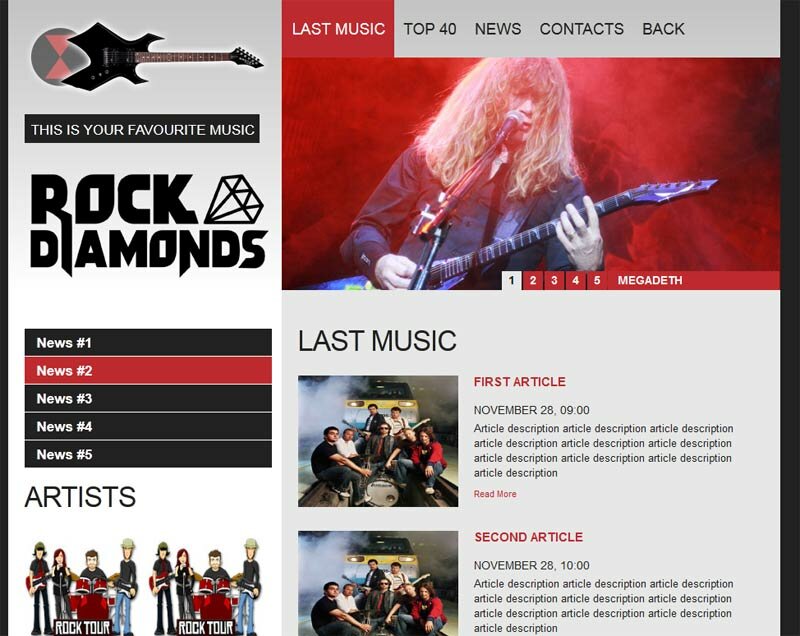
Live Demo
[sociallocker]
download result
[/sociallocker]
Get started
Ok, let`s start. As usual – we will prepare well structured folders:
- css – which will contain our CSS stylesheets (nivo-slider.css, reset.css and style.css)
- images – which will contain all used images
- js – will contain JS files (html5.js, jquery.js, jquery.nivo.slider.pack.js and main.js)
Head section code
Now I am going to give you the usual HTML head area of index.html with the attached CSS/JS.
<!DOCTYPE html>
<html lang="en"><head>
<meta http-equiv="content-type" content="text/html; charset=UTF-8">
    <title>Rock portal single page layout | Script Tutorials</title>
    <meta charset="utf-8">
    <!-- Linking styles -->
    <link rel="stylesheet" href="css/reset.css" type="text/css" media="screen">
    <link rel="stylesheet" href="css/style.css" type="text/css" media="screen">
    <link rel="stylesheet" href="css/nivo-slider.css" type="text/css" media="screen">
    <!-- Linking scripts -->
    <script src="js/jquery.js"></script>
    <script src="js/jquery.nivo.slider.pack.js"></script>
    <script src="js/main.js"></script>
    <!--[if lt IE 9]>
    <script type="text/javascript" src="js/html5.js"></script>
    <![endif]-->
</head>
Moving forward – Main layout (body)
Whole layout consist of 3 main section: header (with logo, navigation menu and slider), main section (two column layout with extra menu block, list of artists, banner placement, friends section and news section at right) and footer (with copyrights and social buttons). It looks like:
<body>
<header><!-- define the header section -->
<div class="header_img"><img alt="" src="images/header-pic.png"></div>
<div class="header_title">This is your favourite music</div>
<div class="logo"><a href=""><img alt="Rock portal" src="images/logo.png"></a></div>
<nav class="primary">
<ul><!-- define the navigation menu -->
..........
</ul>
</nav>
<section id="slider-wrapper"><!-- define the slider section -->
..........
</section>
</header>
<div class="wrap">
<div id="sidebar"><!-- define the sidebar -->
<ul class="extra_menu"><!-- define extra menu block -->
..........
</ul>
<div id="wid1" class="widget"><!-- define the artists block -->
<h3>Artists</h3>
<ul class="artists">
<li>
<a href="#"><img src="images/artist.jpg" alt="artist #1" title="artist #1" /></a>
<div class="name"><a href="#" title="artist #1">artist #1</a></div>
</li>
..........
</ul>
<div class="clear"></div>
</div>
<img src="images/banner.jpg" /><br /><br /><!-- define the banner 350x250 -->
<div id="wid2" class="friends widget"><!-- define extra block with friends -->
<h3>Our friends</h3>
..........
</div>
</div>
<div id="content"><!-- define the content -->
<h3>Last Music</h3>
<ul class="posts">
..........
</ul>
</div>
</div>
<footer><!-- define the footer section -->
<div class="footer">
<div>
<h4>Join us</h4>
<ul class="social">
..........
</ul>
</div>
</div>
<p><a href="https://www.script-tutorials.com/" title="Rock portal" class="site-name">Rock portal</a> © 2011 by Script Tutorials</p>
</footer>
</body>
here are you can see base CSS styles
/* base styles */
* {
    margin:0;
    padding:0;
}
body {
    background:none repeat scroll 0 0 #222;
    color:#333;
    font-family:Arial,Helvetica,sans-serif;
    font-size:12px;
    font-style:normal;
    margin:0;
    padding:0;
    position:relative;
}
img {
    border:0 none;
    margin:0;
    vertical-align:top;
}
h3 {
    color:#222;
    font-size:34px;
    font-weight:400;
    letter-spacing:-1px;
    line-height:1.2em;
    margin:0;
    padding:0 0 21px;
    text-transform:uppercase;
}
h4 {
    color:#FFF;
    font-size:14px;
    font-weight:400;
    line-height:1.2em;
    margin:0;
    text-transform:uppercase;
}
h5 {
    color: #be2a2f;
    font-size: 15px;
    line-height: 16px;
    margin: 0 0 -2px;
    padding: 0 0 16px;
    text-transform: uppercase;
}
Header section with logo, nav menu and slider

Here are HTML for this section:
<header><!-- define the header section -->
    <div class="header_img"><img alt="" src="images/header-pic.png"></div>
    <div class="header_title">This is your favourite music</div>
    <div class="logo"><a href=""><img alt="Rock portal" src="images/logo.png"></a></div>
    <nav class="primary">
        <ul><!-- define the navigation menu -->
            <li class="active"><a href="#">Last Music</a></li>
            <li><a href="#">Top 40</a></li>
            <li><a href="#">News</a></li>
            <li><a href="#">Contacts</a></li>
            <li><a href="https://www.script-tutorials.com/creating-new-html5css3-single-page-layout-rock-portal/">Back</a></li>
        </ul>
    </nav>
    <section id="slider-wrapper"><!-- define the slider section -->
        <div id="slider" class="nivoSlider">
            <a href='#'><img src='images/slider/slide-1.jpg' alt='' title='#sliderCaption1' /></a>
            <a href='#'><img src='images/slider/slide-2.jpg' alt='' title='#sliderCaption2' /></a>
            <a href='#'><img src='images/slider/slide-3.jpg' alt='' title='#sliderCaption3' /></a>
            <a href='#'><img src='images/slider/slide-4.jpg' alt='' title='#sliderCaption4' /></a>
            <a href='#'><img src='images/slider/slide-5.jpg' alt='' title='#sliderCaption5' /></a>
        </div>
        <div id="sliderCaption1" class="nivo-html-caption">
            <p>Megadeth</p>
        </div>
        <div id="sliderCaption2" class="nivo-html-caption">
            <p>Motorama</p>
        </div>
        <div id="sliderCaption3" class="nivo-html-caption">
            <p>AC-DC</p>
        </div>
        <div id="sliderCaption4" class="nivo-html-caption">
            <p>Slayer</p>
        </div>
        <div id="sliderCaption5" class="nivo-html-caption">
            <p>Roger Waters</p>
        </div>
    </section>
</header>
CSS for header section
/* header section */
header {
    height:353px;
    margin:0 auto;
    overflow:hidden;
    position:relative;
    width:940px;
    background: -moz-linear-gradient(#c3c3c3, #ffffff); /* FF 3.6+ */
    background: -ms-linear-gradient(#c3c3c3, #ffffff); /* IE10 */
    background: -webkit-gradient(linear, left top, left bottom, color-stop(0%, #c3c3c3), color-stop(100%, #ffffff)); /* Safari 4+, Chrome 2+ */
    background: -webkit-linear-gradient(#c3c3c3, #ffffff); /* Safari 5.1+, Chrome 10+ */
    background: -o-linear-gradient(#c3c3c3, #ffffff); /* Opera 11.10 */
    filter: progid:DXImageTransform.Microsoft.gradient(startColorstr='#c3c3c3', endColorstr='#ffffff'); /* IE6 & IE7 */
    -ms-filter: "progid:DXImageTransform.Microsoft.gradient(startColorstr='#c3c3c3', endColorstr='#ffffff')"; /* IE8+ */
    background: linear-gradient(#c3c3c3, #ffffff); /* the standard */
}
.header_img {
    left:20px;
    position:absolute;
    top:19px;
}
.header_title {
    background:none repeat scroll 0 0 #222;
    color:#FFF;
    font-size:17px;
    font-weight:400;
    height:35px;
    left:20px;
    line-height:38px;
    padding:0 6px 0 8px;
    position:absolute;
    text-transform:uppercase;
    top:139px;
}
.logo {
    left:17px;
    position:absolute;
    top:192px;
}
/*navigation menu*/
nav {
    left:333px;
    position:absolute;
    top:0;
    z-index:99;
}
nav ul,nav ul * {
    list-style:none;
    margin:0;
    padding:0;
}
nav ul {
    float:left;
    line-height:1.0;
    max-width:607px;
}
nav ul li {
    background:url("../images/menu-divider.gif") no-repeat scroll 0 25px transparent;
    float:left;
    position:relative;
}
nav ul li:first-child {
    background-color:transparent;
}
nav ul li a {
    color:#222;
    display:block;
    font-size:19px;
    font-weight:400;
    height:70px;
    line-height:70px;
    margin:0 -2px 0 0;
    overflow:hidden;
    padding:0 11px 0 13px;
    position:relative;
    text-decoration:none;
    text-transform:uppercase;
}
nav ul li a:hover, nav ul li.active a {
    background:#be2a2f;
    color:#fff;
    outline:0;
}
Custom styles of our slider (nivoSlider) will be in external file:
css/nivo-slider.css
This file available in our package.
Main content section
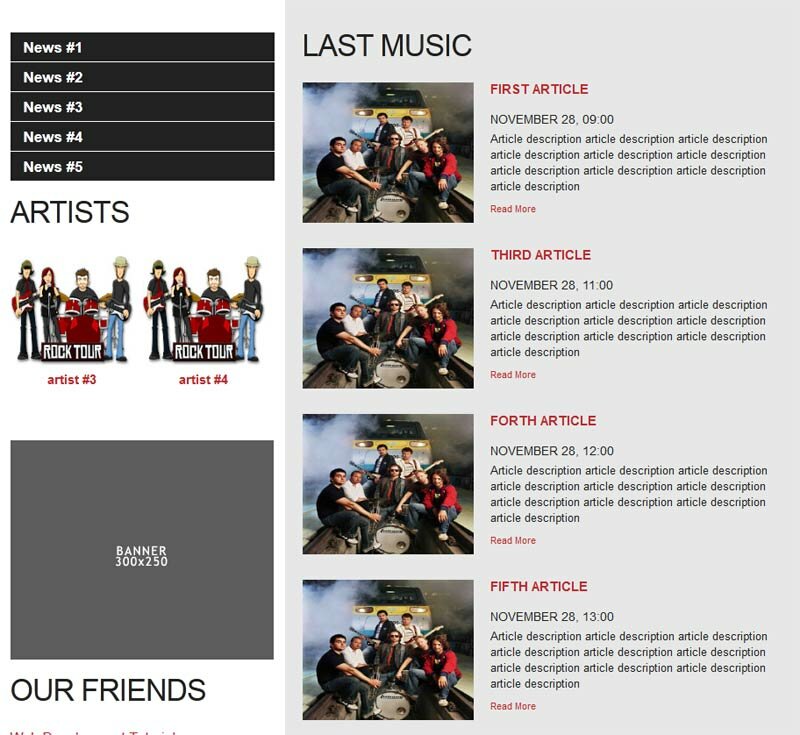
<div class="wrap">
    <div id="sidebar"><!-- define the sidebar -->
        <ul class="extra_menu"><!-- define extra menu block -->
            <li><a href="#">News #1</a></li>
            <li><a href="#">News #2</a></li>
            <li><a href="#">News #3</a></li>
            <li><a href="#">News #4</a></li>
            <li><a href="#">News #5</a></li>
        </ul>
        <div id="wid1" class="widget"><!-- define the artists block -->
            <h3>Artists</h3>
            <ul class="artists">
                <li>
                    <a href="#"><img src="images/artist.jpg" alt="artist #1" title="artist #1" /></a>
                    <div class="name"><a href="#" title="artist #1">artist #1</a></div>
                </li>
                <li>
                    <a href="#"><img src="images/artist.jpg" alt="artist #2" title="artist #2" /></a>
                    <div class="name"><a href="#" title="artist #2">artist #2</a></div>
                </li>
                <li>
                    <a href="#"><img src="images/artist.jpg" alt="artist #3" title="artist #3" /></a>
                    <div class="name"><a href="#" title="artist #3">artist #3</a></div>
                </li>
                <li>
                    <a href="#"><img src="images/artist.jpg" alt="artist #4" title="artist #4" /></a>
                    <div class="name"><a href="#" title="artist #4">artist #4</a></div>
                </li>
            </ul>
            <div class="clear"></div>
        </div>
        <img src="images/banner.jpg" /><br /><br /><!-- define the banner 350x250 -->
        <div id="wid2" class="friends widget"><!-- define extra block with friends -->
            <h3>Our friends</h3>
            <div><a href="https://www.script-tutorials.com/" title="Web Development Tutorials">Web Development Tutorials</a></div>
            <div><a href="http://www.google.com/" title="Google">Google</a></div>
            <div><a href="http://www.facebook.com/ScriptTutorials" title="Facebook">Facebook</a></div>
        </div>
    </div>
    <div id="content"><!-- define the content -->
        <h3>Last Music</h3>
        <ul class="posts">
            <li>
                <a href="#"><img src="images/post.jpg" /></a>
                <h5><a href="#">First article</a></h5>
                <div class="date">November 28, 09:00</div>
                <div class="description">Article description article description article description article description article description article description article description article description article description article description </div>
                <div class="post-data"><a href="#">Read More</a></div>
            </li>
            <li>
                <a href="#"><img src="images/post.jpg" /></a>
                <h5><a href="#">Second article</a></h5>
                <div class="date">November 28, 10:00</div>
                <div class="description">Article description article description article description article description article description article description article description article description article description article description </div>
                <div class="post-data"><a href="#">Read More</a></div>
            </li>
            <li>
                <a href="#"><img src="images/post.jpg" /></a>
                <h5><a href="#">Third article</a></h5>
                <div class="date">November 28, 11:00</div>
                <div class="description">Article description article description article description article description article description article description article description article description article description article description </div>
                <div class="post-data"><a href="#">Read More</a></div>
            </li>
            <li>
                <a href="#"><img src="images/post.jpg" /></a>
                <h5><a href="#">Forth article</a></h5>
                <div class="date">November 28, 12:00</div>
                <div class="description">Article description article description article description article description article description article description article description article description article description article description </div>
                <div class="post-data"><a href="#">Read More</a></div>
            </li>
            <li>
                <a href="#"><img src="images/post.jpg" /></a>
                <h5><a href="#">Fifth article</a></h5>
                <div class="date">November 28, 13:00</div>
                <div class="description">Article description article description article description article description article description article description article description article description article description article description </div>
                <div class="post-data"><a href="#">Read More</a></div>
            </li>
        </ul>
    </div>
</div>
CSS for Main content section
/* main section */
.wrap {
    background-color:#E7E7E7;
    margin:0 auto;
    overflow:hidden;
    width:940px;
}
#sidebar {
    background-color:#FFF;
    float:left;
    padding:47px 12px 20px 20px;
    width:301px;
}
#content {
    float:left;
    padding:42px 20px;
    width:565px;
}
.widget {
    margin-bottom:30px;
    overflow:hidden;
    width:100%;
}
.extra_menu {
    overflow:hidden;
    padding:0 0 15px;
}
.extra_menu li {
    background:none;
    margin:0 0 1px;
    overflow:hidden;
    padding:0;
    vertical-align:top;
    width:100%;
}
.extra_menu li a {
    background:#222;
    color:#fff;
    display:block;
    font-size:17px;
    font-weight:700;
    height:33px;
    line-height:34px;
    overflow:hidden;
    padding:0 0 0 15px;
    text-decoration:none;
}
.extra_menu li a:hover {
    background:#be2a2f;
}
ul.artists {
    list-style:none outside none;
    margin:0;
    overflow:hidden;
    padding:0 0 10px;
    width:100%;
}
ul.artists li {
    background:none repeat scroll 0 0 transparent;
    color:#be2a2f;
    float:left;
    font-size:13px;
    line-height:18px;
    padding:0 10px 20px 0;
    width:140px;
}
ul.artists li .name a {
    color:#be2a2f;
    display:block;
    font-size:15px;
    font-weight:700;
    text-align:center;
    text-decoration:none;
}
.friends div a {
    color:#be2a2f;
    font-size:16px;
    line-height:25px;
    text-decoration:none;
}
ul.posts li {
    background:none repeat scroll 0 0 transparent;
    color:#222;
    font-size:13px;
    line-height:18px;
    overflow:hidden;
    padding:0 0 29px;
    vertical-align:top;
    width:100%;
}
ul.posts li img {
    float:left;
    margin:0 19px 0 0;
}
ul.posts li .date {
    color:#222;
    font-size:14px;
    line-height:1.2em;
    padding:8px 0 5px;
    text-transform:uppercase;
}
ul.posts li h5 {
    padding:0 0 12px;
}
ul.posts li h5 a {
    color:#be2a2f;
    text-decoration:none;
}
ul.posts li .description {
    color:#222;
    font-size:13px;
    line-height:18px;
    padding:0 0 8px;
}
ul.posts li .post-data {
    color:#be2a2f;
    font-size:11px;
    line-height:18px;
}
.post-data a {
    color:#be2a2f;
    float:left;
    padding:0 8px 0 0;
    text-decoration:none;
}
ul.artists li .name a:hover,.friends div a:hover,.post-data a:hover {
    text-decoration:underline;
}
Footer section
Finally, here are our footer area

<footer><!-- define the footer section -->
<div class="footer">
<div>
<h4>Join us</h4>
<ul class="social">
<li><a target="_blank" rel="nofollow" href="#" title="Our RSS"> <img src="images/rss.png" alt="RSS"></a></li>
<li><a target="_blank" rel="nofollow" href="#"> <img alt="facebook" src="images/facebook.png"></a></li>
<li><a target="_blank" rel="nofollow" href="#"> <img alt="twitter" src="images/twitter.png"></a></li>
<li><a target="_blank" rel="nofollow" href="#"> <img alt="facebook" src="images/stumbleupon.png"></a></li>
</ul>
</div>
</div>
<p><a href="https://www.script-tutorials.com/" title="Rock portal" class="site-name">Rock portal</a> © 2011 by Script Tutorials</p>
</footer>
CSS for footer section
/* footer section */
footer {
    margin:0 auto;
    padding:33px 0 33px 20px;
    position:relative;
    width:940px;
}
.footer {
    background:#222;
    float:right;
    height:31px;
    overflow:hidden;
    padding:9px 10px 0 18px;
    width:auto !important;
}
.footer h4 {
    float:left;
    padding:5px 0 0;
}
.footer .social {
    border:none;
    float:left;
    list-style:none;
    margin:0;
    padding:0 0 0 9px;
}
.footer .social li {
    float:left;
    padding:0 0 0 2px;
}
footer p {
    color:#FFF;
    font-size:12px;
    line-height:18px;
    padding:11px 0 0;
}
footer p i a {
    font-style:normal;
    text-decoration:none;
}
footer p a {
    color:#FFF;
}
JS for our template
Here are all necessary JS scripts:
js/html5.js, js/jquery.js and js/jquery.nivo.slider.pack.js
All these libraries already available in package
js/main.js
$(window).load(function() {
    $('#slider').nivoSlider({
        effect: 'random',
        slices:15,
        boxCols:10,
        boxRows:10,
        animSpeed:500,
        pauseTime:4000,
        directionNav:false,
        directionNavHide:false,
        controlNav:true,
        captionOpacity:1
    });
});
nivoSlider itself have very easy initialization – so I hope that all easy here too.
Live Demo
Conclusion
Congrats, our new template ‘Rock portal’ is complete! You can use this as is, but please leave the back link to us intact. Don`t forget to say thanks :) Good luck!






Great stuff guys!..Keep on doing it!
Thanks for the contribution. By the way, your meta tag can be reduced to ‘in HTML5’.
Yes, thanks for remark