

Creating an Attractive HTML CSS Anime Theme Website Layout
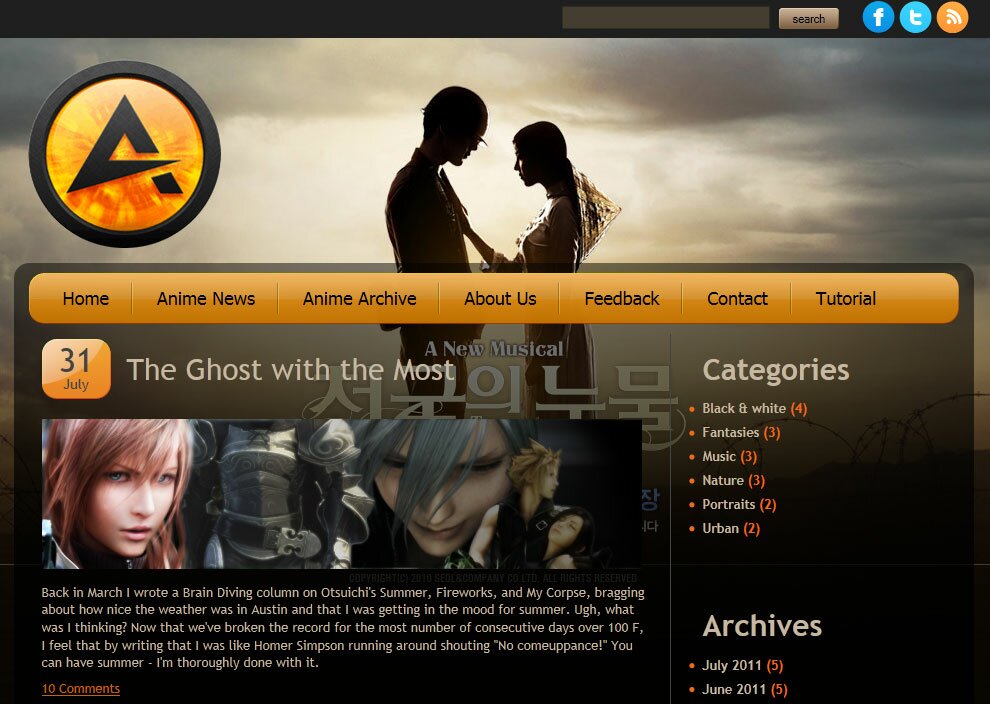
Today I will like to product new masterpiece – new template with codename: ‘Anime theme’. This will nice HTML5 template with good colors. Hope that you can learn some new coding lessons and download our result and use it at your own site (its free as usual).
I going to start step-by-step tutorial for creating html-css layout.
Final Result
Live Demo
Get started
Ok, let`s start. Lets create new folder and few more folders inside (to keep all well structured):
- css – which will contain CSS stylesheets (menu.css and style.css)
- images – which will contain all used images
- js – will contain JS files (html5.js)
Head section code
Now I am going to give you the usual HTML head area of index.html with the attached CSS/JS.
<!DOCTYPE html><!-- The new doctype -->
<html lang="en">
<head>
<title>Creating a HTML5 & CSS3 Single Page Web Layout #5 Anime theme | Script tutorials</title>
<meta charset="utf-8">
<!-- Linking styles -->
<link rel="stylesheet" href="css/style.css" type="text/css" media="screen">
<link rel="stylesheet" href="css/menu.css" type="text/css" media="screen">
<!-- Linking scripts -->
<!--[if lt IE 9]>
<script src="js/html5.js"></script>
<![endif]-->
</head>
Moving forward – Main layout (body)
Whole layout consist of 4 main section: header (with social icons and search), logo, main section (nav menu, main content in 2 columns) and footer. It looks like:
<body>
    <header><!-- Defining the header section of the page -->
        ........
    </header>
    <!-- Defining main logo -->
    <div class="logo">
        ........
    </div>
    <section class="content"><!-- Defining the main content section of the page -->
        ........
    </section>
    <footer><!-- Defining the footer section of the page -->
        ........
    </footer>
</body>
here are you can see base CSS styles
/* base common styles */
article, aside, audio, canvas, command, datalist, details, embed, figcaption, figure, footer, header, hgroup, keygen, meter, nav, output, progress, section, source, video {display:block;}
mark, rp, rt, ruby, summary, time {display:inline;}
* {
    margin:0;
    padding:0;
}
img {
    border-width:0;
}
body {
    background:url(../images/bg.jpg) repeat-x scroll center top #000;
    color:#c7b8a3;
    font-family:"Trebuchet MS", Arial, Helvetica, sans-serif;
    font-size:0.75em;
}
a {
    color:#c46501;
    text-decoration:underline;
}
a:hover {
    text-decoration:none;
}
.clear {
    clear:both;
    display:block;
    height:0;
    overflow:hidden;
    visibility:hidden;
    width:0;
}
Header section and logo

Our header will contain search bar, social icons (at top) and logo at left side. Here are HTML for that section:
    <header><!-- Defining the header section of the page -->
        <div class="header">
            <div class="social_icons">
                <a href="#" title="Facebook"><img alt="" src="images/facebook.png"></a>
                <a href="#" title="Twitter"><img alt="" src="images/twitter.png"></a>
                <a href="#" title="RSS"><img alt="" src="images/rss.png"></a>
            </div>
            <div class="search">
                <form action="" method="get">
                    <input type="text" name="q" value="" />
                    <input type="submit" value="search" />
                </form>
            </div>
            <div class="clear"></div>
        </div>
    </header>
    <!-- Defining main logo -->
    <div class="logo">
        <a href="" title="Anime theme"><img src="images/logo.png" /></a>
    </div>
CSS for Header section
/*header*/
header {
    background-color:#1f1f1f;
}
header .header {
    overflow:hidden;
    position:relative;
    width:960px;
    height:42px;
    margin:0 auto;
}
header .search {
    float:right;
    margin-top:10px;
    width:300px;
}
header .search input[type=text] {
    background-color:#443e30;
    border:1px solid #2F2C29;
    color:#FFF;
    font-size:1em;
    height:20px;
    margin-right:5px;
    width:203px;
    padding:1px 0 0 3px;
}
header .search input[type=submit] {
    background-image:url(../images/search.gif);
    height:21px;
    width:60px;
    font-size:0.9em;
    border-width:0;
}
header .social_icons {
    float:right;
    margin-right:5px;
    margin-top:5px;
}
.logo {
    position:relative;
    width:960px;
    height:225px;
    margin:0 auto;
}
.logo img {
    margin:20px 10px;
}
Main content section
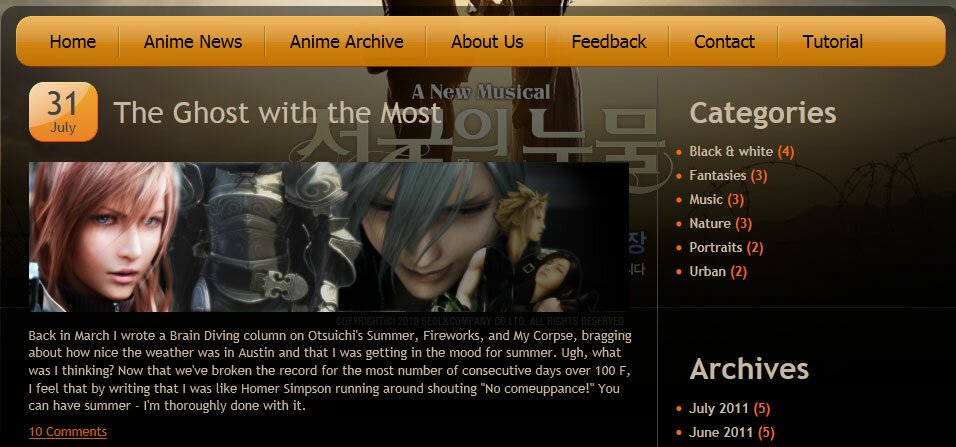
After our header area – we have main content area. In top we will have navigation menu, then – rest content (2 columns). First column can contain full length posts, second – for categories (or archive links). Of course – you can customize here anything.
<section class="content"><!-- Defining the main content section of the page -->
<!-- navigation menu -->
<nav>
<ul>
<li><a href="https://www.script-tutorials.com/">Home</a></li>
<li><a href="#">Anime News</a></li>
<li><a href="#">Anime Archive</a></li>
<li><a href="#">About Us</a></li>
<li><a href="#">Feedback</a></li>
<li><a href="#">Contact</a></li>
<li><a href="https://www.script-tutorials.com/creating-new-html-css-website-layout-5-anime-theme">Tutorial</a></li>
</ul>
</nav>
<div class="clear"></div>
<div class="column">
<div class="post">
<div class="title">
<div class="date"><span>31</span>July</div>
<h2><a href="#" title="post 1">The Ghost with the Most</a></h2>
</div>
<div class="text-box">
<p><img alt="" src="images/post.png"><br>Back in March I wrote a Brain Diving column on Otsuichi's Summer, Fireworks, and My Corpse, bragging about how nice the weather was in Austin and that I was getting in the mood for summer. Ugh, what was I thinking? Now that we've broken the record for the most number of consecutive days over 100 F, I feel that by writing that I was like Homer Simpson running around shouting "No comeuppance!" You can have summer - I'm thoroughly done with it.</p>
</div>
<div class="comments">
<a href="#" title="comments on post 1">10 Comments</a>
</div>
</div>
<div class="post">
<div class="title">
<div class="date"><span>17</span>July</div>
<h2><a href="#" title="post 1">Disney To Adapt Tuxedo Gin</a></h2>
</div>
<div class="text-box">
<p><img alt="" src="images/post.png"><br>Walt Disney Pictures has hired Reno 911 co-creator Robert Ben Garant to write "Tux," a screenplay based on Tokihiko Matsuura`s romantic comedy manga Tuxedo Gin. The 1997-2000 manga series stars "a young street fighter who falls into a coma and learns that he has lived his life so selfishly that he only has enough karma points to be reincarnated as an animal 15 pounds or less. Trapped in the body of a chin-strap penguin, he tries to overcome the humiliation and rack up enough good deeds to get his old body back and save the girl he loves." Garant wrote the screenplays for Disney`s 2005 films Herbie Fully Loaded and The Pacifier. The film will be produced by Paul Young and Peter Principato of Principato-Young Entertainment, VIZ Media`s Jason Hoffs, and Shogakukan`s Ichiro Takase.</p>
</div>
<div class="comments">
<a href="#" title="comments on post 1">20 Comments</a>
</div>
</div>
</div>
<div class="sidebar">
<div class="block">
<h2>Categories</h2>
<ul>
<li><a title="" href="#">Black & white</a> (4)</li>
<li><a title="" href="#">Fantasies</a> (3)</li>
<li><a title="" href="#">Music</a> (3)</li>
<li><a title="" href="#">Nature</a> (3)</li>
<li><a title="" href="#">Portraits</a> (2)</li>
<li><a title="" href="#">Urban</a> (2)</li>
</ul>
</div>
<div class="block">
<h2>Archives</h2>
<ul>
<li><a title="" href="#">July 2011</a> (5)</li>
<li><a title="" href="#">June 2011</a> (5)</li>
<li><a title="" href="#">May 2011</a> (5)</li>
<li><a title="" href="#">April 2011</a> (5)</li>
<li><a title="" href="#">March 2011</a> (5)</li>
<li><a title="" href="#">February 2011</a> (5)</li>
<li><a title="" href="#">January 2011</a> (5)</li>
</ul>
</div>
</div>
<div class="clear"></div>
</section>
CSS for navigation menu
css/menu.css
nav {
    overflow:hidden;
    position:relative;
    width:910px;
    background:url("../images/menu-bg.png") no-repeat scroll left top transparent;
    margin:10px auto;
    padding:10px;
}
nav ul {
    list-style-image:none;
    list-style-position:outside;
    list-style-type:none;
    overflow:hidden;
    margin:0;
    padding:0;
}
nav ul li {
    background:url("../images/menu-devider.gif") no-repeat scroll left top transparent;
    float:left;
    font-size:1.5em;
    line-height:normal;
    margin-left:-2px;
    overflow:hidden;
    padding:0;
}
nav ul li a {
    color:#000;
    display:block;
    font-family:Tahoma,Arial,Helvetica,serif;
    font-weight:400;
    text-decoration:none;
    text-transform:none;
    padding:3px 24px 5px 26px;
}
nav ul li a:hover {
    text-decoration:none;
    color:#fc0;
}
CSS for Main content section
/*center content*/
section.content {
    overflow:hidden;
    position:relative;
    width:960px;
    background:transparent url(../images/cbg.png) repeat-x scroll center top;
    -moz-border-radius:15px;
    -webkit-border-radius:15px;
    border-radius:15px;
    margin:0 auto;
}
.content .column {
    float:left;
    width:605px;
    padding:0 23px 7px 28px;
}
.content .sidebar {
    float:left;
    width:235px;
    border-left:1px solid #444;
    padding:0 39px 7px 25px;
}
.post {
    overflow:hidden;
    padding-bottom:13px;
}
.post .title {
    overflow:hidden;
    padding-top:5px;
    width:100%;
}
.post .title .date {
    background:url("../images/date-bg.png") no-repeat scroll left top transparent;
    color:#444;
    float:left;
    font-size:1.167em;
    font-weight:400;
    line-height:1em;
    margin-right:16px;
    text-align:center;
    width:69px;
    padding:5px 0 8px;
}
.title .date span {
    display:block;
    font-size:2.357em;
    line-height:1em;
}
.post .title h2 {
    color:#C7B8A3;
    font-size:2.5em;
    font-weight:400;
    line-height:1.01em;
    text-transform:none;
    padding:15px 0 0;
}
.post .title h2 a {
    color:#C7B8A3;
    text-decoration:none;
}
.post .title h2 a:hover {
    text-decoration:underline;
}
.post .text-box {
    font-size:1.09em;
    line-height:1.35em;
    overflow:hidden;
    padding-top:10px;
    padding-bottom:10px;
    width:100%;
}
.post .text-box img {
    margin:10px 0;
}
.post .comments {
    color:#E29111;
    font-size:1.083em;
    line-height:1em;
    overflow:hidden;
    text-transform:none;
    padding:0 0 16px;
}
.sidebar .block {
    padding:7px 30px 50px 7px;
}
.sidebar .block h2 {
    font-size:2.5em;
    margin:10px 0;
}
.sidebar ul {
    width:100%;
}
.sidebar li {
    color:#EF6A1B;
    font-size:1.083em;
    font-weight:700;
    line-height:1.146em;
    padding:4px 0 5px;
}
.sidebar li a {
    color:#C7B8A3;
    text-decoration:none;
}
Footer section
Here are our footer area

<footer><!-- Defining the footer section of the page -->
<div>Anime theme © 2011 : <a class="link" href="#">Privacy</a></div>
</footer>
CSS for footer section
/*footer*/
footer {
    width:100%;
    background-color:#111;
}
footer div {
    font-size:1.4em;
    position:relative;
    width:960px;
    margin:0 auto;
    padding:30px 0 40px 40px;
}
JS for our template
Here are all necessary custom JS scripts
js/html5.js
This file already available in package
Live Demo
[sociallocker]
download result
[/sociallocker]
Conclusion
Congrats, our new template ‘Anime theme’ is complete! You can use this as is, but please leave the back link to us intact. Don`t forget to say thanks :)




Thank dear for tuition but i’m developing a online shopping mall and i have not good idea for creating a good webpages
Hi Sunil Kumar,
You asking me to prepare nice template for Online Shop in future?
hi there how can i add images to “Anime Archive” from the menu, i mean i want to make in such a way that when im clicking on that i will be sent to a page where i can view images that i’ve put.
Do you mean a new page with the photo upload form for this page?
really today i’m very very happy about finding this website…….thank very very much…..
First off, seriously awesome tutorial! Worked straight away, and the commenting in your CSS made it very easy to edit most of what was needed :). I have one question though, as I’m rather new to CSS. The transparent black background image that is used for the main post section, I understand how to affect the width of its borders, but can’t figure out how to increase its height. Could you let me know what parameters I should set for this? Many thanks!
Hello Rob, do you mean cbg.png ? If so – you can make the image larger to increase the height.